
How to Seamlessly Integrate Headless E-commerce Shopify for Enhanced Flexibility
Are you ready to unlock your online store’s full capabilities with a headless commerce architecture on Shopify?
Then you’ve come to the right place.
The ecommerce world is rapidly changing with businesses looking for ways to stay ahead and offer a more personalized shopping experience.
This is when integrating a headless ecommerce Shopify solution can revolutionize your store by giving you more control over your store’s frontend and backend.
This setup allows you to craft a shopping experience that’s both personalized and engaging for your customers.
By the end of this blog, you’ll know how to smoothly integrate a headless commerce solution with your Shopify store.
Key Takeaways
- Understand the benefits of integrating a headless commerce architecture with Shopify.
- Learn how to enhance your store’s flexibility and customization capabilities.
- Discover the steps to achieve a seamless integration.
- Gain insights into creating a more personalized customer experience.
- Explore the full range of possibilities for your online business with a headless ecommerce development company.
Understand Headless Ecommerce Shopify Architecture
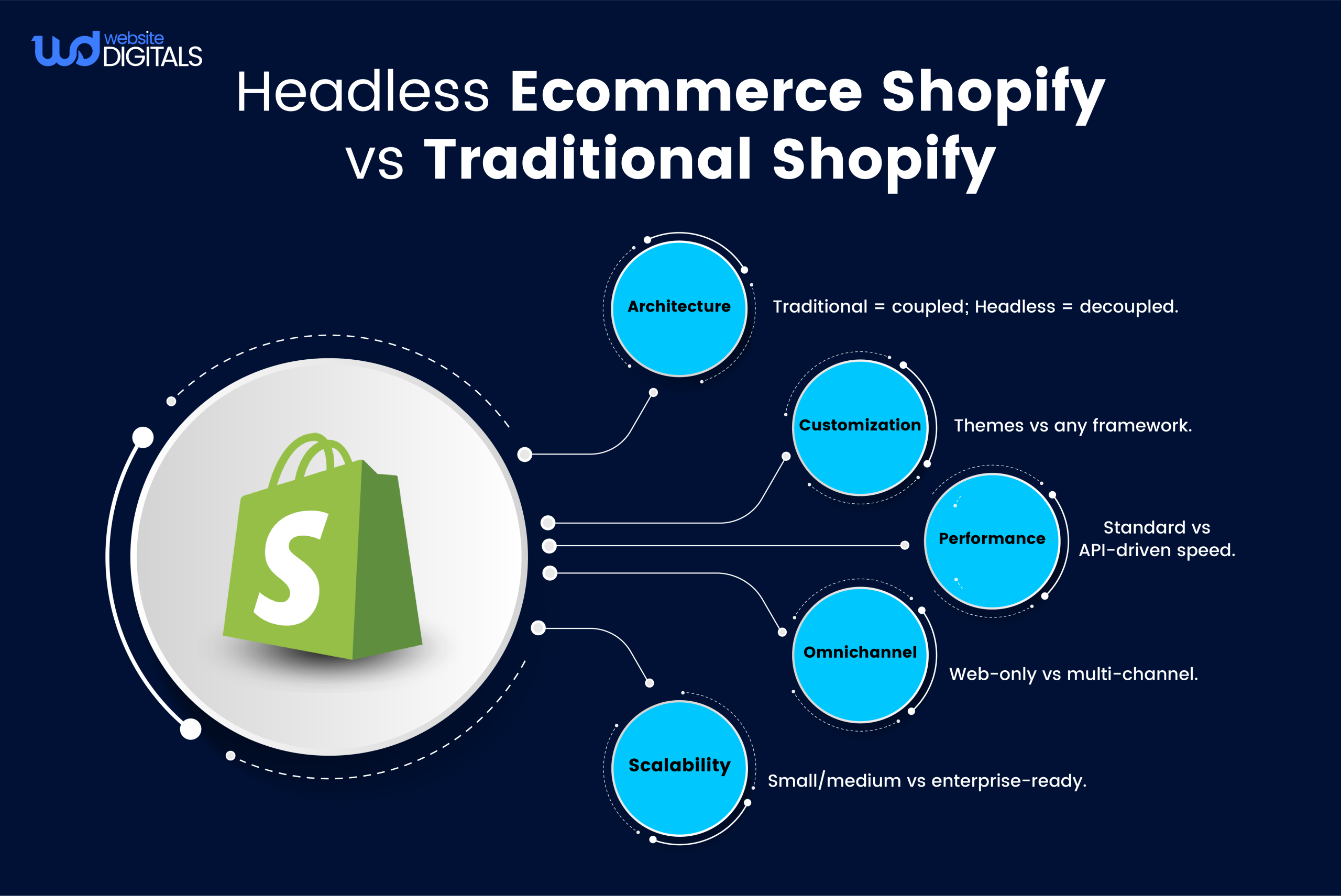
Headless ecommerce architecture is a commerce platform that’s decoupled from the frontend.
It offers greater flexibility in presenting content and interacting with customers.
By separating the frontend (user interface) from the backend (commerce functionality), businesses can leverage the best of both worlds.
|
“The headless commerce approach enables developers to build fast, responsive, and highly customizable user interfaces using modern frontend technologies,” says a leading ecommerce expert. |
How Headless Differs from Traditional Shopify Setups?
Unlike traditional Shopify setups, where frontend and backend are tightly coupled, headless ecommerce architecture offers freedom.
Note: You can choose any frontend technology, such as React, Vue.js, or Angular, to create a bespoke shopping experience.
Additional Info: With headless commerce, you can also enhance performance and speed, as the backend’s capabilities do not limit the frontend.
Benefits of Implementing Headless Commerce with Shopify
As you dive into the world of headless architecture, you’ll see how it can revolutionize your online store’s performance and user interaction. Many headless Shopify examples show how separating frontend and backend significantly improves load speed and user interaction.
Enhanced Performance and Speed
- Headless commerce is a game-changer for your store’s speed and performance.
- By separating the frontend from the backend, you can fine-tune each part independently.
- This leads to quicker page loads and a more seamless user journey.
Example: using modern frontend frameworks like React or Vue.js can make your storefront more responsive and engaging.
|
82% of consumers say slow page speeds impact their purchasing decisions. |
Greater Customization Capabilities
- It unlocks the door to greater customization, enabling you to craft a shopping experience that mirrors your brand’s essence.
- With the freedom to pick any frontend tech, you can build a unique and captivating user interface that speaks to your audience.
Improved Omnichannel Experience
- A headless commerce setup ensures a unified and seamless shopping experience across all channels and devices.
- By using APIs to manage content and product data, you can present your brand’s message and offerings consistently.
Know Why It Is Necessary? This consistency is key, whether customers are browsing your web development site, mobile app, or social media.
Case Study: TASCHEN–Headless Shopify via Shopify Plus
Overview
TASCHEN (the well-known art book publisher) aimed to build a more flexible, content-rich eCommerce site, integrating product information management (PIM) and enabling a more modular, performant frontend experience.
They leveraged Shopify Plus with a headless architecture to meet these goals.
Implementation Highlights
- They decoupled the frontend from the Shopify backend, making it a headless setup.
- Integrated a PIM system (Product Information Management) tightly into the commerce flow to handle complex product data and enrich content.
- The headless architecture allowed them more freedom in front-end design and control over content layout, while Shopify Plus continued to manage orders, payments, inventory, etc.
Outcomes
- Better content management: easier linkage between rich editorial/book content and commerce product pages.
- More flexible frontend: TASCHEN could deliver customized experiences, visual layouts, etc., not constrained by theme limits.
- Scalability and maintainability: the architecture allows the brand to evolve the frontend independently from the backend, making updates less risky.
Lessons
- Use headless where content + commerce intersect heavily: For a brand like TASCHEN, whose products are deeply tied to narrative, editorial content, art, etc., the separation helps.
- PIM + headless = powerful combo: The ability to manage rich product metadata and content together enhances the experience.
- Cost vs benefit: This kind of architecture is not trivia; it requires developer effort and systems integration. The business must justify this via performance gains, flexibility, or content-driven differentiation.
Assessing Your Business Needs for Headless Architecture
To successfully implement headless ecommerce, you must first understand your business needs.
A platform like Shopify offers flexibility and customization. Yet, it’s not suitable for everyone.
Assessing your business needs involves looking at your current setup, customer expectations, and future plans.
When Headless Makes Sense for Your Store
- Headless ecommerce is ideal for businesses needing customization and flexibility.
- If your current setup with Shopify feels restrictive, a headless platform might be the answer.
- It’s also beneficial if you aim to create a unique customer experience or integrate with various channels.
|
Business Needs |
Headless Ecommerce Benefits |
|
High customization requirements |
Flexibility in design and functionality |
|
Multi-channel presence |
Seamless integration across different platforms |
|
Unique customer experiences |
Ability to craft personalized experiences |
Resource Requirements and Considerations
Adopting a headless ecommerce solution demands a lot of technical know-how. You’ll need a team skilled in frontend development, API integrations, and possibly a headless CMS Integration.
Think about the resource requirements for development, upkeep, and updates.
Highlight: Make sure you have the budget and personnel to support this architecture.
Essential Prerequisites Before Implementation
It prepares you for the implementation process, preventing common pitfalls and ensuring a seamless transition.
Technical Skills and Team Requirements
To set up headless ecommerce on Shopify, your team must possess specific technical skills. They should be proficient in frontend development frameworks.
Experience with Shopify’s Storefront API is also essential. Your team should also understand how to manage and integrate a headless CMS.
Key roles include:
- Frontend developers with experience in headless ecommerce
- Backend developers familiar with Shopify’s API
- A project manager to oversee the implementation process
Budget Considerations for Headless Shopify
When budgeting for a headless Shopify development service store, several factors come into play.
Development costs vary based on project complexity and chosen technology stack.
Consider the expenses for:
- Integrating a headless CMS
- Custom frontend development
- Ongoing maintenance and updates
Selecting the Right Frontend Technology
In the world of headless ecommerce, Shopify’s frontend technology is key.
Your choice affects your store’s performance, customization, and user experience.
Popular Frontend Frameworks for Headless Shopify
Several frontend frameworks work well with headless Shopify, each with its own strengths. Popular ones include:
- React: Known for its component-based architecture and flexibility.
- Vue.js: Offers a progressive web app (PWA) and a flexible framework for building user interfaces.
- Next.js: A React-based framework that enables server-side rendering and static site generation.
Evaluating Options Based on Your Needs
When looking at frontend frameworks, think about your
- The team’s skills,
- your site’s complexity,
- scalability needs.
Key Note: If your team knows React well, Next.js could be a great choice for better performance. Vue.js might be better if you want easy integration.
Choosing a Headless CMS for Your Shopify Store
A headless CMS lets you manage content freely, without being bound to a specific frontend framework, making it an ideal headless CMS for ecommerce setups that require flexibility and speed.
Top Headless CMS Options Compatible with Shopify
Several headless CMS options work well with Shopify, each bringing its own set of features and advantages. Some leading choices include:
- Contentful: Renowned for its adaptability and growth capabilities, Contentful is a favorite among developers.
- Strapi: An open-source CMS that stands out for its customization options and user-friendly design.
- Storyblok: A CMS that offers a visual editing experience and supports various content models.
Integration Considerations for Each CMS
You’ll need to look at the CMS’s API capabilities, its support for multi-channel content delivery, and its compatibility with your chosen frontend framework.
As “the right headless CMS can make all the difference in your ecommerce journey”, ecommerce experts agree.
Step-by-Step Implementation of Headless Ecommerce Shopify
Understanding the process of implementing headless ecommerce with Shopify unlocks its full capabilities.
Setting Up Shopify as Your Backend
- The first step involves creating a Shopify store, configuring products, and organizing data.
- Shopify’s robust backend capabilities make it ideal for managing ecommerce operations.
- You must set up your product catalog, configure shipping and payment options, and keep your store’s data accurate and up-to-date.
Configuring the Storefront API
- After setting up your Shopify backend, configure the Storefront API.
- This API enables your frontend application to communicate with your Shopify backend.
- Proper configuration of the Storefront API is critical for a seamless headless ecommerce experience.
- You’ll need to generate API credentials and understand how to use the API to retrieve necessary data.
Connecting Your Frontend Framework
- With your Shopify backend and Storefront API set up, connect your chosen frontend framework.
- Popular frameworks like React, Vue.js, and Angular can be used to build a custom storefront.
Learn More: Choosing the right frontend framework depends on your team’s expertise and project needs.
Building Custom Shopping Experiences
- The final step is to build custom shopping experiences using your chosen frontend framework.
- This involves designing and developing a user interface that is engaging and functional.
- By leveraging Shopify backend data via the Storefront API, you can create a tailored shopping experience that meets customer needs and enhances their shopping experience.
Managing Data Flow in Your Headless Shopify Architecture
Transitioning to a headless ecommerce setup requires effective data flow management.
In a headless Shopify store, it’s essential to ensure seamless communication between frontend and backend systems.
API Communication Strategies
API-driven communication is vital in managing data flow in headless ecommerce, and you must choose the right API protocols for your business needs.
Moreover, Shopify’s Storefront API is a top choice for its flexibility and efficiency in data fetching.
Additionally, when setting up API communication, consider data caching, API rate limits, and error handling.
Some key considerations for API communication include:
- Choosing the right API protocol (e.g., REST, GraphQL)
- Implementing data caching to reduce the load on your API
- Handling API rate limits to avoid disruptions
- Developing a robust error-handling mechanism
Handling Product and Inventory Updates
- Product and inventory updates are critical for data consistency in your headless Shopify store.
- Webhooks can notify your frontend application of these changes.
- Integrating webhooks with your API strategy ensures your store stays updated and accurate.
|
Update Type |
Description |
Recommended Handling |
|
Product Updates |
Changes to product information (e.g., price, description) |
Use webhooks to notify your frontend application |
|
Inventory Updates |
Changes to inventory levels |
Integrate with your inventory management system |
Catch Point For You! Effective API communication strategies and proper handling of product and inventory updates ensure a seamless and efficient data flow in your headless Shopify architecture.
Testing and Quality Assurance for Headless Storefronts
The success of your headless ecommerce store relies heavily on thorough testing and quality assurance.
Integrating various frontend and backend technologies demands a seamless and efficient operation.
Performance Testing Methodologies
- They are key to identifying and resolving bottlenecks in your headless storefront.
- It’s vital to use methods like load testing to simulate high traffic.
- Stress testing pushes your system to its limits.
- Tools like Apache JMeter and Locust are invaluable for this purpose.
User Experience Validation
- Validating the user experience is equally critical.
- Your storefront must be intuitive and work as expected across various devices and browsers.
- Techniques such as A/B testing and user feedback sessions offer valuable insights.
- Tools like Hotjar help understand user behavior and pinpoint areas for improvement.
Overcoming Common Challenges in Headless Ecommerce Shopify
Starting your headless ecommerce journey with Shopify comes with several challenges. Hence, the need to overcome these hurdles is essential for success.
SEO Optimization for Headless Sites
- SEO optimization is a major concern for headless ecommerce.
- Given the reliance on APIs and JavaScript, ensuring search engines can index your site is critical.
- Implementing server-side rendering (SSR) or static site generation (SSG) can greatly enhance your site’s search engine visibility.
Managing Third-Party App Integrations
- Integrating third-party apps is another challenge.
- Shopify’s vast app ecosystem isn’t fully compatible with headless architectures.
- It’s important to choose apps that support headless integrations or develop custom frontend development solutions.
Below is a comparison of popular apps and their compatibility:
|
App Name |
Headless Compatible |
Custom Integration Required |
|
App1 |
Yes |
No |
|
App2 |
No |
Yes |
|
App3 |
Yes |
Yes |
Handling Updates and Maintenance
- Keeping both frontend and backend components up-to-date is essential for security and performance.
- A robust testing framework can help catch issues before they impact your live site, ensuring a seamless customer experience.
- By tackling these challenges head-on, you can successfully implement headless ecommerce with Shopify.
Measuring Success After Implementation
To evaluate the effectiveness of your new architecture, tracking these metrics should highlight performance and pinpoint areas for enhancement.
Key Performance Indicators to Track
To measure the success of your headless ecommerce implementation, focus on specific key performance indicators (KPIs) explained in the table below:
|
KPI |
Description |
Importance |
|
Page Load Time |
Time taken for a page to load completely |
High |
|
Conversion Rate |
Percentage of visitors who complete a desired action |
High |
|
User Engagement |
Metrics like bounce rate and average session duration |
Medium |
Optimization Based on Analytics
- After identifying your KPIs, leverage analytics tools to monitor performance and make informed decisions.
- Analyze your data to uncover trends, opportunities, and challenges.
- Then, adjust your strategies to optimize your headless ecommerce setup.
Wrapping Up!
Adopting a headless architecture boosts your store’s performance, speed, and omnichannel commerce experience.
Implementing headless ecommerce with Shopify requires several key steps. You must assess your business needs, choose the right frontend technology, and manage data flow.
By following these steps and using the right tools and expertise, you can create a seamless shopping experience for your customers.
Now, you’re ready to embark on your headless ecommerce journey with Shopify. With the knowledge and insights you’ve gained, you can explore the vast possibilities of headless commerce.
So, connect with Website Digitals, and we will take your online store to new heights.
You’ll be on your way to providing a scalable ecommerce solution that meets your customers’ evolving needs.
Contact us today at the given number (646) 222-359 or email us at info@websitedigitals.com.
FAQs
What is headless ecommerce, and how does it work with Shopify?
Headless ecommerce separates the frontend and backend, boosting flexibility and customization. Shopify uses the platform for managing products and orders. A separate frontend framework is used to create a custom shopping experience.
How do I choose the right frontend technology for my headless Shopify store?
Choose based on performance, customization, and compatibility with Shopify's Storefront API. Popular options include React, Vue.js, and Next.js. Select based on your business and technical needs.
What are some top headless CMS options compatible with Shopify?
Top headless CMS options include Contentful, Strapi, and Ghost. Consider their content management, Shopify integration, and scalability when choosing.
What are some common challenges in headless ecommerce with Shopify, and how can I overcome them?
Challenges include SEO, managing integrations, and updates. Overcome these by optimizing SEO, carefully integrating apps, and planning for updates.
How does Shopify Hydrogen work for headless commerce?
Shopify Hydrogen is a React-based framework built specifically for creating custom, headless storefronts on Shopify. It offers pre-built components, hooks, and integrations to accelerate development and deliver fast, personalized shopping experiences.
What is the difference between headless Shopify and traditional Shopify?
In traditional Shopify, the frontend and backend are tightly connected, limiting customization to themes. In headless Shopify, the frontend is separated, giving developers complete freedom to build unique customer experiences while Shopify manages backend operations.
Are there case studies of brands using headless Shopify?
Yes. Brands like TASCHEN, Babylist, and Victoria Beckham Beauty have successfully implemented headless Shopify to gain flexibility, integrate headless CMS systems, and deliver faster, content-driven shopping experiences.






