
How to Design a Stunning WordPress Website That Converts Visitors into Customers
Poor website design, low conversion rates, and disengaging layouts they’re the silent brand blockers standing between you and real customer trust.
Because of this, many businesses struggle with presentation, not potential.
Knowing how to design a website in WordPress helps bridge that gap between traffic and trust.
According to Stanford University research, 75% of users judge a company’s credibility by its website design.
As designer Paul Rand once said,
“Design is the silent ambassador of your brand.”
A well-structured WordPress website isn’t about decoration; it’s about clarity, trust, and conversion.
In this guide, you’ll learn step-by-step how to design a site that not only looks professional but also persuades, performs, and converts.
Key Takeaways
|
Essential Design Elements Every High-Converting WordPress Site Needs
-
Clean & Responsive Design:
A responsive web design ensures your site looks flawless across devices.
With more than 60% of internet traffic coming from mobile users, responsive layouts are no longer optional, BUT foundational.
Using a responsive theme built on HTML5, CSS3, and JavaScript helps maintain consistent layouts while optimizing load times.
Why does it matter?
|
A minimal, whitespace-rich layout improves readability and enhances UX (user experience) design, while clear contrast guides visitors naturally toward conversion points. |
Effective information architecture leads visitors to their goal with minimal friction.
Keep the site navigation menu concise and intuitive, featuring no more than seven main links. Incorporate a logical site map to help both users and search engines understand your hierarchy.
Using breadcrumbs and a sticky header helps users know where they are, a key factor in WordPress UX design.
-
Persuasive Copy & Visuals
Every headline, paragraph, and image should communicate your brand’s value. Align visuals with your brand identity and color psychology.
When pairing text with imagery, use WordPress website graphics and branding techniques that maintain consistency across all pages.
Highlight benefits, use active verbs, and keep CTAs visually distinct through contrast, size, and white space.
WordPress Design Elements & Their Psychological Impact
|
Design Element |
Psychological Effect |
Best Practice |
|
Color Palette |
Builds emotion and brand recognition |
Use warm tones for energy, cool tones for trust |
|
Typography |
Communicates tone and readability |
Match font style with brand personality |
|
White Space |
Creates focus and clarity |
Use generous spacing around CTAs and key text |
|
Images & Icons |
Adds relatability |
Use authentic, brand-aligned visuals |
|
Motion & Micro-interactions |
Increases engagement |
Keep animations subtle to avoid distraction |
-
Trust-Building Elements
Trust is the backbone of conversion, and it’s a core principle for anyone learning how to make a website on WordPress with long-term success in mind.
Incorporate client testimonials, case studies, or certifications from trusted partners like WP Engine or WordPress VIP.
Display SSL (Secure Sockets Layer) security badges and payment assurances on checkout pages.
Accessibility also plays a trust-building role. Follow WCAG (Web Content Accessibility Guidelines) to ensure your site is inclusive and compliant.
-
Optimized Product or Service Pages
Focus on a clear headline, concise copy, benefit-driven visuals, and a strong CTA.
Include high-quality images optimized for the web, compress them using WordPress website performance optimization plugins, and ensure your page builder plugin (like Elementor or Gutenberg editor) uses clean code to prevent bloat.
How Professional WordPress Design Impacts Conversions
(Real World Case Study) 1:
|
Kinsta reported a 33% faster load time and a significant boost in engagement after optimizing its Core Web Vitals and simplifying design elements. |
(Real World Case Study) 2:
|
Smashing Magazine, which migrated to a fully custom WordPress build focused on accessibility and page performance, resulted in increased session duration and reader retention. |
How to Design a WordPress Website That Works (7 Steps to Get It Right)
Step 1: Start with a Clear Website Strategy
Before you touch a theme or a line of code, define your website’s purpose. Identify your user persona, core business goals, and conversion objectives.
Every design choice, from color to layout, should serve those goals.
Tip:
|
Create a wireframe to visualize the flow before web development begins. |
Step 2: Design with Your Audience in Mind
A successful WordPress site doesn’t appeal to everyone; it speaks directly to your ideal audience.
Balance aesthetics with usability.
Keep the tone of your visuals and copy consistent with your brand’s personality, professional for agencies, engaging for e-commerce, and clear for WordPress fintech website development agency clients.
Tip:
|
Study user behavior using tools like Google Analytics to understand which pages visitors engage with most. |
Step 3: Choose the Right Theme
Your WordPress theme customization defines your visual identity and performance baseline.
Look for lightweight, mobile-optimized themes that follow WordPress Coding Standards and pass the Theme Check standards outlined by WPBeginner.
Avoid themes bloated with unnecessary features. Instead, extend functionality with WordPress plugins for contact forms, SEO, and analytics.
Step 4: Design with Clarity & Simplicity
Simplicity enhances usability. Too many colors, fonts, or animations can distract from your message. Apply the ”less, but better” principle inspired by Dieter Rams.
Use consistent spacing, logical template hierarchy, and clearly defined content blocks.
In WordPress site layout design, prioritize eye movement paths (Z- or F-patterns) and leave enough whitespace to emphasize CTAs.
Step 5: Add Conversion-Focused Elements
Guide users toward your goals with thoughtfully placed CTAs, lead magnets, and forms. Use color contrast to make buttons stand out without overwhelming the design.
Incorporate micro-interactions and custom CSS animations to create visual feedback without distraction.
Establish credibility by showcasing social proof and aligning design with conversion rate optimization best practices.
Step 6: Optimize for Mobile and Performance
Speed directly affects engagement and ranking. According to Think with Google, 53% of users abandon sites that take longer than 3 seconds to load.
To learn how to increase website speed WordPress, leverage caching plugins, compress images, and use a reliable WordPress hosting & site design provider like WP Engine or EasyWP.
Implement lazy loading, enable GZIP compression, and test site speed using PageSpeed Insights. A fast and mobile-first experience can increase conversions by over 20%.
Step 7: Test, Launch, and Refine Your Design
Once the site is live, conduct A/B testing on headlines, CTAs, and layouts.
Check your staging environment for bugs before deploying updates.
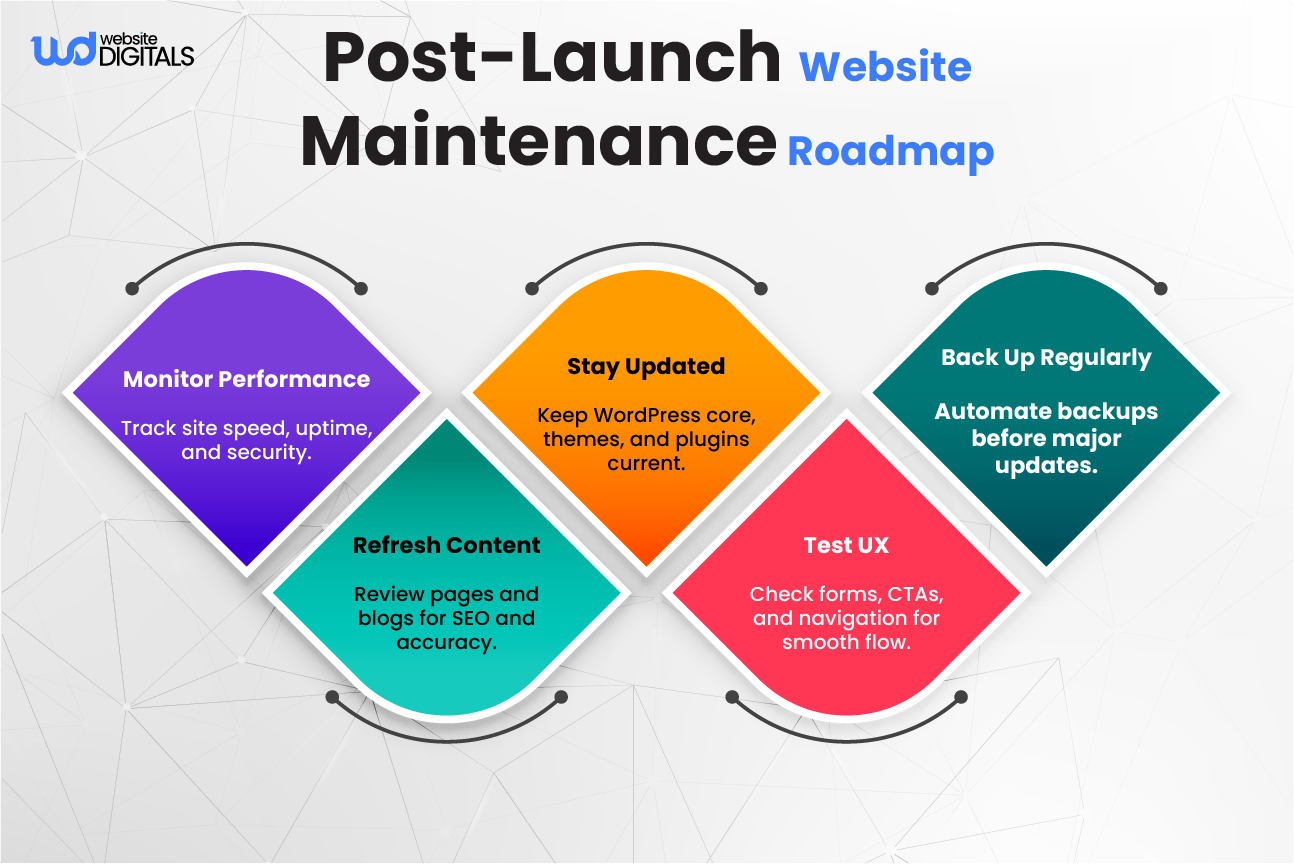
Use version control (Git) for tracking design iterations and WordPress website maintenance design considerations for long-term success.
Optimization doesn’t end at launch; regularly analyze heatmaps, visitor recordings, and analytics reports to refine your design continuously.
Final Say: Let’s Turn Your WordPress Site into a Conversion Powerhouse
Design isn’t just about visuals but the foundation of trust and clarity that turns visitors into customers.
By learning how to design a WordPress website the right way gives you full control over how people perceive and interact with your brand.
If done right, your website becomes a dependable growth engine that works for your business around the clock.
At Website Digitals, we build WordPress websites that blend performance, usability, and conversion strategy to help your brand stand out and sell smarter.
Ready to build a site that looks professional and drives results?
Call (646)-222-3598 or email info@websitedigitals.com to get started today.
Frequently Asked Questions
What makes Website Digitals different from other WordPress design agencies?
At Website Digitals, we don’t just build WordPress sites; we design digital experiences that convert. Our approach blends strategic UX design, fast performance, and brand alignment to help businesses turn visitors into loyal customers.
Can Website Digitals handle fintech or complex WordPress web development projects?
Yes. Our team specializes in WordPress fintech website development and custom enterprise builds. We create secure, scalable, and high-performing websites tailored to industry standards and user behavior.
How to design a responsive WordPress site for mobile?
Use a mobile-optimized theme, test layouts on multiple devices, and apply flexible grids with CSS. Keep navigation simple and compress images to maintain performance across all screen sizes.
How to choose a WordPress theme for website design?
Pick a lightweight, customizable, and SEO-friendly design that aligns with your brand style. Avoid themes overloaded with plugins, and ensure it’s built for performance and accessibility.
What are some WordPress website design tips for small business owners?
Focus on clarity, fast loading speed, and visible CTAs. Use a clean, mobile-friendly website layout with readable fonts, and ensure your site communicates your brand value instantly.
What are the best WordPress themes for website design?
Some top-rated themes include Astra, GeneratePress, and OceanWP, all known for speed, flexibility, and compatibility with page builders like Elementor and Gutenberg.
Why should I hire a WordPress website design service instead of using a free template?
Hiring a professional WordPress design service ensures your site is unique, secure, conversion-focused, and aligned with your brand goals, something generic templates can’t achieve.






