
Does Squarespace Host Domains Securely for Professional Brand Presence
Most customers never say it, but an insecure domain is one of the quickest ways to lose a sale.
In fact, 69% of people have abandoned a purchase or sign-up simply because the site didn’t feel trustworthy, proof that domain security directly affects conversions.
That’s exactly why, when creating your online presence, one important question always comes up: Does Squarespace host domains, or should you rely on a separate registrar?
That confusion usually comes from a challenge nearly every entrepreneur faces, which is:
- Uncertainty around hosting
- Domain security and setup.
These problems drain valuable time and create friction right when your brand needs clarity.
Peter Drucker said it well:
“Efficiency is doing the thing right; effectiveness is doing the right thing.”
Choosing where your domain lives, and how it’s protected, is one of those essential “right things” that strengthen your brand’s foundation.
This guide simplifies the entire process and helps you understand how Squarespace handles domains, what’s included, and whether it supports your long-term brand needs.
Key Takeaways
|
Why Secure Domain Hosting Matters for a Professional Brand
Your domain is more than a web address; it’s the core of your brand identity.
Before visitors see your design, content, or product, they see your domain name.
If it’s not secure or properly managed, it impacts:
- Trust
- Website reliability
- Brand authority
- Search visibility
- Customer perception
A compromised domain can lead to phishing risks, downtime, or credential leaks.
For startups and entrepreneurs, even a small disruption can cost business opportunities.
This is why choosing the right domain registrar and hosting path matters just as much as choosing the right website builder or hosting platform.
A secure domain strategy ensures:
- Consistent DNS performance
- Protected ownership
- Smooth renewals
- Reduced risk of domain hijacking
- Reliable SSL enforcement
A professional brand needs stability at its foundation, and your domain is that foundation.

Does Squarespace Actually Host Domains? A Clear Explanation
At the center of this topic is one primary question: Does Squarespace host domains in the same way traditional registrars do?
Yes, Squarespace is an accredited domain registrar.
This means you can:
- Register new domains directly inside Squarespace
- Transfer existing domains to Squarespace
- Manage DNS settings from your dashboard
- Access security features like SSL and WHOIS privacy
Many users assume Squarespace is only a design or CMS platform, but domain hosting is a built-in service.
Understanding this distinction helps entrepreneurs streamline their setup instead of juggling multiple platforms.
Domain Hosting vs Website Hosting
These two are often confused:
|
Term |
Meaning |
|
Domain hosting |
Where your domain name is registered and managed |
|
Website hosting |
Where your site’s files, content, and code are stored |
Squarespace handles both.
But its domain hosting focuses more on simplicity than deep technical flexibility.
Security Features Squarespace Provides for Domains
Squarespace includes several built-in protections that help entrepreneurs secure their domain without needing deep technical knowledge. These features strengthen your brand’s foundation and reduce the risk of common setup errors.
1. SSL Certificates
Every Squarespace domain includes automatic SSL security, which encrypts visitor data and removes browser security warnings. You don’t need to install or manage certificates yourself, Squarespace handles it, keeping your site protected and search-friendly.
2. WHOIS Privacy
Squarespace includes privacy protection at no extra cost. This keeps your personal or business information out of public databases, helping prevent spam, data scraping, and impersonation attempts.
3. Renewal Protection
Accidental domain expiration can break your site and disrupt business. Squarespace supports auto-renewal and sends reminders, ensuring your domain stays active and always belongs to you.
4. Simplified DNS Security
Squarespace streamlines DNS server settings, reducing the risk of misconfigured A records, MX records, or CNAME records, a common issue for new brands. While it’s not built for advanced DNS needs, it’s reliable for most small businesses.
5. Clear Ownership Controls
Your domain ownership details, renewal status, and billing remain easy to manage from one dashboard, making it simpler to maintain control as your business grows.
These features collectively offer a stable, secure environment for startups that want reliable domain management without added complexity.
Real World Scenario:
|
A healthcare clinic building its site through Squarespace development for healthcare clinics needed stronger privacy and patient trust from day one. By registering the domain directly with Squarespace, they benefited from automatic SSL encryption, free WHOIS privacy, and simplified domain settings, essential protections for patient communication and sensitive medical information. |
What Squarespace Domain Hosting Includes (Core Feature Breakdown)
Squarespace focuses on simplicity, giving entrepreneurs a streamlined way to manage their domain without juggling multiple tools.
Here’s a concise look at what’s included:
1. DNS Management
Squarespace lets you manage essential records such as CNAME records, A records, MX records, TXT, SRV, and CAA.
This covers the core DNS needs for most businesses, including website connections, email setup, and verification tools.
2. Privacy Protection
WHOIS privacy is included at no extra cost.
This helps protect your contact information from spam, scraping, and impersonation attempts, an important layer of security for any growing brand.
3. Domain Renewal Tools
With automatic renewals, reminders, and multi-year registration, Squarespace reduces the risk of accidental domain loss.
Everything is designed to keep your domain active without manual intervention.
4. Pricing Transparency
Domain fees are straightforward with no surprise upsells.
This makes budgeting easier, especially for startups that want predictable costs.
5. Centralized Dashboard Management
Your domain, SSL, site settings, and analytics all live in one dashboard.
This unified approach shortens the learning curve and makes domain management more accessible for small business website owners.
How Squarespace Supports a Professional Brand Identity
A strong brand presence isn’t built on design alone; it starts with a stable, well-managed domain foundation.
Squarespace reinforces that foundation by combining essential tools into a single, cohesive environment that works especially well for fast-moving entrepreneurs.
1. Consistent Branding Across Every Touchpoint
Your website URL, design elements, templates, and publishing tools all operate within one ecosystem.
This creates a seamless brand experience without the scattered setup that often comes with mixing multiple platforms.
2. Centralized Control Without the Technical Overload
Instead of navigating between different registrars and site builders, Squarespace brings everything under one login.
This streamlined setup gives founders the control they need while removing unnecessary technical barriers, which is especially useful for those handling web development tasks on their own.
3. Smooth Domain Management With Fewer Surprises
Confusion around domain settings, SSL activation, DNS propagation, or even simple design updates like how to change squarespace template can slow down a launch.
Squarespace minimizes these hurdles by automating critical tasks and guiding users through what actually matters.
4. Reduced Dependence on Third-Party Tools
Your entire web presence, from hosting to renewal, can be managed through one dashboard.
This eliminates platform conflicts and helps keep your brand infrastructure clean and reliable.
Together, these advantages create a professional, consistent identity that supports long-term growth and simplifies operations for founders who want confidence, not complexity.
Comparisons: Squarespace vs Popular Registrars
|
Feature |
Squarespace |
GoDaddy |
Namecheap |
|
Ease of Use |
Very simple, beginner-friendly |
Moderate, ads & upsells |
Simple, clean interface |
|
Domain Pricing |
Higher than average |
Varies; often higher renewals |
Generally low-cost |
|
SSL Certificate |
Included free |
Often extra cost |
Included free |
|
WHOIS Privacy |
Included free |
Extra cost for many domains |
Included free |
|
DNS Management |
Basic, limited advanced options |
Full advanced DNS tools |
Full advanced DNS tools |
|
Support |
Strong website + domain support |
Large support team |
Good support, community resources |
|
Best For |
Entrepreneurs wanting an all-in-one system |
Users needing advanced control |
Budget-focused users needing flexibility |
Real Issues Entrepreneurs Face (and How Squarespace Handles Them)
Many entrepreneurs run into domain-related challenges during setup, usually because DNS, transfers, or email configurations aren’t as straightforward as they seem.
Squarespace doesn’t offer the depth of advanced registrars, but it does address the issues most startups encounter.
1. DNS Not Updating
Slow or failed DNS propagation typically happens when records are entered incorrectly.
How Squarespace helps:
Its DNS editor highlights missing or incorrect entries and simplifies managing A records, CNAME records, and MX records, reducing common errors.
2. Domain Not Connecting
A website won’t load if the domain isn’t pointing properly.
How Squarespace helps:
Domains registered with Squarespace connect automatically.
External domains get clear instructions and real-time connection status to guide setup.
3. Transfer Confusion
Domain transfers can feel overwhelming due to locks, codes, and timing.
How Squarespace helps:
The platform provides a step-by-step transfer process with automated checks and progress updates.
4. Email Alignment Issues
Misconfigured MX records can interrupt email service.
How Squarespace helps:
Squarespace offers guided instructions for connecting providers like Google Workspace or Microsoft 365.
Pro Tip:
|
While Squarespace simplifies most of the domain setup, optimizing a few DNS records can improve performance:
These small optimizations support a more reliable web presence, especially for businesses that rely on consistent communication and uptime. |
Quick Guide: Securing Your Domain on Squarespace
A secure domain setup is one of the simplest ways to protect your brand and avoid technical setbacks.
Squarespace streamlines much of the process, but taking a few intentional steps ensures your domain remains stable, connected, and protected long-term.
Here’s a focused guide to help you get everything in place.
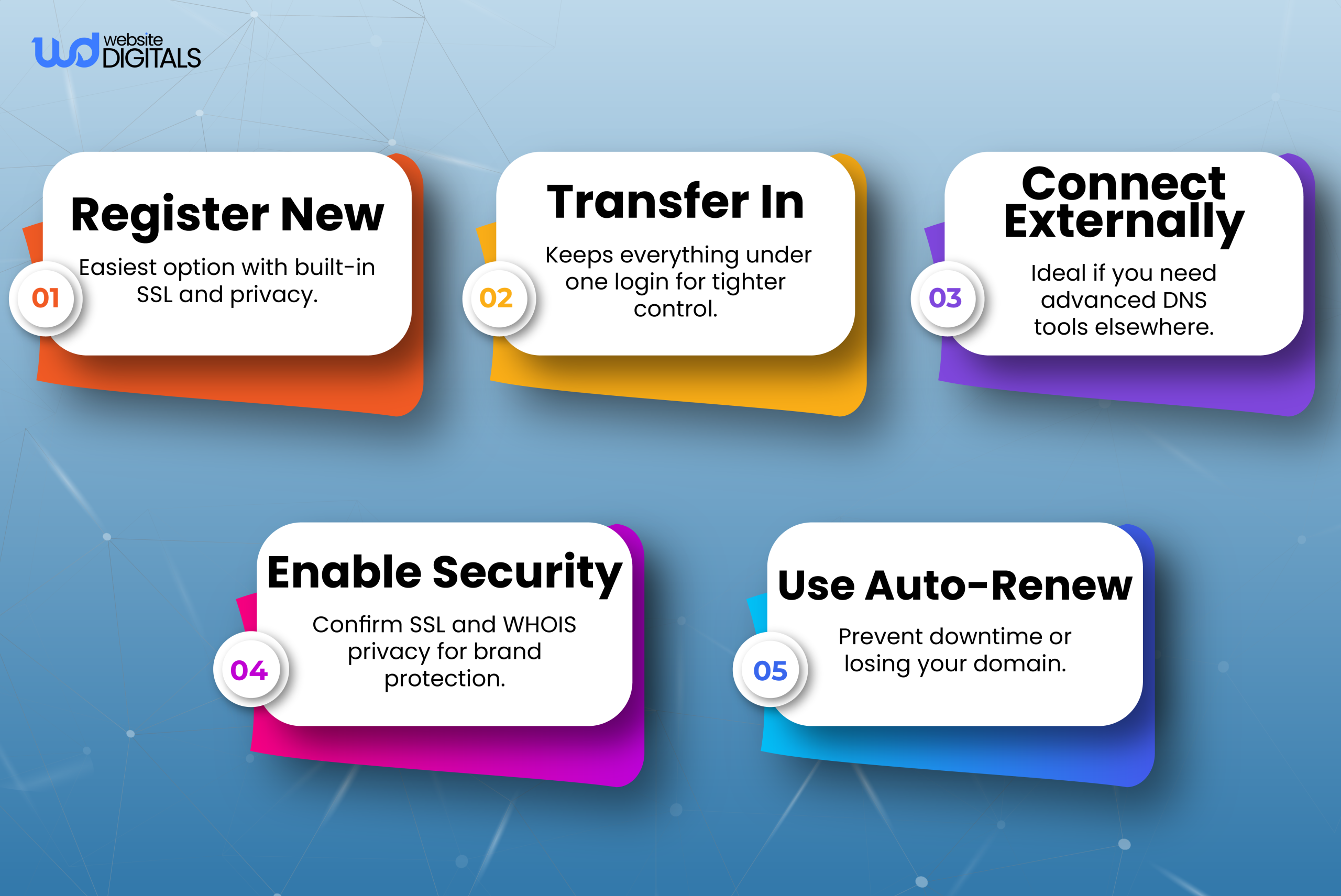
1. Complete the Right Setup Path
Start by choosing how you want your domain to integrate with Squarespace.
- Register a new domain if you want everything managed in one dashboard.
- Transfer an existing domain if you want tighter control and simpler renewals.
- Connect an external domain if you prefer keeping your DNS with another registrar.
After selecting your path, verify ownership and make sure SSL is turned on so your site loads securely.
2. Review Your DNS Settings
Double-check your A records, MX records, CNAMEs, and any forwarding settings your business relies on.
Proper DNS ensures your website loads correctly, emails route without interruption, and integrations work as expected.
3. Turn On Auto-Renewal
Losing a domain due to expiration can create severe downtime and brand disruption.
Enable automatic renewal to ensure your domain stays active without manual intervention.
4. Verify Ownership Information
Make sure the registrant’s email, business details, and contact information are accurate and accessible.
This prevents verification issues, especially during transfers or renewal confirmations.
5. Protect Your Credentials
Your domain is a core asset. Store account logins securely, limit administrative access, and avoid sharing credentials across unnecessary team members.
A small step in security can prevent major vulnerabilities.
Bonus Tip:
|
A simple but often overlooked step is keeping your domain settings aligned with updates you make across your brand. If you change email providers, update your branding, switch templates, or add third-party tools, your DNS might need small adjustments. Reviewing your domain settings every few months ensures that nothing breaks in the background, your emails stay deliverable, your verification records stay up to date, and integrations continue running smoothly. This small habit prevents silent issues that could impact search visibility or customer communication. |
Final Thought: Is Squarespace a Secure Choice for a Professional Brand Presence?
Many business owners ask the same thing: Does Squarespace host domains securely and reliably?
Yes, it does.
And once you see how Squarespace manages registration, DNS, and security, it’s easier to decide whether its all-in-one approach fits your brand’s needs.
With automatic SSL, built-in privacy protection, and a single dashboard for everything, Squarespace keeps domain management simple while giving your brand a stable, professional foundation.
Your final choice depends on what matters most for your business, especially if you’ve been debating whether squarespace or wix better aligns with your long-term goals, but now you have the clarity to make that decision with confidence.
And if you’d like to support setting up or refining your Squarespace site, our team at Website Digitals is always here to help. You can reach us at info@websitedigitals.com or contact us directly at (645)-222-3598 for friendly, expert Squarespace development guidance.
FAQs
How can Website Digitals help me set up or optimize my Squarespace domain?
At Website Digitals, we handle the full domain setup process for you, from connecting or transferring your domain to configuring DNS settings and securing SSL. Our team ensures your Squarespace domain is properly aligned with your website, email, and branding, so everything works smoothly from day one.
Do you offer ongoing Squarespace development support after the domain setup?
Yes. We provide continued support for design updates, DNS adjustments, email configuration, and performance improvements. Whether you’re a startup or scaling brand, Website Digitals ensures your entire Squarespace environment stays secure, stable, and optimized.
Does Squarespace host domains or just websites?
Squarespace hosts both. You can register a domain directly through Squarespace or connect one from another registrar while still hosting your website on the platform.
What does Squarespace domain hosting include?
It includes domain registration, SSL certificates, WHOIS privacy, DNS management, auto-renewal protection, and full integration with your Squarespace website.
Is Squarespace a good domain registrar?
Squarespace is a solid choice if you prefer simplicity and integrated management. While not as advanced as specialized registrars, it offers reliable security, clear pricing, and strong ease of use.
How do DNS settings work on Squarespace?
Squarespace provides a clean DNS panel where you can edit essential records like A records, MX records, and CNAME entries. Changes are guided and simplified, making it beginner-friendly.
Can Squarespace manage all domain settings for me?
Yes, Squarespace can handle the core domain settings most businesses need, including DNS records, SSL, privacy, and renewals. For advanced DNS features, an external registrar may offer more control.






