
How Does Content Management System Work for Seamless Web Development
Many businesses still struggle with complex APIs, inconsistent templates, and disconnected workflows that slow down web publishing.
But what if your team could hit “publish” and see updates appear instantly across your website, mobile app, and digital platforms, all without the need for a developer?
That’s where understanding What is Content Management System CMS and “how does content management system works” becomes essential.
According to recent research, 44% of organizations now use a headless CMS to achieve faster delivery and easier integration.
In this blog, you’ll explore how a CMS streamlines web development through its core components, how traditional, decoupled, and headless architectures function, and the key features that make a CMS secure, scalable, and efficient.
Without delay, let’s jump right in.
Key Takeaways
|
What Is a Content Management System?
A Content Management System (CMS) is software that enables users to create, edit, and publish digital content without programming skills.
It acts as the backbone of modern websites, allowing multiple contributors to work simultaneously through a centralized, intuitive user interface (UI).
Core Components of a Content Management System: CMA and CDA
The content delivery application (CDA) handles backend operations. It processes information from the CMA and delivers it to website visitors.
|
Component |
Primary Function |
User Interaction |
Technical Requirement |
|
Content Management Application (CMA) |
Front-end interface for creating and editing content |
Direct user interaction |
No coding required |
|
Content Delivery Application (CDA) |
Processes and delivers content to the live website |
Backend operation |
Handles server and technical logic |
|
Integrated System |
Coordinates CMA and CDA for seamless publishing |
Unified user experience |
Automates infrastructure management |
The Role of Content Management Systems in Modern Web Development
A Content Management System (CMS) has become essential to modern web development by simplifying how organizations create, manage, and deliver digital content.
- Centralized Collaboration: Unites marketing, design, and IT teams within one platform for streamlined content workflow.
- Automation Efficiency: Handles repetitive publishing processes, freeing developers to focus on performance and scalability.
- Accessibility: Empowers non-technical users to update websites and manage content independently.
- Version Control: Maintains content integrity and consistency through built-in revision tracking.
- Multichannel Publishing: Distributes content seamlessly across web, mobile, and digital platforms.
- Scalability & Agility: Adapts to growing business needs, supporting fast, data-driven digital experiences.
This integrated approach makes the CMS a core driver of efficient, scalable, and customer-focused web development.
Real World Case Study:
|
A prime real-world example is The Times (UK), which adopted WordPress VIP to replace its legacy system. This move unified its content repository, streamlined workflows, and cut publishing time by over 34%, allowing faster, more consistent delivery across all digital platforms. |
Important: CMS Considerations for the Healthcare Industry
|
Unlike most business websites, cms development for healthcare comes with higher stakes. Teams must update content quickly while protecting sensitive information and meeting strict compliance standards. A reliable CMS helps healthcare organizations stay accurate and secure by supporting:
|
Why Use a Content Management System for Seamless Web Development
Adopting a robust platform for your digital presence yields significant advantages that extend far beyond simple page creation.
These platforms are strategic investments that empower entire organizations.
Here’s what you’ll gain with the use of CMS:
-
Business Benefits and Efficiency Gains
A modern Content Management System (CMS) delivers major efficiency gains by enabling real-time collaboration, allowing multiple users to edit and publish content simultaneously without version conflicts.
Tasks that once required developers can now be completed in minutes through an intuitive user interface.
Built-in SEO tools simplify optimization for better search visibility, while scalable architecture ensures the platform grows effortlessly with your business needs.
-
Enhancing User Experience and Workflow
The user-friendly architecture of modern platforms enhances workflow efficiency through features such as role-based access control and automated scheduling, ensuring accuracy and speed in every publishing cycle.
Centralized content repositories maintain organization and support multichannel delivery, helping teams uphold brand consistency.
With integrated metadata management and version control, these systems simplify complex operations, allowing organizations to stay agile and focused on strategic objectives.
How Does Content Management System Work
Step 1: Content Creation and Editing
Users begin within the Content Management Application (CMA), where they create or edit pages using a WYSIWYG editor.
The CMS automatically applies design rules through a template engine, ensuring layout consistency and brand alignment.
Bonus Point:
|
This visual environment eliminates the need for manual coding and accelerates content production. |
Step 2: Content Storage and Management
All created material is securely stored in a structured database, forming the foundation of a database-driven website.
The CMS organizes information with metadata tagging, categories, and version history, enabling efficient content lifecycle management and easy updates across the platform.
Step 3: Review, Approval, and Scheduling
Through built-in workflow management, content passes through an approval process before going live.
Role-based access control ensures editorial oversight, while automated scheduling allows teams to publish at optimal times without disrupting the workflow.
Step 4: Publishing and Delivery
Once approved, the Content Delivery Application (CDA) processes the finalized content and merges it with predefined templates.
The system then distributes it via a Content Delivery Network (CDN) to deliver fast, secure, and globally accessible web pages.
Step 5: API Integration and Omnichannel Publishing
Modern and headless CMS architectures extend beyond traditional websites using RESTful APIs or GraphQL to deliver content across multiple platforms, including mobile apps, smart devices, and digital displays.
This supports omnichannel publishing, allowing one content source to serve diverse audiences consistently.
Pro Tip: Choose a CMS That Scales With Your Content Lifecycle
|
When evaluating platforms, look beyond design flexibility, assess how well the system supports your content lifecycle, workflow management, and metadata management. Opt for solutions that offer API integration and cloud hosting to future-proof scalability, particularly if you plan to implement a headless cms react setup for modern web applications. |
Key Features for Seamless Web Development
|
Feature |
Benefit |
Impact |
|
SEO Optimization |
Better search rankings |
Increased visibility |
|
Content Staging |
Safe testing environment |
Quality assurance |
|
User Permissions |
Role-based access |
Security and control |
|
Analytics |
Performance tracking |
Data-driven decisions |
Conclusion
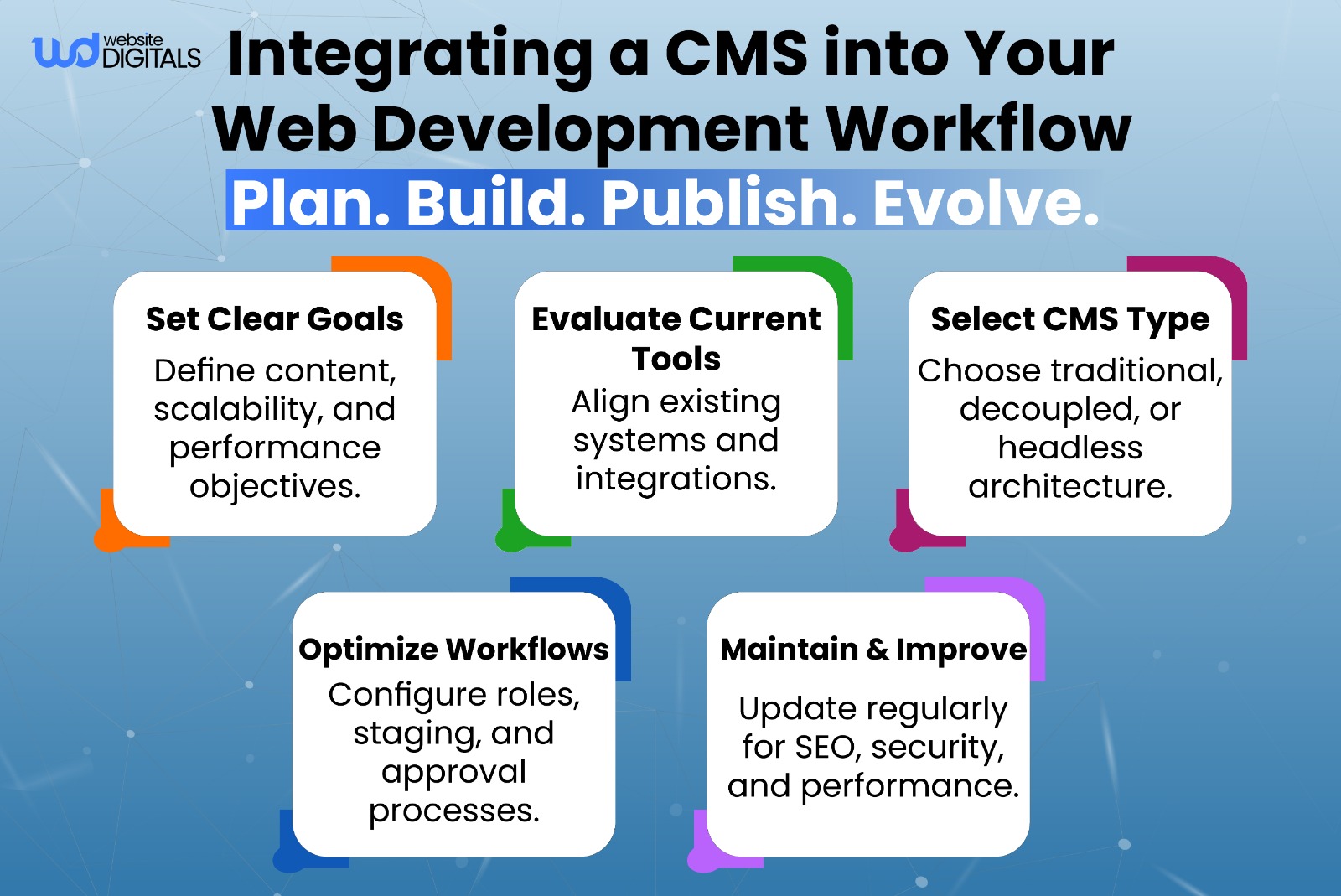
Learning “how does content management system works” is the foundation of successful CMS development.
Modern platforms like WordPress, Shopify, and Drupal empower businesses to create, manage, and scale websites efficiently without heavy coding. The right CMS framework streamlines content workflow, enhances scalability, and ensures a secure, SEO-optimized digital presence.
If you’re ready to build or upgrade your CMS, our experts at Website Digitals specialize in custom CMS development tailored to your business goals. Reach out to us at websitedigitals@gmail.com or call (646)-222-3598 to start developing a powerful, future-ready content management system today.
FAQ
What makes Website Digitals different from other CMS providers?
Website Digitals offers custom CMS solutions designed for scalability, SEO performance, and seamless multichannel publishing, helping businesses manage and deliver content efficiently across every platform.
How does Website Digitals integrate a CMS into existing workflows?
We tailor the CMS architecture to fit your current systems, ensuring smooth content workflow, user collaboration, and consistent branding without disrupting ongoing operations.
How does a CMS manage content?
A Content Management System stores text, images, and media in a structured database, organizing them with metadata and version control so users can easily edit, update, and publish content.
How does CMS architecture work?
CMS architecture is built around two main components, the Content Management Application (CMA) for creation and editing, and the Content Delivery Application (CDA) for rendering and displaying content to users.
What happens in a CMS during content publishing?
When content is approved, the CMS processes it through the publishing workflow, applies design templates, and pushes it live while maintaining consistent structure and formatting.
How does a CMS publish content to the web?
The CDA retrieves stored data, merges it with templates, and delivers it to users through a web server or content delivery network (CDN), ensuring fast and reliable website performance.






