
How to Integrate Payment Gateway in Website Without Complications
Most eCommerce losses don’t happen on product pages; they happen at checkout.
Yes, you heard it right!
Many businesses struggle not because of pricing or products, but because they don’t know how to integrate payment gateway in website without running into errors, security gaps, or limited payment options.
According to the Baymard Institute, nearly 70% of online carts are abandoned, with payment issues being a leading cause.
As Bill Gates once said,
“Your most unhappy customers are your greatest source of learning.”
In eCommerce, failed payments are often the loudest feedback customers give.
This guide uses those pain points as lessons, showing you how to integrate a payment gateway correctly, so you can reduce failures, simplify setup, and build a checkout experience customers trust and complete with confidence.
Key Takeaways
|
What a Payment Gateway Actually Does (Simple, Non-Technical Explanation)
A payment gateway works like the card machine you see at a checkout counter, just online.
When a customer enters their payment details on your website, the gateway immediately steps in to handle the sensitive part.
It securely locks (encrypts) the information, sends it to the customer’s bank, and checks whether the payment can go through.
This quick check, called payment authorization, usually takes just a few seconds.
If the bank approves it, the gateway confirms the payment so the money can be transferred to your merchant account later.
The gateway doesn’t store or keep your money.
Its main job is to keep payments safe, reduce fraud, and make sure online transactions happen smoothly and legally. Without a payment gateway, accepting payments on a website simply isn’t possible.
Common Payment Gateway Integration Problems Businesses Face
Even with the best intentions, many companies stumble during the setup phase.
One of the biggest hurdles is failing to configure the webhook correctly.
When a webhook isn’t optimized, your website might not receive the “payment successful” message from the bank.
Other common issues include:
- High Latency: A slow checkout system that frustrates users.
- Security Gaps: Lack of proper data protection, which exposes the business to liability.
- Rigid Systems: Difficulty in setting up recurring payments for subscription-based models.
- Poor Error Handling: When a card is declined, the user gets a cryptic error message instead of helpful instructions, leading them to quit the site.
Choosing the Right Payment Gateway Before You Start Integrating
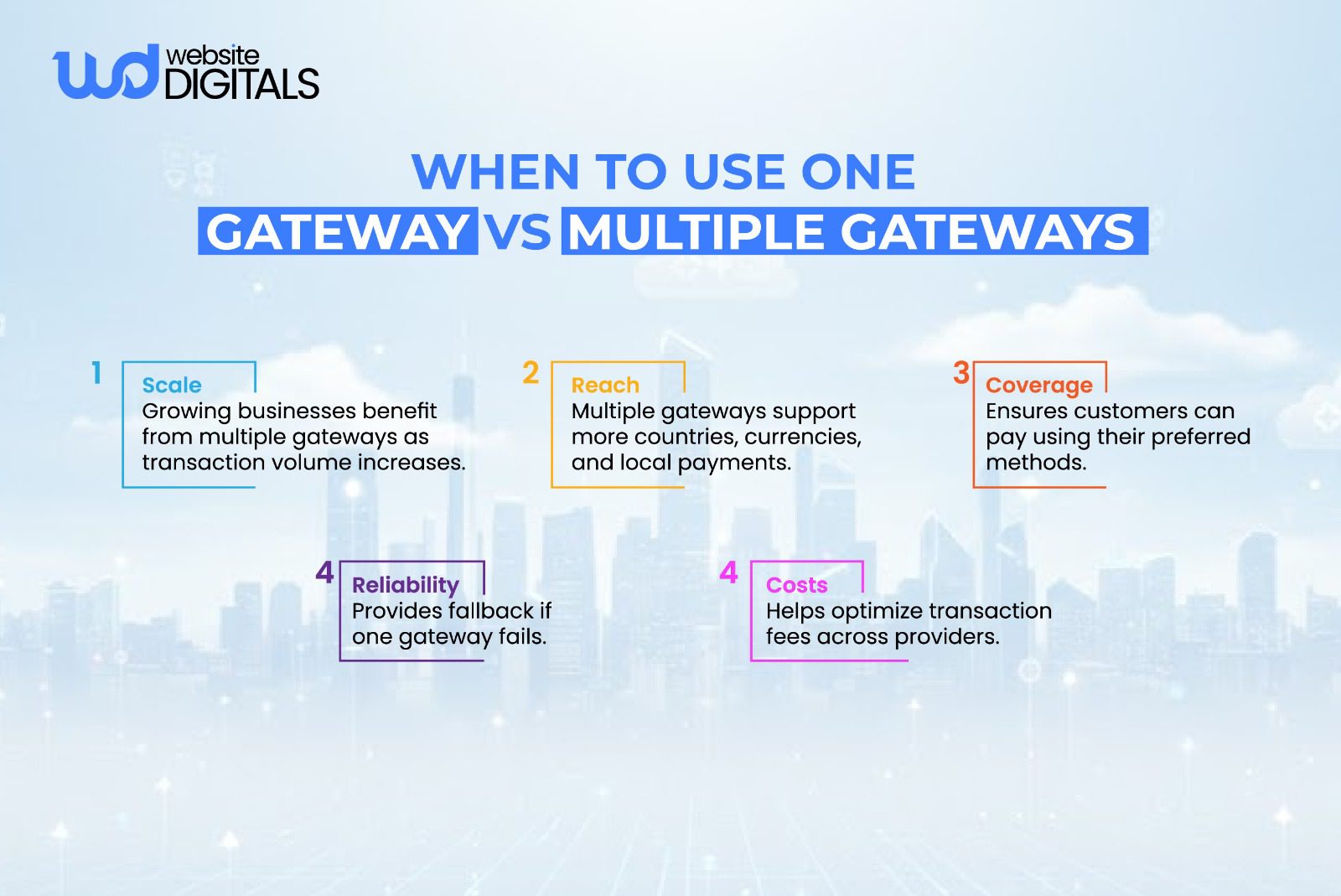
Before you look into how to integrate payment gateway in website code, you must choose the right provider.
Not all gateways are created equal. Some are better for international sales, while others offer lower fees for local digital transactions.
Consider these factors:
- Compatibility: Does it work with your existing shopping cart integration?
- Payout Speed: How quickly does the payment processor move money to your bank?
- Support for Multiple Currencies: Essential if you plan to grow globally.
- Fee Structure: Look for hidden costs beyond the standard transaction fee.
Working with an experienced ecommerce development company can help you navigate these choices, ensuring you don’t get locked into a contract that limits your growth or eats your margins.
Real World Scenario:
|
A mid-size online store expands into new regions but faces payment failures because its gateway doesn’t support local wallets or currencies. Adding a second gateway solves the issue and improves checkout completion. |
Step-by-Step: How to Integrate a Payment Gateway Without Complications
Step 1: Define Your Payment Needs
Start by listing what you need.
- Are you selling physical goods?
- Digital downloads
- Or memberships?
This determines if you need a simple one-time checkout or a system capable of handling recurring payments.
You also need to decide which payment methods to accept: credit cards, digital wallets, or local bank transfers.
Real World Scenario:
|
A service provider struggles with booking no-shows. Integrating partial payments and instant confirmations helps secure commitments and improve cash flow. |
Step 2: Choose the Right Integration Method
There are generally three ways to handle the integration:
- Hosted Payment Page: The user is redirected to the gateway’s site (like PayPal) to pay. It’s the easiest to set up, but it gives you less control over the branding.
- API-Based Integration: You use a REST API to process payments directly on your site. This allows for a seamless user experience but requires more technical expertise to maintain transaction security.
- Direct Post: Data is sent to the gateway without passing through your server, reducing your security burden while keeping the user on your site.
Hosted Checkout vs Embedded Checkout (UX Impact)
|
Aspect |
Hosted Checkout |
Embedded Checkout |
|
Trust |
High trust due to familiar third-party pages |
Trust depends on website design and security cues |
|
Branding |
Limited control over look and feel |
Full control over branding and UI |
|
Speed |
Quick to launch, minimal setup |
Faster checkout experience once implemented |
|
Compliance |
Lower PCI compliance responsibility |
Higher compliance responsibility |
|
Conversion |
Slight drop due to redirection |
Higher conversions with seamless flow |
Step 3: Prepare Your Website for Payments
The first requirement is a valid SSL certificate.
This ensures that all data sent between the user’s browser and your server is scrambled.
Beyond security, you should look at your website’s overall health and speed.
A buggy or slow interface is often cited as a trait of the worst website design, and it will kill your conversion rates regardless of how good your gateway is.
Step 4: Implement the Gateway Securely
Your developers will work with API credentials provided by the gateway to link your site to their network.
- Connect to API endpoints: These are the specific digital addresses where payment data is sent.
- Set up Server-Side Validation: Never trust data coming only from the user’s browser; always verify it on your server to prevent price manipulation.
- Implement Tokenization: Use tokenization to ensure that you never store actual credit card numbers in your database. Instead, you store a “token” that represents the card, which is useless to hackers.
Real World Scenario:
|
A SaaS platform experiences recurring payment drops due to expired cards. Implementing tokenization and smart retry logic reduces involuntary churn. |
Step 5: Test Transactions Before Going Live
Never launch without rigorous testing. Most gateways provide a “sandbox” or “test mode.” You should simulate various scenarios:
- Successful transactions.
- Declined cards (insufficient funds).
- Expired cards.
- International addresses.
- Fraud detection triggers.
Once testing is complete, you can move to the live environment and start processing real online payments.
Pro Tip: Implement a Gateway Fallback Strategy
|
If your primary gateway fails, automatically route payments to a secondary provider. This is widely used by large eCommerce brands to prevent revenue loss. |
Security and Compliance: How to Stay Safe Without Slowing Down
Here are a few security and compliance practices you can adopt to protect your business without slowing down the checkout process.
- PCI DSS standards exist to ensure customer payment data is handled in a secure and compliant environment.
- To simplify compliance, most businesses use payment gateways and encryption to manage sensitive card information. This approach keeps critical data off your website while maintaining strong security.
- Adding fraud prevention tools, such as blocking repeated failed payment attempts, helps identify risks before they cause damage.
- Real-time validation features allow payments to be processed quickly while keeping both your business and customers protected.
How Expert Payment Integration Improves Revenue and Reduces Support Load
When you understand how to integrate payment gateway in website layouts effectively, the benefits extend far beyond just “accepting money.”
-
Fewer Failed Payments
Properly configured gateways and API endpoints ensure that communication between your site and the bank is stable.
This reduces the number of “technical errors” that cause customers to give up.
-
Faster Checkout Experience
Through checkout optimization and smart interactive website features, you can offer capabilities like one-click payments that reduce friction and speed up conversions.
By securely saving customer details (via tokens), returning buyers can finish their purchase in seconds.
This convenience is a major factor in customer loyalty.
-
Lower Dispute and Refund Rates
When a payment confirmation page is clear and provides an immediate receipt, customers feel more confident.
Clear communication via the gateway reduces “accidental” chargebacks where a customer doesn’t recognize a charge on their statement.
-
Better Customer Trust
A professional, seamless payment flow eliminates the “sketchy” feeling that poorly integrated checkout systems create.
If your payment area looks unpolished or unreliable, users are unlikely to trust you with their financial information.
A clean, branded, and fast payment process builds long-term trust and encourages customers to complete their purchase with confidence.
Final Say – Get Payment Gateway Integration Done Right
Payment gateway integration is a core part of eCommerce development and requires careful execution. Knowing how to integrate payment gateway in website the right way helps prevent payment failures and creates a smooth checkout experience.
At Website Digitals, our experts simplify secure payment gateway integration and checkout optimization to support scalable eCommerce growth.
If you need help integrating or improving your payment system, contact us at info@websitedigitals@gmail.com or call (646)-222-3598 to get expert support for your eCommerce website.
FAQs
1 How does Website Digitals help with payment gateway integration?
Website Digitals handles secure backend integration, API setup, checkout optimization, and compliance-ready payment systems for eCommerce businesses.
2 Can Website Digitals fix failed or broken payment gateways?
Yes, our team audits existing integrations, resolves payment failures, and improves transaction success rates.
3 What is payment gateway integration?
Payment gateway integration is the process of connecting your website to a gateway that securely authorizes and processes online payments.
4 How does a payment gateway work on a website?
It encrypts payment data, sends it to the bank for approval, and returns a confirmation so the transaction can proceed.
5 What is payment gateway integration in simple terms?
It allows your website to safely collect payment details and communicate with banks without storing sensitive data.
6 What are the steps to integrate a payment gateway into a website?
Define payment needs, choose an integration method, prepare your site, implement securely, and test before launch.
7 What should I know about payment gateway API documentation?
API documentation explains endpoints, credentials, webhooks, and error handling needed for backend integration.






