The Best Themes for WordPress Websites to Maximize Your Online Store’s Performance
Picking the right WordPress theme sounds simple until you realize how many “beautiful” ones slow your store down.
Most look good on demos but fail where it matters: speed, sales, and customer trust.
That’s the real struggle when searching for the best themes for WordPress website performance.
According to Google PageSpeed Insights, even a one-second delay can drop conversions by 20%. Imagine losing sales not because of your products, but because your theme can’t keep up.
As Leonardo da Vinci said,
“Simplicity is the ultimate sophistication.”
The most effective WordPress themes embody that principle, streamlined, fast, and focused on delivering a seamless shopping experience.
In this guide, we’ll explore themes that go beyond aesthetics to offer true performance, reliability, and measurable growth for your online store.
Key Takeaways
- Understanding how your WordPress theme impacts site speed, SEO, and user experience.
- Learning what to look for when choosing a theme that fits your brand and business goals.
- Exploring top-performing themes like Astra, GeneratePress, and Flatsome for eCommerce success.
- Discovering the benefits of lightweight, mobile-friendly, and WooCommerce-compatible themes.
- Knowing why regular updates, clean code, and trusted developers ensure long-term website performance.
Why Your Theme Choice Shapes Store Performance
In WordPress-based eCommerce, your theme serves as the engine powering every customer interaction.
It influences:
- Page load time
- Search rankings
- Usability
- And even the checkout experience.
A well-built theme balances responsive design, SEO-friendly code, and eCommerce integration to ensure that every element of your store works in harmony.
While many site owners focus on marketing campaigns or plugins, the theme dictates the foundation of your website’s performance.
Automattic, the company behind WordPress.com, stresses that themes must comply with WordPress theme review standards to guarantee security, performance, and accessibility.
Warning
|
Ignoring these fundamentals can cost sales and reputation. |
Key Performance Factors to Evaluate Before Choosing a Theme
Selecting a WordPress theme for your store involves more than liking its design.
The right evaluation process saves time, money, and potential technical issues later.
Here are the essential performance indicators to assess before deciding:
-
Design Flexibility and Customization
A professional eCommerce website must adapt to your brand’s visual identity.
Themes that offer built-in customization through a drag-and-drop builder or template kit make it easier to achieve consistency across pages, an essential part of understanding how to design a website in WordPress for brand cohesion.
Look for Gutenberg compatibility or support for popular page builders like Elementor.
Real World Example:
|
A strong example of flexibility is Divi by Elegant Themes, used by over 2 million websites worldwide. Its drag-and-drop builder and layout library allow online retailers to easily adapt their branding without needing developer intervention, ideal for scaling businesses. |
-
Mobile Responsiveness
Over 70% of online purchases happen on mobile devices. A mobile-friendly theme ensures that your layout adjusts seamlessly to all screen sizes.
Test demos on different devices and use Google’s Mobile-Friendly Test to verify compliance with WCAG accessibility guidelines.
-
Integration with WooCommerce and Plugins
If your store relies on WooCommerce, your theme must integrate it natively.
Compatibility with major plugins, such as Yoast SEO, Mailchimp, and payment gateways, prevents future conflicts.
Look for mentions of WooCommerce support or pre-styled checkout templates.
-
Code Cleanliness and Security
Themes with bloated or poorly written code can slow your site and introduce vulnerabilities.
Ensure the theme follows WordPress.org’s theme development handbook standards.
Regular updates, theme security audits, and clean code are indicators of a dependable product.
-
Ongoing Updates and Support
A theme’s performance is only as strong as its maintenance.
Choose developers known for update frequency, responsive customer service, and detailed documentation.
Top WordPress Themes for E-Commerce Performance
Below are performance-tested themes widely recognized for their speed, flexibility, and compatibility with modern eCommerce operations.
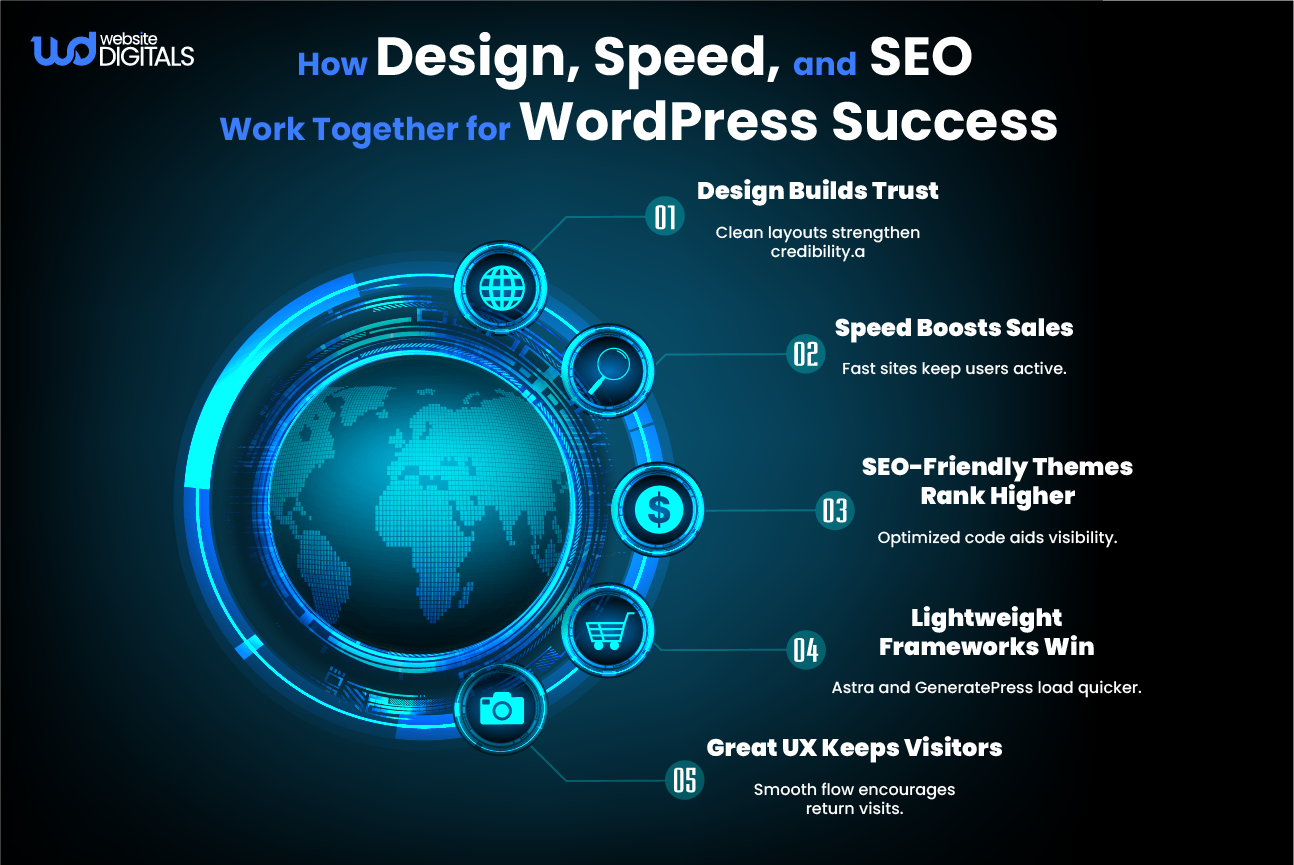
Astra remains one of the fastest and most lightweight themes available.
It’s built with performance in mind, offering page-speed optimized templates and deep WooCommerce integration.
Its modular design and compatibility with Gutenberg make it ideal for scalable online stores. Astra’s minimal code ensures improved scores in Google PageSpeed Insights and Core Web Vitals.
GeneratePress is perfect for performance-focused businesses.
Known for its lightweight theme structure, it loads quickly and performs exceptionally well across hosting environments, including WP Engine.
The theme’s minimal CSS and compatibility with caching plugins enhance the theme’s performance and SEO.
Why:
|
Both Astra and GeneratePress are known for lightweight, fast-loading frameworks, so this point reinforces that takeaway naturally and provides value right where readers are evaluating speed-related themes. |
Designed specifically for online retailers, Flatsome combines elegant design with strong conversion-focused features.
It offers a built-in UX Builder that supports responsive design and eCommerce integration out of the box.
Its visual editor makes it an excellent choice for non-technical teams managing multiple product lines.
OceanWP offers advanced customization without sacrificing speed.
Its robust integration with WooCommerce, SEO-friendly design, and multi-purpose theme templates make it a popular choice for product-heavy websites.
It includes extensive layout libraries and pre-built demos for quick setup.
Developed for modern businesses, Neve is a mobile-responsive and block-editor theme built for fast-loading sites.
It’s fully compatible with popular page builders and offers child theme compatibility for safer customization.
For startups and SMEs, Neve balances affordability with professional-grade features.
Developed by the WooCommerce team, Storefront is optimized for stability and compatibility.
It’s a straightforward choice for those seeking reliability over flashiness.
With consistent updates, solid theme licensing, and minimal conflicts, Storefront provides a secure, scalable base for any eCommerce operation.
When to Consider Premium Themes for WordPress Websites
While free themes may seem appealing initially, premium options provide tangible long-term advantages.
Paid themes typically include better support & documentation, enhanced security, and exclusive layout libraries.
Premium developers also offer customization for niche markets, for example:
|
A WordPress development company for real estate might adapt a premium theme to match a property portal’s data and SEO needs. |
These added layers of optimization, combined with priority support and extended features, justify the investment.
Premium licenses often include ongoing updates, which protect your store against compatibility issues and theme security vulnerabilities, a factor frequently highlighted in TechRadar’s performance audits of popular WordPress themes.
Free vs Premium WordPress Themes Comparison Table
|
Feature |
Free Themes |
Premium Themes |
|
Customization Options |
Limited layouts and design flexibility |
Full design control with advanced page builders |
|
Support & Updates |
Community support only |
Dedicated support team with frequent updates |
|
Performance |
May include extra code or ads |
Optimized for speed and SEO compliance |
|
Security |
Varies by developer |
Regular security patches and audits |
|
Best For |
Beginners and hobby sites |
Professional eCommerce stores and growing brands |
How to Choose the Right Theme for Your Store
The process of selecting a theme should follow a structured evaluation rather than a visual preference.
Here’s a step-by-step method to help you identify the right fit:
- Define Your Store’s Goals: Clarify if your priority is conversion, usability, or brand presentation.
- Test Performance Demos: Use Google PageSpeed Insights and GTmetrix to benchmark speed before purchase.
- Check Plugin Compatibility: Ensure support for SEO, analytics, and marketing tools.
- Evaluate Developer Reputation: Research reviews and update logs on official marketplaces.
- Plan for Long-Term Scalability: Opt for themes that develop with new WordPress versions and web standards.
By following these steps, you safeguard your investment and ensure consistent website performance.
Pro Tip:
|
Always test your theme’s demo on multiple devices and browsers. A quick performance check on Google PageSpeed Insights or GTmetrix can reveal hidden issues before launch, a crucial step if you’re focused on how to increase website speed WordPress sites depend on for conversions. |
Actionable Next Step: Build a Store That Performs
Selecting from the best themes for WordPress website options is more than a design task, but a strategic business move.
Each theme featured above combines design precision and technical strength to drive measurable results for your online store.
If you’re ready to move beyond standard templates and build a high-performing eCommerce presence, our team at Website Digitals can help.
We specialize in WordPress web development and theme customization that meet WordPress.org standards and align with your long-term growth.
Ready to design a WordPress store that delivers performance, reliability, and measurable results?
Contact us at (646)-222-3598 or email info@websitedigitals.com to start building your next success story.
FAQs
How can Website Digitals help me choose the best WordPress theme for my store?
At Website Digitals, we evaluate your business goals, target audience, and performance requirements to recommend the best themes for WordPress website success. Our experts ensure your theme supports speed, SEO, and conversion optimization from day one.
Does Website Digitals offer theme customization and web development services?
Yes. Our team provides WordPress web development and theme customization tailored to your business, whether you run an online store or need a WordPress development company for real estate. We focus on creating high-performing, responsive, and brand-aligned websites.
How to choose a WordPress website theme for your business?
Start by defining your goals, conversion, branding, or usability. Then test theme performance, check plugin compatibility, and ensure it’s mobile responsive and SEO-friendly before finalizing your choice.
What features should I look for in a WordPress website theme?
Look for features like responsive design, WooCommerce support, clean code, Gutenberg compatibility, and ongoing updates. These ensure your website performs smoothly and remains secure.
Are free WordPress website themes safe and reliable?
Free themes can be safe if downloaded from trusted sources like WordPress.org, but they often lack support, security updates, and customization options compared to premium themes.
What is the fastest WordPress theme for websites?
Themes such as Astra, GeneratePress, and Neve are known for their page-speed optimized structure and lightweight design, making them ideal for eCommerce and business websites.
Premium themes offer better performance, dedicated support, and advanced customization options. Free themes are limited in flexibility and updates but suitable for small or temporary projects.
How to evaluate SEO-friendliness of a WordPress website theme?
Check if the theme uses clean code, supports schema markup, and loads quickly. Use tools like Google PageSpeed Insights to assess SEO performance and mobile usability.
How to switch WordPress website themes without losing SEO?
Before switching, back up your site and maintain the same URL structure and metadata. Use a staging site to test the new theme and verify that page speed, internal links, and redirects remain intact.