Why CMS for Web Development is Essential for Seamless User Experience
You spend time creating great content, then watch users leave before they even see it.
That’s one of the most frustrating parts of slow website performance.
According to studies, performance delays significantly reduce user engagement and task completion, especially on content-heavy websites.
In many cases, the issue isn’t hosting or traffic; it’s a CMS that wasn’t built for speed or flexibility.
A modern cms for web development keeps content flowing smoothly, helping users focus on what matters instead of waiting for pages to load.
In this blog, we’ll explore why the CMS you choose quietly shapes every click, scroll, and interaction, how does content management system work in real-world web development, and how the right one turns performance from a problem into an experience users don’t even have to think about.
Key Takeaways
|
Why Website Builders Start Feeling Restrictive Over Time
-
Built for Speed, Not Growth
Website builders are great at getting you online fast. Drag, drop, publish, DONE!
But that speed comes at a cost.
Once your content grows, those same tools start to feel limiting.
What worked for a few pages wasn’t built to handle scale, structure, or long-term needs.
-
Drag-and-Drop Gets Messy
As pages multiply, “easy editing” turns into clutter.
Layouts drift, updates take longer, and mobile designs break more often than you’d like.
Keeping things consistent becomes work, real work.
-
Vendor Lock-In Shows Up
Most builders don’t give you full control of your site’s code.
Want to switch platforms or add custom features? If the builder doesn’t support it, you’re stuck.
Your website can grow, but only within its boundaries.
-
Control Starts to Fade
Over time, customization feels like a compromise.
Every new requirement needs a workaround.
That’s usually the moment businesses realize they’ve outgrown the builder and need a platform that offers real flexibility and ownership.
How CMS Platforms Work in Web Development
-
Backend vs Frontend
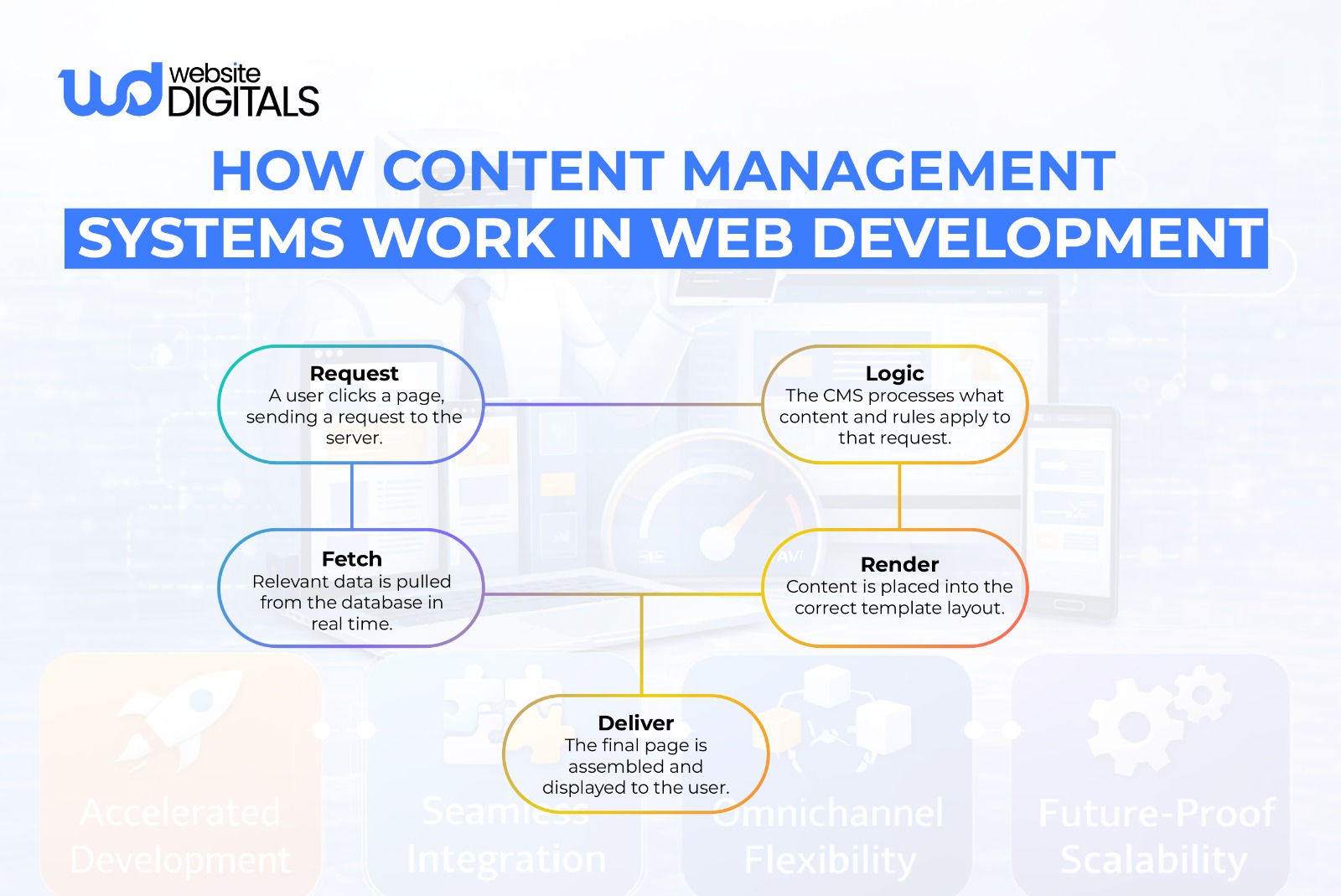
A CMS separates where content lives from how it looks.
Content is managed in the backend, while the frontend handles presentation, so updates don’t disrupt design or functionality.
-
Dynamic Content Loading
Instead of hard-coded pages, a CMS pulls content from a database and loads it in real time.
This keeps pages consistent, easier to update, and faster as the site grows.
-
Template-Based Design
Templates control layouts across the entire site.
Change one layout, and it updates everywhere, saving time and keeping the experience clean and consistent.
-
Built to Scale
CMS platforms are designed to grow with your website.
Adding new pages, content types, or features doesn’t slow things down or create a structural mess.
Real-World Example:
|
When the BBC needed to serve millions of users across regions, devices, and breaking-news cycles, their old setup simply couldn’t keep up. So they shifted to a modular CMS architecture, one built for flexibility, speed, and scale. The result wasn’t just faster load times, but smoother editorial workflows that let teams publish, update, and adapt content in real time. Instead of fighting their platform, the CMS faded into the background, doing exactly what it should: making complex content delivery feel effortless to the user. |
-
Performance Optimization
Cleaner code and flexible architecture make CMS platforms easier to optimize.
Faster load times, smoother interactions, and better UX come naturally when the system is built right.
Key Features of a CMS for Web Development
Modern systems offer a suite of content creation tools and developer tools that allow for a high degree of customization:
- CMS plugins: These allow you to add features like contact forms, memberships, or forums without rebuilding the site.
- Website templates: Unlike rigid builder layouts, these can be fully customized with code to match your brand identity perfectly.
- CMS integration: Easily connect your site to your CRM, email marketing tools, or accounting software.
- SEO tools for CMS: Gain deep control over metadata, sitemaps, and URL structures to improve search rankings.
How CMS Improves User Experience in Real, Practical Ways
User experience is often discussed as a “feeling,” but it is actually a result of technical reliability.
A cms for web development ensures that your visitors have a smooth journey every time they land on your page.
-
Faster Updates Keep Information Accurate
In a growing company, information changes daily.
If your team has to wait for a developer to manually change code every time a price or service description changes, your site will eventually lag behind reality.
With a CMS, content automation, and easy-to-use dashboards mean your marketing team can keep the site current in real-time.
A CMS relies on a solid website architecture.
This means your categories, tags, and menus are logically linked.
When a user looks for a specific service, the CMS serves it up through a predictable hierarchy, reducing frustration and keeping them on your site longer.
-
More Reliable Mobile Experience
While builders claim to be “responsive,” they often break when you add custom content.
A CMS using modern web development frameworks is built to adapt content fluidly.
Whether your user is on a smartphone or a 27-inch monitor, the backend ensures the website templates adjust the layout perfectly without manual intervention.
CMS vs Website Builders: Which Is Better for User Experience?
|
Factor |
CMS |
Website Builders (e.g., Squarespace) |
|
Layout Flexibility |
Content and design stay stable as pages grow |
Fixed templates limit changes |
|
Content Scalability |
Handles growth without clutter |
Becomes harder to manage over time |
|
Navigation Clarity |
Structured and predictable |
Can feel confusing as pages increase |
|
Consistency |
Uniform layouts across pages |
Inconsistencies with manual edits |
|
Mobile Experience |
Adapts better as content expands |
Mobile layouts often break |
|
Long-Term UX |
Built for ongoing updates |
Often needs redesigns later |
4 Signs Your Website Experience Is Suffering Without a CMS
If you are unsure whether you need to make the switch, look for these common pain points.
If your team is experiencing any of these, your current platform is likely holding you back.
1. Delayed or Avoided Content Updates
If the thought of adding a new blog post or updating a team member’s bio feels like a massive chore, your system is failing you.
Content should be easy to manage.
If you are avoiding updates because the interface is too complex, your users are missing out on fresh information.
2. Inconsistent Page Layouts
Have you noticed that your “About Us” page looks slightly different from your “Services” page?
This happens in builders where you have to manually adjust elements on every page.
A CMS ensures website management is centralized, so a change to the header or footer applies everywhere instantly.
3. Weak or Unreliable Mobile Experience
Check your site on three different mobile devices. Are the buttons easy to click? Does the text wrap correctly?
If the mobile experience feels like a “shrunken” version of your desktop site, you need the more robust web design tools provided by a professional CMS.
4. Low Engagement and Drop-Offs
If your analytics show that people land on your homepage and immediately leave, it might be due to slow load times.
Builders often carry “bloated” code.
A dedicated cms development company can optimize your backend to ensure lightning-fast performance, which directly impacts user retention.
Choosing the Right Time to Move to a CMS
|
Business Stage |
CMS Need |
Risk of Delay |
Outcome |
|
Early Launch |
Basic content control |
Messy structure later |
Quick start, limited growth |
|
Growth Phase |
Scalable content management |
UX inconsistencies |
Faster updates, better UX |
|
Content Expansion |
Structured workflows |
Content chaos |
Consistent pages, clarity |
|
Optimization Stage |
Performance & SEO control |
Slow site, drop-offs |
Improved engagement |
|
Expansion Phase |
Advanced customization |
Platform limitations |
Long-term scalability |
What to Look for in a CMS If You’re Not Technical
You don’t need to be a coder to understand how to use Content Management System tools effectively. When evaluating a new platform, look for these core elements:
- Simple Content Editing: You should have a visual editor that looks like a standard word processor.
- Clear and Predictable Workflows: The system should allow you to save drafts, preview changes, and schedule posts for later.
- Website security in CMS: Look for platforms that offer easy updates and robust permissions so only authorized users can make major changes.
- E-commerce CMS features: Even if you don’t sell products today, ensure the system can handle payments and inventory if you decide to grow in that direction.
For more advanced needs, some companies are now moving toward a Headless CMS.
This is a modern approach where the content is managed in one place but can be sent to any device (a website, a mobile app, or even a smart fridge) via an API.

Avoiding Common Mistakes When Moving Beyond Website Builders
Transitioning to a cms for web development is a significant step. To ensure you don’t lose the progress you’ve made, keep these points in mind:
-
Choosing Tools That Are Too Complex
Don’t buy a Ferrari if you only need a reliable sedan.
Some backend development tools are designed for massive corporations with full-time IT staff.
Ensure the CMS you choose is manageable for your specific team size.
-
Ignoring UX During Migration
When you move your data, it’s tempting to focus only on the technical side.
However, this is the perfect time to audit your website architecture. Ask yourself: “Is this the best way to present this information to our customers?”
-
Treating CMS as a Purely Technical Decision
A CMS is a business tool, not just a coding project.
It affects how your marketing team works, how your sales team tracks leads, and how your customers perceive your brand.
Involving your non-technical stakeholders in the selection process is vital.
Pro Tip: CMS Performance Depends on Governance, Not Just Technology
|
Many CMS failures happen because no one defines ownership, who updates plugins, who reviews content, and who monitors performance. A simple governance model prevents long-term UX decay. |
Final Thoughts — Seamless UX Comes From Better Control
When your website platform starts limiting growth, it’s time for a change.
The right cms for web development gives you the flexibility to scale, improve SEO performance, and maintain long-term stability, without constant fixes.
With the right expertise, that transition doesn’t have to be complex.
A professional web development firm can help you implement a CMS that supports your goals, not your limitations.
If you’re ready to build a CMS that actually grows with your business, our experts at Website Digitals are here to help. Reach out at info@websitedigitals.com or connect on a call with us at (646)-222-3598 to get started.
FAQs
1 How does Website Digitals help with CMS development?
Website Digitals helps businesses choose, build, and scale the right CMS—whether that means custom CMS development, performance optimization, or seamless migration from website builders.
2 Is Website Digitals a good fit for non-technical teams?
Yes. Website Digitals designs CMS solutions that are easy to manage for marketers and content teams, while still being powerful enough for developers and long-term growth.
3 What is a CMS for web development?
A CMS for web development is a platform that lets you create, manage, and update website content without manually editing code, while keeping design and functionality structured and scalable.
4 How do CMS platforms work in web development?
CMS platforms store content in a backend database and dynamically display it on the frontend using templates, allowing updates without affecting site design or performance.
5 What are the key features of a CMS for web development?
Key features include content editing tools, templates, plugins, CMS integration, SEO controls, user roles, and security management, all designed to support scalable websites.
6 What’s the difference between CMS vs. traditional web development?
Traditional web development relies on hard-coded pages, while a CMS enables dynamic content management, faster updates, and easier long-term maintenance.
7 What are the pros and cons of CMS for web development?
Pros include scalability, easier content updates, better UX, and SEO control. Cons may include setup complexity or plugin dependency if not implemented properly.