Custom Squarespace Templates That Maximize Conversion and Visual Identity
Your brand deserves a website that talks, persuades, and gets results!
As designer Paul Rand said:
“Your website is the silent ambassador of your brand”
Yet generic Squarespace templates can make you blend in and weaken conversions.
Visitors decide whether to trust a site in just 2.6 seconds, barely enough time to blink.
That fleeting first impression can make or break your credibility.
Custom Squarespace templates solve this by combining personality, UX, and conversion science into a design that captures attention and drives action.
In this blog, we’ll show exactly how a custom template can elevate your brand and boost results.
Key Takeaways:
- Learn how default Squarespace templates limit brand differentiation and conversions.
- Discover how custom Squarespace theme design aligns visuals with strategy.
- Explore real-world examples of businesses that transformed through customization.
- Understand the step-by-step process for building a high-performing Squarespace site.
Why Your Squarespace Site Looks Like Everyone Else’s
Let’s be honest, if you’ve explored Squarespace’s default templates, you’ve probably noticed something: they start to look the same after a while.
That’s because most users rely on a handful of popular templates.
They’re easy to use and visually appealing, but they also make it harder for your brand to stand out.
The result is simple: your website might look sleek, but so does your competitor’s. When visitors can’t tell your brand apart, your online presence becomes forgettable.
|
Real-World Scenario: A mid-sized fitness brand used the default Brine template, the same one as three of its competitors. Visitors couldn’t distinguish between them. After moving to a custom Squarespace theme design, the brand saw a 42% boost in engagement and a 23% higher conversion rate within 60 days. |
When first impressions happen in seconds, blending in isn’t an option.
The Real Cost of Blending In Online
Using what everyone else uses has a cost, and not just aesthetic.
When your website doesn’t reflect your brand’s story, you lose trust, recognition, and conversion potential.
According to research, 38% of users stop engaging with a website if the layout or visuals are unattractive.
Additionally, a study found that consistent branding can increase revenue by up to 33%.
That’s what’s at risk when you rely on default templates that don’t express who you are.
Default vs. Custom Template Performance
|
Metric |
Default Template |
Custom Template |
|
Conversion Rate |
2% |
5–7% |
|
Bounce Rate |
65% |
40% |
|
Brand Recall |
Low |
High |
|
SEO Readiness |
Limited |
Optimized |
What Makes Custom Squarespace Templates Different
Custom Squarespace templates are built around you, your audience, your goals, and your brand tone.
They combine design psychology with technical precision to create a seamless and conversion-focused experience.
Strategic Branding Meets Functional Design
A great website isn’t just about looks; it’s about purpose.
Custom templates transform your brand guidelines into a living digital experience that reflects your voice and vision across every page element, from typography to tone.
If you’re exploring how to design a Squarespace website that reflects your brand voice, start by translating your brand guidelines into a digital experience, mapping everything from typography to tone.
Pro Tip:
|
Use color psychology strategically. Warm tones encourage action, cool tones inspire trust, and contrast draws attention to your CTAs. When your site reflects your brand’s personality, visitors instantly recognize they are in the right place. |
Built for Conversion
Default templates prioritize flexibility.
Custom templates are designed for results blending strategic web development and design psychology to turn visitors into customers.
Through proven user flow strategies, smart CTA placement, and visual hierarchy, they turn visitors into customers.
Conversion-Driven Design Essentials:
- Clear above-the-fold CTAs that grab attention
- Strategic white space that guides the eye
- Simple navigation that reduces friction
Even small design improvements can produce major results.
For instance, improving page load speed by just one second can increase conversions by up to 20%.
Scalable Design Framework
Your business will grow, and your website should grow with it.
A custom Squarespace structure makes it easy to add pages, campaigns, or microsites while maintaining a cohesive visual identity.
This adaptability is equally essential in Squarespace development for education, where schools and e-learning platforms often need to expand course libraries, programs, or student portals over time.
Bonus Point:
|
A well-coded custom template can last two to three times longer than a default one, saving thousands of dollars in redesign costs. |
Core Features of High-Converting Custom Squarespace Templates
Custom templates are not just beautiful; they are built for performance.
Here are the essential elements that make them powerful and profitable.
Mobile-First and Fluid Engine Optimization
With over 64.35% of website visits coming from mobile devices, responsiveness is no longer optional.
Squarespace 7.1’s Fluid Engine enables dynamic, grid-based layouts that adapt perfectly to every screen.
|
Real-World Scenario: A creative agency implemented a mobile-first layout using Fluid Engine and reduced its mobile bounce rate by 36%, resulting in more qualified leads and higher client satisfaction. |
Speed-Optimized and Core Web Vitals Compliant
A site that looks stunning but loads slowly loses conversions.
Custom Squarespace templates optimize performance through:
- Lazy loading of images
- Compressed media files
- Lightweight CSS and JavaScript
SEO-Ready Structure
A custom Squarespace template ensures every on-page element, from metadata to header tags, supports SEO best practices.
They are schema-ready, allowing Google’s NLP systems to understand content contextually.
Note:
|
Always include descriptive ALT text, internal links, and consistent H-tag hierarchy for stronger crawlability and indexing. |
Integrated Lead Generation Modules
Squarespace integrates seamlessly with tools like Mailchimp, HubSpot, and ConvertKit.
A custom layout ensures your lead forms are both visually consistent and strategically placed to drive engagement and sign-ups.
Conversion-Centric Design Psychology
Design is more than colors and typography; it is a behavioral science.
Custom Squarespace templates use layout rhythm, cognitive flow, and visual triggers to guide users toward action.
If you study Squarespace online store examples, you’ll notice that high-performing eCommerce designs rely on emotional triggers and layout balance to inspire purchases.
|
Real-World Scenario: An e-commerce boutique saw a 60% increase in completed purchases after repositioning its “Add to Cart” button and updating its brand color palette for stronger contrast and clarity. |
Visual Identity and Brand Consistency
Your website is the digital handshake of your brand.
Consistency in fonts, colors, and imagery builds recognition and trust, the foundation of every strong brand.
Translating Brand Guidelines into Template Architecture
When your offline branding aligns seamlessly with your online presence, customers experience a cohesive journey.
A custom Squarespace template translates your logo, color palette, and typography into a unified digital expression.
Storytelling through UX Flow
Every scroll tells a story.
Design your user journey to move naturally from awareness to action, guiding visitors step by step toward engagement.
Things to Consider:
- Accessibility such as color contrast and legible font size
- Emotionally driven imagery
- Intuitive transitions between sections
When your design tells your story, visitors do not just browse; they connect.
Real World Case Study
|
After a sleek Squarespace 7.1 redesign with smarter layouts and sharper CTAs, the site saw a 75% jump in form submissions, 37% more new subscribers, and 22% longer session times, proving that a cleaner, conversion-focused design can drive real results fast. |
Why Agencies and Developers Choose Custom Templates
Custom templates are not just for end-users.
They bring significant benefits to agencies and developers who need scalable, efficient, and brand-driven web design frameworks.
They deliver:
- Faster deployment cycles
- Higher client satisfaction
- Long-term recurring revenue opportunities
Faster Deployment and Reusable Frameworks
Build once, refine continuously, and adapt for similar projects.
Custom frameworks can be repurposed across related industries while maintaining originality.
Note:
|
This approach can save up to 30 percent of development time, increasing team productivity and consistency. |
Client Retention Through Differentiation
When clients see their website performing better and standing apart from competitors, they stay.
This differentiation improves retention and often leads to referrals and repeat projects, helping agencies grow organically.
White-Label Customization and Scalability
Agencies can offer white-labeled templates under their own brand to strengthen credibility and control.
Key Insight:
|
This strategy can reduce design turnaround time by nearly one-third and streamline production while maintaining full creative ownership. |
How to Get Started with a Custom Squarespace Template
Building a custom Squarespace design is simple when you follow a clear roadmap.
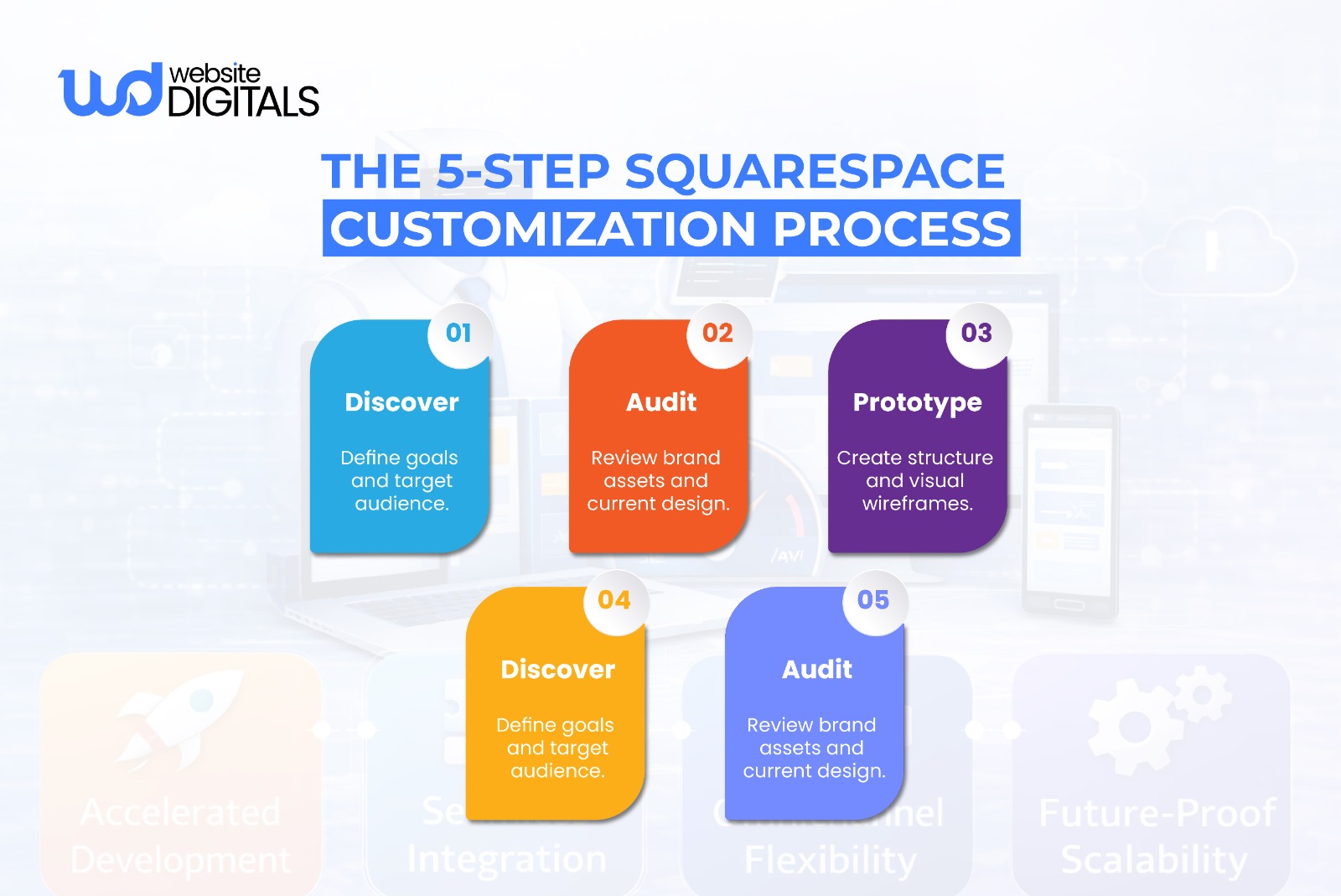
Step-by-Step Process
- Discovery Call: Define your goals, target audience, and success metrics.
- Brand and Design Audit: Review your existing visuals, tone, and content alignment.
- Template Prototype: Create wireframes to visualize the layout and flow.
- Testing and Optimization: Test across devices and browsers for a consistent experience.
- Launch and Analyze: Deploy, monitor, and refine based on real user data.
Things to Consider:
|
Before launching, ensure your site is responsive on multiple screen sizes and browsers. Verify accessibility compliance, SEO structure, and analytics tracking before going live. |
Partner with Experts Who Build for Performance and Identity
If your goal is to increase conversions and strengthen brand identity, work with professionals who specialize in Squarespace customization rather than general web design.
Look for certified experts or agencies with:
- Proven Squarespace portfolios
- Experience with Squarespace 7.1 Fluid Engine
- Strong understanding of design psychology and SEO integration
Pro Tip:
|
Ask if the agency or developer is part of the Squarespace Expert Partner Program or holds relevant certifications to ensure credibility and quality. |
Final Thoughts: Your Template Should Sell, Not Just Show
A custom Squarespace template is more than a visual upgrade. It is your brand’s voice, digital foundation, and silent salesperson working around the clock.
Your website should engage, build trust, and convert, not simply exist.
We believe every brand deserves a distinctive online identity that delivers both performance and creativity. Start your journey toward a high-converting Squarespace experience that reflects your vision and goals.
Partner with Website Digitals, where creativity meets strategy. Let our team of certified Squarespace experts craft a custom template that reflects your brand and drives measurable growth.
Call us today at (646)–222-3598 or email us at info@websitedigitals.com to start building a website that truly sells, not just shows.
FAQs
- What are the main differences between default and custom Squarespace templates?
Default templates are predesigned and limited in flexibility, offering a quick setup but minimal room for unique branding. Custom Squarespace templates, on the other hand, are tailored to your brand identity, user experience, and SEO structure, allowing for a more personalized and conversion-driven website.
- Are custom Squarespace templates worth it for mid-size businesses?
Yes, absolutely. For mid-size businesses, custom Squarespace templates enhance credibility, user trust, and conversion rates. They also provide scalability for future growth and deliver stronger ROI compared to generic templates.
- How long does it take to develop a custom Squarespace template?
The development process typically takes 3 to 6 weeks, depending on the project’s complexity, available branding assets, and testing requirements. This timeframe includes design, development, testing, and optimization phases.
- Can I still use Squarespace updates if I have a custom template?
Yes, you can. Custom templates built on Squarespace 7.1 remain fully compatible with all Squarespace updates and new features. Your site continues to benefit from the latest platform enhancements without compatibility issues.
- How do custom templates improve website conversions?
Custom templates improve conversions by streamlining user flow, placing CTAs strategically, and applying proven layout psychology. This reduces friction, builds user trust, and helps guide visitors toward specific actions such as sign-ups or purchases.
- Do I need coding knowledge to manage a custom Squarespace template?
No, you don’t. Squarespace allows you to edit content visually through its built-in editor. Developers handle the technical framework so you can manage pages, images, and text easily without any coding skills.
- Can agencies reuse one custom template across multiple clients?
Yes, agencies can reuse custom frameworks across clients using white-label or modular template structures. However, it’s important to verify licensing terms and customize branding elements for each client to maintain originality and compliance.
- What is the pricing range for custom Squarespace templates in the USA?
In the United States, custom Squarespace templates typically range from $500 to $5,000, depending on design depth, branding integration, and added functionalities. Agencies specializing in Squarespace 7.1 and Fluid Engine may charge more for advanced features or SEO-optimized builds.
- How do I choose the right designer or developer for custom Squarespace work?
Look for verified professionals with a Squarespace Expert Partner badge, a strong portfolio, and positive client testimonials. You can also check their understanding of design psychology, SEO strategy, and Fluid Engine capabilities for added assurance.
- What if I want to switch back to a default Squarespace template later?
You can switch back anytime. Your content will remain intact, but layout adjustments may be required to match the new template’s design structure. Always back up your content and visuals before making major template changes to ensure a smooth transition.