Why Headless CMS Development is Revolutionizing Web Development
A website starts small, then adds regions, landing pages, integrations, and traffic.
What once felt manageable slowly becomes harder to control.
Updates take longer, performance slips, and teams spend more time working around the CMS than improving the site.
The signs usually look like this:
- Small content changes need developer help
- Layout updates feel boxed in by templates
- Pages slow down as content grows
- Each release takes more coordination than before
These issues surface when a CMS built for simpler sites is pushed to scale.
Headless CMS development tackles the structure behind the problem by separating content management from frontend delivery, letting teams grow without tying every change to backend constraints.
Market research projects the headless CMS software market will grow from $973.8 million in 2025 to over $7.1 billion by 2035, reflecting demand for scalable content systems.
In this blog, we explain how headless CMS development works, why teams adopt it, and how it supports modern web projects at scale.
Key Takeaways
|
What Headless CMS Development Involves – Core Components
Headless CMS development is not a single tool or platform.
It is an architectural approach built around clearly separated layers that communicate through APIs.
Each layer has a defined role, which reduces friction as systems grow.
-
API Layer for Content Delivery
At the center of headless CMS development is the API layer.
Content is delivered as raw data through REST API or GraphQL, rather than being rendered as HTML by the CMS.
This allows frontend applications to request only the data they need, improving efficiency and reducing unnecessary load.
-
Frontend Application Layer
Because the CMS does not control presentation, teams have full freedom in frontend development.
Interfaces can be built using modern JavaScript frameworks and frontend frameworks, giving developers control over layout, interactions, and performance without CMS limitations.
-
Structured Content Modeling
In a headless system, content is not treated as a fixed page.
Through content modeling, information is broken into structured fields that can be reused across platforms.
Product details, descriptions, and metadata can power websites, apps, and other channels without duplication.
This structure supports multi-channel publishing, localization, and long-term content consistency.
-
Hosting and Deployment Infrastructure
A decoupled setup allows backend architecture and frontend applications to run independently.
Each layer can use the hosting environment best suited to its needs.
Updates to one layer do not require changes to the other, which simplifies deployment and reduces risk.
-
Performance and CDN Layer
Performance is built into the architecture.
Content and assets are cached through a CDN, while static site generation and server-side rendering improve page speed and reduce server strain.
This setup supports consistent performance, even during traffic spikes.
-
Third-Party Integrations and Services
Because the system is built as an API-first CMS, CMS integration with analytics tools, CRMs, ecommerce platforms, and marketing services is straightforward.
Each service focuses on a single role, keeping the overall system clean and easier to maintain.
Frontend vs CMS Roles in a Headless Architecture
In a traditional setup, the boundaries are blurred. In a headless environment, the roles are clear:
|
Feature |
CMS Responsibility (The Body) |
Frontend Responsibility (The Head) |
|
Data Storage |
Stores images, text, and metadata. |
No storage; only displays data. |
|
User Interface |
Provides the editor’s dashboard. |
Provides the end-user experience. |
|
Routing |
Manages content URLs and hierarchies. |
Handles how users navigate the site. |
|
Styling |
None (Headless). |
Manages CSS, animations, and layouts. |
|
Logic |
Validates content and permissions. |
Handles user interactions and state. |
How Headless CMS Development Changes the Web Development Process
Adopting a headless setup changes how your team actually works.
It moves from a linear, “one-step-at-a-time” process to a more flexible, side-by-side workflow.
-
Parallel Frontend and Backend Development
In traditional setups, frontend work often waits until the backend is ready.
With headless CMS development, both teams start at the same time.
Once the content structure is defined, frontend teams build the interface using sample content while backend work continues in parallel.
This overlap reduces delays and speeds up delivery.
-
Full Control Over Frontend Architecture
Developers are no longer limited by fixed templates or platform rules.
They can build layouts and interactions around real business needs, not CMS constraints.
The CMS supports the project instead of shaping it, allowing more flexible and purposeful frontend development.
-
Easier Maintenance and Future Updates
Because content and design are separate, updates are simpler.
Design changes do not affect stored content, and CMS changes do not disrupt the frontend.
If the CMS needs to be replaced later, the site does not need to be rebuilt, which lowers long-term maintenance effort.
How Headless CMS Improves Website Performance
Website performance affects search visibility and user behavior.
Headless CMS development removes common performance bottlenecks found in traditional systems.
The sections below explain where these gains come from:
-
Faster Page Load Times
With static site generation (SSG), pages are built into ready-to-serve HTML files ahead of time.
When a visitor loads a page, there is no database query or heavy processing involved.
The server simply delivers a prebuilt file, which significantly improves page speed and reduces delays caused by backend processing.
-
Reduced Server Load
In a headless setup, content is delivered through APIs and frequently cached on a CDN.
This means the content management system itself receives very little direct traffic.
Lower server strain reduces infrastructure costs and helps the site remain stable even during high traffic periods.
-
Better Core Web Vitals
Google prioritizes user experience signals such as Core Web Vitals.
Headless architectures perform well here because the frontend is lightweight and purpose-built for performance optimization.
Metrics like Largest Contentful Paint (LCP) and First Input Delay (FID) improve when unnecessary backend logic is removed from page rendering.
-
Faster Time to First Byte
Using server-side rendering (SSR) or edge caching shortens the Time to First Byte (TTFB).
Requests are handled closer to the user, reducing latency commonly found in database-driven systems.
This results in quicker initial responses and a more consistent browsing experience.
Why Headless CMS Offers More Flexibility Than Traditional Platforms
Traditional CMS platforms often define how a site should be built before teams fully understand their requirements.
Templates, plugins, and platform rules shape decisions early, making change harder as projects grow.
Headless CMS removes these constraints by separating content from presentation, giving teams room to adapt without reworking the system.
-
Frontend Framework Freedom
With a headless setup, teams are not tied to a specific frontend technology.
Developers can work with React, Vue, Next.js, or any framework that fits the project.
This flexibility removes the need to learn proprietary templating systems and allows teams to build with tools they already know.
-
Custom UI and UX Flexibility
Traditional CMS themes often limit layout and interaction options.
Headless CMS removes those limits. Designers define the experience without worrying about theme restrictions, and developers implement it exactly as planned.
This makes it easier to create interfaces that match real product requirements instead of adjusting ideas to fit a template.
-
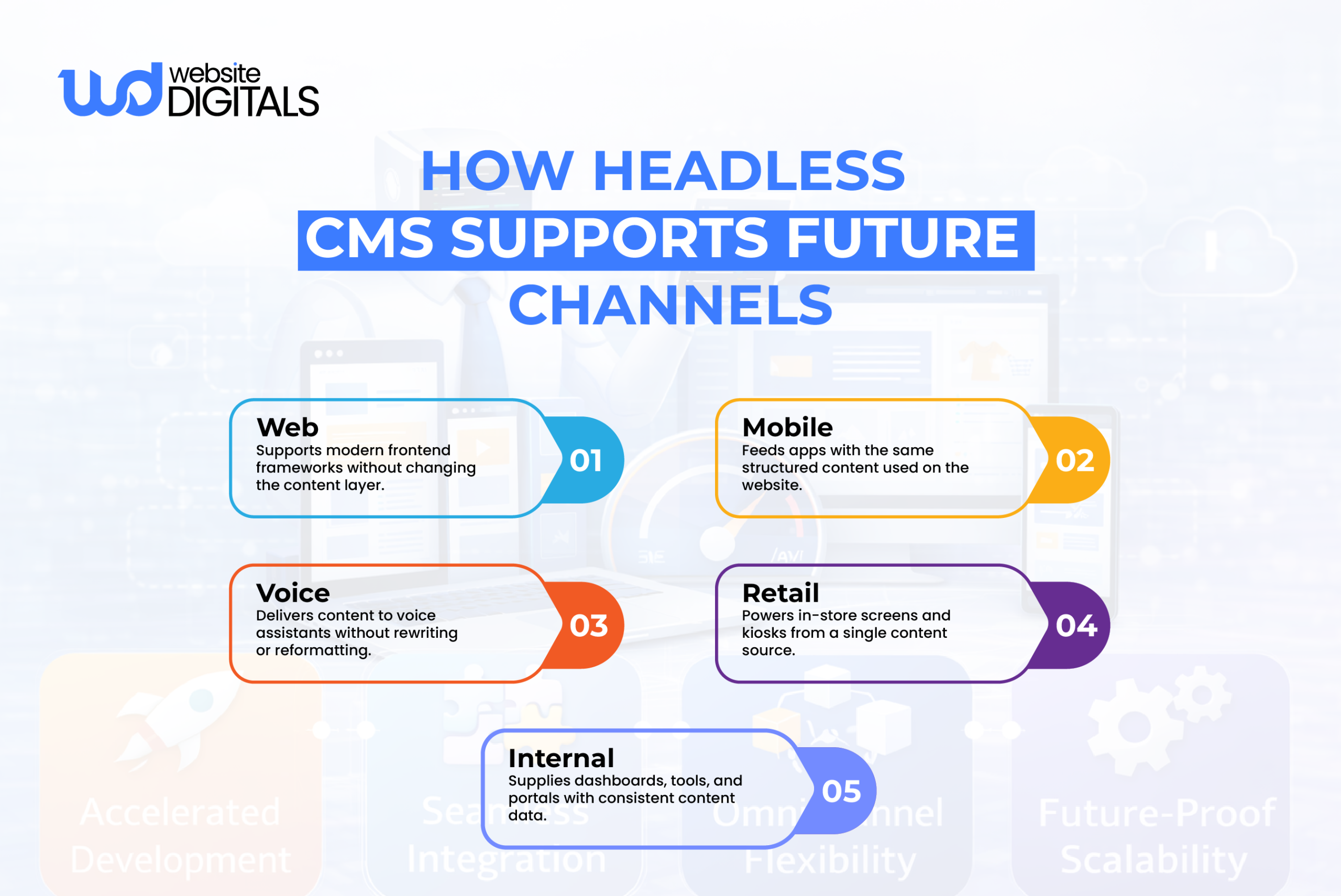
Reusable Multi-Channel Content
Headless CMS treats content as structured data, not fixed pages.
Content is created once and reused across multiple channels, such as websites, mobile apps, email campaigns, and in-store displays.
This reduces duplication and keeps messaging consistent, even as new platforms are added.
-
API-Based Integrations Without Plugins
Instead of relying on large plugin stacks, headless CMS connects services through APIs.
Search, forms, analytics, and other features are handled by dedicated tools that focus on a single job.
These services integrate cleanly, update independently, and avoid the conflicts common in plugin-heavy systems.
-
Flexible Architecture for Future Changes
As requirements change, headless architecture adapts without forcing rebuilds.
New frontends can be added, technologies can change, and new channels can be supported without altering the content layer.
This flexibility supports growth while keeping long-term maintenance manageable.
How Headless CMS Solves Content Scalability Issues
As your business grows, your content needs to grow with it.
A headless-cms-for-ecommerce or a large-scale enterprise site requires a robust foundation that can handle complexity without slowing down.
-
Structured Content for Scale
By defining a clear content architecture, you ensure that your data is machine-readable and organized.
This makes it much easier to run bulk updates or use AI tools to analyze your content library.
-
Centralized Multi-Channel Content
Instead of managing separate content for your blog, your app, and your store, multi-channel publishing allows you to manage everything from one central hub.
This ensures brand consistency across every touchpoint.
-
Simplified Localization Management
For global brands, localization is often a nightmare in traditional systems.
Headless platforms are built to handle multiple languages and regional variations of content natively, allowing editors to swap between “US-English” and “UK-English” or “French” with ease.
-
Multi-Site and Multi-Brand Support
If your organization manages multiple websites, a headless setup allows you to share content between them.
You can have one “source of truth” for your privacy policy or product specs that updates across ten different sites simultaneously.
-
Scalable Content Governance
With content governance tools, you can set strict permissions.
You can ensure that an editor in the marketing department only has access to the blog, while the product team only manages product content management fields.
Headless CMS for E-commerce Businesses
For online retailers, the stakes are even higher.
A standard storefront might not provide the unique shopping experience needed to convert visitors.
This is where cms development for ecommerce businesses shifts the needle.
By using Shopify headless or similar architectures, brands can keep the powerful backend of a platform like Shopify for payments and inventory, while building a completely custom frontend.
This allows for:
- Checkout customization that goes far beyond standard templates.
- Unique headless Shopify examples like interactive 3D product previews or personalized shopping quizzes.
- Integrating multiple data sources (like a separate PIM or ERP) into a single, cohesive storefront.
When looking for professional web development services, it is essential to partner with a team that understands how to bridge the gap between these complex systems and a high-converting user interface.
Wrapping It Up!
The move toward headless CMS development reflects how modern websites are built to scale.
Separating content from presentation helps teams maintain performance, adapt to change, and manage growing content without repeated rebuilds.
This approach supports flexible development and smoother content operations across platforms.
If you’re planning your next CMS project, the team at Website Digitals can help you evaluate the right architecture and implement it effectively.
Reach us at info@websitedigitals.com or connect through our contact us at (646)-222-3598 to discuss your CMS development needs.
FAQs
1 How does Website Digitals approach headless CMS projects?
At Website Digitals, we start by understanding your content structure, performance goals, and growth plans. From content modeling to frontend delivery, we focus on building a CMS setup that scales cleanly and fits your long-term CMS development needs.
2 Can Website Digitals help migrate from a traditional CMS to a headless one?
Yes. Website Digitals helps businesses transition from traditional CMS platforms to headless setups by restructuring content, selecting the right tools, and ensuring performance and SEO are maintained throughout the migration.
3 What is headless CMS development?
Headless CMS development is an approach where content management is separated from how content is displayed. Content is stored centrally and delivered through APIs, allowing it to be used across websites, apps, and other platforms without being tied to templates.
4 How does headless CMS development work?
Content is created and managed in a CMS, then delivered through APIs such as REST or GraphQL. Frontend applications fetch this content and control how it’s displayed, giving teams more flexibility and performance control.
5 What is the difference between headless CMS vs traditional CMS development?
Traditional CMS platforms tightly couple content and presentation, which limits flexibility and performance. Headless CMS development separates these layers, making it easier to scale content, improve speed, and support multiple channels.
6 Why use a headless CMS for web development?
Teams use headless CMS for web development to improve performance, support modern frontend frameworks, reuse content across platforms, and avoid limitations caused by themes and plugins in traditional systems.