Headless CMS vs Traditional CMS Implementation Challenges and Solutions

If your CMS slows updates, breaks with plugins, or locks you into rigid templates, it’s holding your team back.
Today’s content must reach everywhere, websites, apps, and emerging platforms.
Traditional CMS platforms weren’t built for this pace, and 84% of CMS users say their system prevents them from realizing the full value of their content.
Headless CMS offers speed and flexibility, but only when executed correctly.
In this blog, we break down Headless CMS vs Traditional CMS, the implementation challenges teams face, and how to choose the right system for long-term growth.
Key Takeaways
- Identify the core implementation differences between Headless and Traditional CMS.
- Learn about real-world migration challenges that derail enterprise projects.
- Explore practical, actionable solutions to streamline CMS implementation.
- Plus: Get the Headless CMS Implementation Checklist (Free resource).
The CMS Dilemma: Why Implementation Success Defines Digital Growth
Imagine a global retail brand managing more than twenty websites, mobile apps, and digital kiosks.
Each channel needs timely content updates, consistent branding, and fast performance.
A decade ago, a traditional CMS such as WordPress or Drupal was sufficient. Today, that is no longer the case.
According to Hygraph’s analysis referencing Gartner Research, around 60 percent of new SaaS and enterprise content solutions are expected to adopt headless or decoupled CMS architecture by 2025, reflecting the industry’s move toward greater agility and scalability.
A traditional CMS tightly couples the front end and back end. It is simple to use but fails to deliver when large-scale customization or omnichannel distribution is required.
A headless CMS, on the other hand, separates these layers and uses APIs such as REST or GraphQL to deliver content anywhere, from websites to mobile apps to smartwatches.
It sounds ideal, but a headless CMS also introduces a new set of implementation challenges.
Traditional CMS Limitations in Modern Architectures
- Tight coupling restricts scalability and innovation, especially for small enterprises exploring cms development for local businesses that need flexibility and speed.
- Limited integration with modern frameworks such as React or Next.js
- Plugin overload leads to slower performance and higher security risk
- Manual content deployment slows down agile workflows
Real-World Scenario: A global retailer using WordPress struggled to manage fifteen localized websites. Each content update required manual edits, delaying campaign rollouts. After migrating to a decoupled CMS, the company reported a 40 percent reduction in publishing time, significantly improving agility across regions. (Source: Kodekx – CTO’s Guide to Decoupled CMS)
Why Headless CMS Promises Agility (But Brings Complexity Too)
Headless CMS platforms such as Contentful, Strapi, and Sanity offer several key advantages:
- API-first flexibility for cross-platform delivery
- Seamless integration with modern front-end frameworks
- True omnichannel publishing capabilities
- Greater developer freedom to design any interface
However, implementing a headless CMS requires experienced developers, clear governance, and well-structured content models.
Without these elements, teams can quickly face confusion instead of flexibility.
Pro Tip: Start small. Launch your first channel on a headless CMS, test workflows, and expand gradually across platforms.
Deep Dive into Technical and Operational Layers
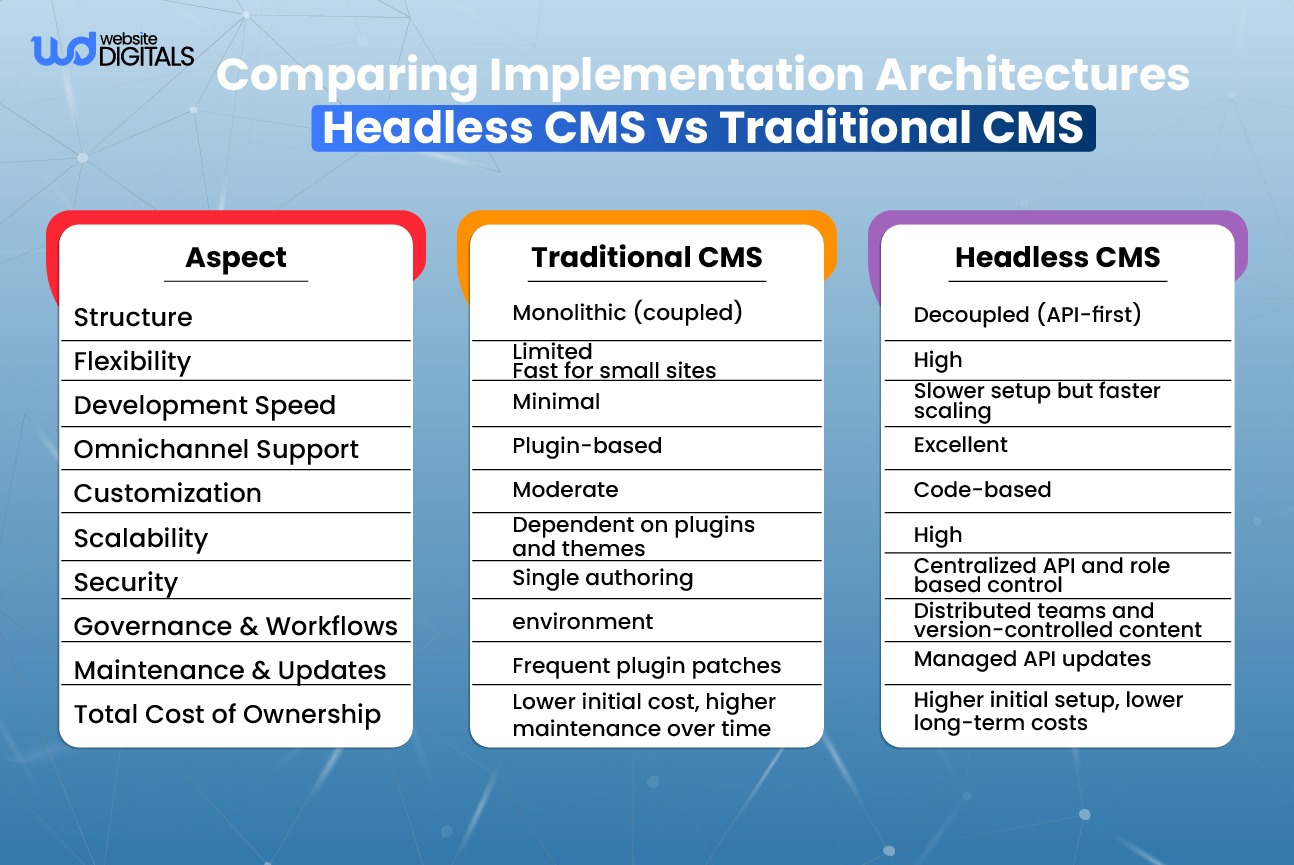
Infographic :Comparing Implementation Architectures: Headless CMS vs Traditional CMS
Architectural Overview
Traditional CMS: A traditional CMS is a single, monolithic system where front-end templates and back-end logic reside together. This architecture simplifies setup for small sites but limits flexibility for enterprises managing multiple brands, regions, or digital assets.
Headless CMS: In a headless CMS, content is stored centrally and distributed via APIs such as REST or GraphQL to any channel web, mobile, IoT, or smart devices. This model supports modern frameworks like React, Vue.js, and Next.js, making it an integral part of modern web development, ensuring scalability and speed.
Snippet Definition (for AEO): A headless CMS is an API-first platform that separates content management from presentation, enabling flexible, omnichannel delivery across devices.
Content Delivery Workflows
Traditional CMS: Operates in a linear publishing model where a content editor writes, saves, and publishes within one platform. This approach offers simplicity but lacks flexibility for multi-channel distribution.
Headless CMS: Content is created once and delivered anywhere websites, apps, and kiosks through content delivery APIs that power modern next.js cms front-end architectures. This decoupling supports consistent branding and faster campaign rollout across multiple channels.
Body Image Suggestion:
🖼️ Insert image showing a “multi-channel content flow powered by an API-based CMS.”
(Alt text: “Diagram showing centralized content repository distributing to multiple digital channels.”)
Integration Ecosystems
- Headless CMS: Uses REST or GraphQL APIs to integrate with CRMs, marketing-automation tools, analytics platforms, and front-end frameworks like headless cms react for seamless UI development.
- Traditional CMS: Often relies on plugins and themes, which can introduce maintenance overhead, version conflicts, and performance degradation.
- Enterprise Integration: A headless CMS connects seamlessly to CI/CD pipelines, supporting continuous deployment and faster content synchronization.
Bonus Point: A headless CMS opens the door to future-ready digital experiences such as AR, VR, smart displays, and voice interfaces, helping brands stay adaptable as new channels emerge.
Things to Consider: While integration flexibility is a major advantage, API orchestration and governance require skilled teams and clear documentation to avoid technical debt.
Understanding the Real Implementation Challenges
Implementation Challenges with Headless CMS
- Complex Setup and Developer Expertise Required: A headless CMS requires experienced developers to design APIs, structure content models, and manage version control systems effectively. Without technical proficiency, implementation can become time-consuming and error-prone.
- Integration Overhead Across APIs and Microservices: Integrating multiple APIs for analytics, personalization, and localization increases documentation and testing workload. This can lead to higher maintenance costs if not supported by strong DevOps practices.
- Governance, Workflow, and Versioning Gaps: In the absence of well-defined governance frameworks, collaboration between development and content teams can break down. Versioning conflicts and approval delays often occur when roles and permissions are not clearly established.
- Higher Initial Costs and Team Reliance: Setting up infrastructure, building custom integrations, and onboarding teams require more upfront investment. However, these costs deliver long-term ROI through scalability, faster deployments, and omnichannel agility.
Things to Consider:
- Train non-technical users early to build comfort with new workflows.
- Maintain comprehensive documentation to ensure continuity.
- Use SDKs and integration kits provided by vendors such as Contentful, Strapi, or Sanity for faster development.
Implementation Challenges with Traditional CMS
- Limited capability to deliver omnichannel experiences
- Slower load times during high-traffic periods due to plugin-heavy architectures
- Security vulnerabilities from outdated or unmaintained plugins
- Plugin conflicts and manual update cycles causing downtime
Solutions to Headless CMS Implementation Challenges
- Begin with a phased migration strategy, start small using a hybrid (decoupled) model.
- Follow content modeling best practices to ensure scalable structures.
- Choose developer-friendly CMS platforms such as Strapi, Hygraph, or Sanity for smoother onboarding.
- Implement CI/CD automation pipelines to streamline testing and deployment.
- Establish centralized governance using clear roles, permissions, and approval flows.
Bonus Tip: Use AI-driven workflows to automate tagging, translation, and publishing cycles, improving efficiency for distributed teams.
How to Optimize Traditional CMS Implementations
You do not always need to abandon your existing CMS. In many cases, optimizing it can deliver excellent results.
Optimization Tips:
- Add caching layers and CDNs to improve performance under load.
- Automate plugin updates, testing, and backups to minimize risk.
- Explore hybrid CMS options like Kentico or Sitecore for added flexibility.
Note: Legacy does not mean obsolete. A well-optimized traditional CMS can still deliver high ROI with the right infrastructure and governance strategy.
Decision Framework: Choosing the Right CMS for Your Enterprise
|
Factor |
Traditional CMS |
Headless CMS |
|
Flexibility |
Low |
High |
|
Scalability |
Moderate |
Excellent |
|
Security |
Moderate |
High |
|
Speed of Deployment |
Fast initial setup |
Slower setup, faster scaling |
|
Maintenance |
Frequent manual updates |
Automated pipelines |
|
Governance and Compliance |
Basic role management |
Advanced RBAC and version control |
|
Integration Complexity |
Plugin-based |
API-based microservices |
|
Cost (Initial vs Long-term) |
Lower upfront, higher ongoing costs |
Higher upfront, better long-term ROI |
Drive Engagement and Conversion
- Traditional CMS: Best for smaller websites and faster initial setup but limited in flexibility for scaling and integration.
- Headless CMS: Ideal for enterprises pursuing omnichannel growth and long-term scalability.
- Hybrid Models: Provide a balanced approach, allowing gradual transformation without disrupting current operations.
Your CMS is not just a back end; it is the foundation of your digital experience.
Choose a model that can evolve with your business and remain adaptable to future technologies.
Download the Complete Headless CMS Implementation Guide
Transform your digital experience architecture today.
Get your free guide and checklist to evaluate, plan, and execute a seamless Headless CMS migration.
Disclaimer:
This article is intended for educational and professional guidance only.
Results and suitability may vary depending on your organization’s goals, budget, and technical capacity.
Conclusion
The CMS landscape is evolving rapidly.
The debate between Headless CMS vs Traditional CMS is not about which one is universally better, but about which aligns best with your organization’s vision, agility needs, and scalability goals.
For enterprises preparing for their next digital transformation, Website Digitals recommends adopting a hybrid, scalable content strategy that blends flexibility with control.
The best CMS is the one that grows with you empowering your teams to deliver faster, smarter, and consistently across every channel.
Let’s talk about how we can streamline your transformation journey.
Call us at (646)-222-3598 or email info@websitedigitals.com, your next-generation content strategy starts today.
Frequently Asked Questions (FAQs)
1. What are the main implementation challenges of a Headless CMS?
The biggest challenges include initial setup complexity, developer training, content modeling, and managing multiple API integrations across systems. Organizations must also establish clear governance and version control workflows to ensure smooth collaboration between developers and content teams.
2. Can a Traditional CMS be converted into a Headless system?
Yes, many traditional CMS platforms such as WordPress and Drupal now offer decoupled or hybrid CMS options. This enables you to separate the front end and deliver content through REST or GraphQL APIs without rebuilding your entire infrastructure.
3. Which CMS model is more secure: Headless or Traditional?
A Headless CMS generally provides stronger security since the front end is separated from the back end, reducing exposure to common web vulnerabilities. However, true security depends on implementation practices, API management, and regular updates not solely on the architecture type.
4. How long does Headless CMS implementation take?
Implementation typically takes 8–16 weeks, depending on your project’s scale, integrations, and team size. For enterprise-grade migrations involving multiple channels and automation workflows, timelines can extend further.
5. What’s the cost difference between Headless and Traditional CMS?
A Traditional CMS is generally more affordable at the start but incurs higher maintenance costs over time due to plugin updates and limited scalability. A Headless CMS, while more expensive initially, delivers better long-term ROI through flexibility, performance, and reduced downtime.
6. Do Headless CMS platforms support non-technical content editors?
Yes. Modern headless CMS platforms such as Storyblok, Sanity Studio, and Hygraph now include visual editing interfaces and drag-and-drop content modeling. However, usability varies by platform, so proper training and configuration remain important.
7. What are Hybrid CMS solutions, and how do they combine both models?
Hybrid CMS solutions bridge the gap between traditional and headless models. They allow marketers to use familiar WYSIWYG interfaces while enabling developers to deliver content via APIs. Popular hybrid CMS options include Kentico Xperience, Sitecore, and Adobe Experience Manager (AEM).
8. Which Headless CMS platforms are best for enterprise scalability?
For enterprise-grade scalability, Contentful, Strapi, and Hygraph (GraphCMS) are among the most trusted options. These platforms provide robust APIs, global CDN delivery, granular permission controls, and seamless integration with CI/CD pipelines.
9. Is a Headless CMS suitable for eCommerce platforms?
Yes, a Headless CMS is ideal for eCommerce. It supports omnichannel product delivery, headless checkout, PWA integrations, and personalized content experiences. Brands can unify web, app, and marketplace content while maintaining fast, secure transactions.
10. What skills do teams need for a successful Headless CMS implementation?
Teams should have expertise in JavaScript frameworks (React, Next.js, Vue.js), API management (REST and GraphQL), and DevOps automation. Strong content modeling skills and documentation discipline are also critical for long-term scalability and governance.