How to Increase WordPress Website fast for Better User Experience and SEO
Have you ever clicked on a website and found yourself waiting… and waiting… until you gave up?
Now imagine that same frustration driving your visitors away, potential customers who leave before even seeing your content or products.
That is the real cost of a slow-loading WordPress website. Every extra second your pages take to load means higher bounce rates, lower rankings, and missed sales opportunities.
For e-commerce stores and corporate websites, that delay does not just hurt user experience. It directly affects your revenue and brand perception.
Speed has become a critical factor for both SEO and UX performance, making optimization a business necessity, not just a technical enhancement.
If you have ever wondered how to increase WordPress website speed and turn those seconds of lag into faster conversions and happier users, this guide is for you.
It is not a generic “tech tips” list. It is a clear, actionable roadmap to transform your site into a high-speed, conversion-optimized digital experience that search engines and visitors will appreciate.
“Fast websites make happy users.” — Steve Souders, web performance expert.
Key Takeaways
- Faster WordPress websites improve SEO rankings, user engagement, and conversion rates.
- Optimization combines technical fine-tuning with efficient content delivery.
- Tools like Lighthouse, GTmetrix, and Cloudflare CDN help analyze and monitor performance.
- A well-balanced mix of hosting, caching, and optimization plugins can cut load times significantly, boosting user satisfaction and ROI.
The Cost of a Slow WordPress Website
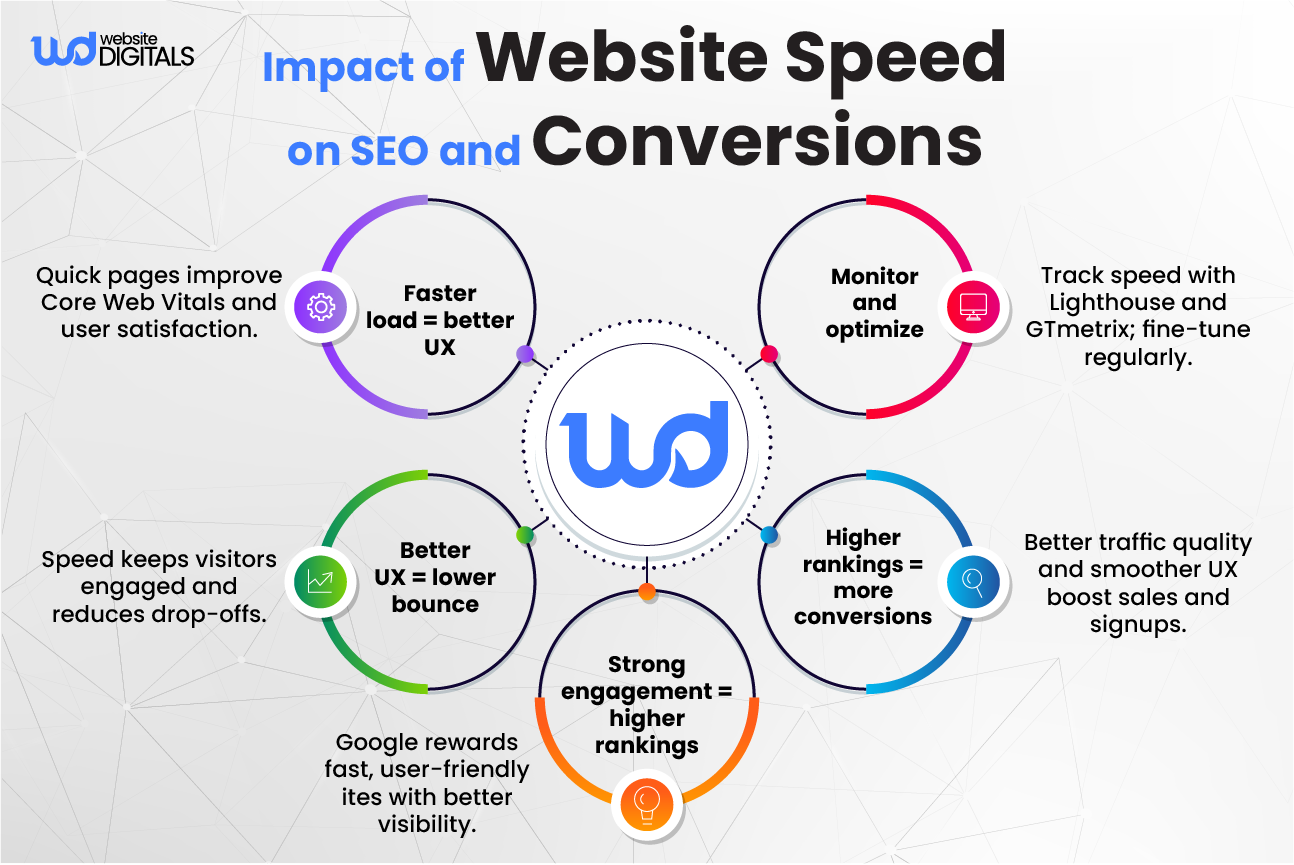
Nothing kills user attention faster than a slow, spinning loader. When your WordPress site lags, visitors click away before your content even has a chance to load.
A slow WordPress website doesn’t just frustrate users; it reflects poor web development practices that damage credibility, search performance, and ultimately revenue. Let’s look at how this slowdown affects your business from three critical angles: user trust, SEO, and sales performance.
How Page Load Time Impacts Conversions and Bounce Rate
|
Page Load Time (Seconds) |
Average Bounce Rate |
Conversion Impact |
|
1s |
~10% |
Optimal performance |
|
3s |
~32% |
Slight drop in conversions |
|
5s |
~90% |
Significant user loss |
|
6s+ |
100%+ higher bounce |
Major sales impact |
What Happens When Your Website Is Slow
User Abandonment and Lost Trust
Visitors don’t just leave slow sites; they lose confidence in the brand behind them. In today’s digital marketplace, speed equals credibility. A fast-loading website feels more professional and trustworthy, while a lagging one gives the impression of neglect or instability.
Things to Consider: Always test how your website loads across multiple devices and networks to ensure consistent performance.
SEO and Google Rankings Drop
Since Google rolled out its Core Web Vitals framework, site speed and interactivity have become measurable ranking factors.
The key metrics now include Largest Contentful Paint (LCP), Interaction to Next Paint (INP), and Cumulative Layout Shift (CLS). Poor results on these metrics signal a bad user experience, making it harder to rank competitively.
Note: A PageSpeed Insights score alone doesn’t determine ranking; the field data from real users in Google Search Console does.
Pro Tip: Run monthly Lighthouse audits to identify slow-loading assets and prevent performance regressions.
Revenue Leakage in E-Commerce
For e-commerce businesses, even small slowdowns during checkout can translate into lost revenue. If your site takes several extra seconds to load, potential buyers often abandon their carts.
Optimizing your server response time (Time to First Byte, or TTFB), improving caching, and reducing render-blocking scripts can make a measurable difference in conversion rates and customer retention.
|
Real-World Scenario: A mid-sized fashion retailer reduced its page load time from 6s to 2s after implementing Cloudflare CDN and WP Rocket caching. The result was a 27% increase in sales conversions and a noticeable drop in bounce rate. |
Bonus Tip: Review your Core Web Vitals report in Google Search Console for both mobile and desktop data. Address issues where load time exceeds two seconds or where layout shifts disrupt user flow.
Understanding the Core Factors Behind Slow WordPress Sites
If your WordPress website feels sluggish, understanding the root causes is the first step toward optimizing it for speed and performance.
Several technical and structural factors can slow down your site, from hosting limitations to bloated plugins and outdated code. Let’s explore the most common culprits and how to fix them.
Cheap shared hosting divides resources among hundreds of websites, which often results in high Time to First Byte (TTFB) and slower page response times.
When your site competes for limited bandwidth and CPU, it struggles to deliver pages quickly, especially during peak traffic periods.
Recommendation: Consider upgrading to dedicated or managed WordPress hosting for better scalability and reliability.
WP Engine (Managed WordPress Hosting) Managed hosts provide optimized environments with built-in caching and automatic updates that can significantly improve stability and speed.
Pro Tip: Choose a hosting provider that offers built-in support for PHP 8+, HTTP/2 or HTTP/3, and server-level caching.
2. Plugin and Theme Bloat
Having too many plugins or one poorly coded theme can severely slow down your WordPress site. Every plugin loads scripts and styles that add to your total page size and increase Interaction to Next Paint (INP) delays.
Recommendation: Regularly audit your plugins using Query Monitor or similar tools. Remove unused or overlapping plugins and always opt for lightweight themes such as GeneratePress or Astra for optimal performance.
Bonus Tip: After every major update, test your site speed using GTmetrix or Google PageSpeed Insights to ensure the new code does not introduce latency.
3. Unoptimized Images and Media
Images often account for 60–70% of a page’s total load size. (Web Image Formats: Assessment of Their Real-World-Usage and Performance across Popular Web Browsers, 2023) Large, uncompressed media files can dramatically affect your Largest Contentful Paint (LCP) and slow initial rendering.
Recommendation: Use image optimization tools like Smush, ShortPixel, or Imagify to compress files without sacrificing quality. Convert images to WebP format for next-generation performance and faster delivery.
Pro Tip: Enable lazy loading so images load only when users scroll to them, reducing initial load time and server stress.
4. Lack of Caching and CDN Integration
Without caching or a Content Delivery Network (CDN), your site rebuilds pages for every visitor, consuming server resources and increasing latency.
Caching stores copies of static files, while CDNs deliver them from servers closest to the user, reducing distance and load time.
Recommendation: Use proven tools like WP Rocket, LiteSpeed Cache, or Cloudflare CDN to enhance both speed and reliability.
Key Insight: Caching improves repeat visits and overall Core Web Vitals performance, particularly for mobile users.
5. Outdated PHP or WordPress Core
Running old versions of PHP or WordPress Core not only slows down your website but also increases security vulnerabilities. Older codebases often lack compatibility with newer optimization features and caching mechanisms.
Recommendation: Keep your WordPress Core and PHP version updated (preferably PHP 8.1 or higher).
Always back up your site before updating and testing new configurations in a staging environment to prevent compatibility issues.
Note: Avoid using nulled plugins or themes. They often contain malware, outdated code, or security vulnerabilities that can further degrade performance.
Proven Strategies to Make Your WordPress Website Lightning Fast
Here is your step-by-step roadmap on how to make website on WordPress perform faster and deliver a smooth, high-performance user experience.
Each step focuses on actionable improvements that enhance both Core Web Vitals and overall site performance, Each step focuses on actionable improvements that enhance both Core Web Vitals and overall site performance, offering the easiest way to build a WordPress website that’s fast, stable, and SEO-ready.
Step 1: Optimize Hosting and Server Configuration
Your hosting environment forms the foundation of your website’s speed.
Move to managed WordPress hosting from providers such as WP Engine, Kinsta, or SiteGround Cloud for optimized performance and reliability.
Enable HTTP/3, TLS 1.3, and object caching (Redis or Memcached) for faster data delivery and better scalability.
Pro Tip: Test your server speed using Bitcatcha or Pingdom Tools before finalizing your host. Always create a backup and test changes in a staging environment before deployment.
Step 2: Implement Caching for Instant Gains
Caching stores pre-rendered pages and assets, reducing server load and delivering instant speed improvements.
Recommended plugins include WP Rocket, W3 Total Cache, and LiteSpeed Cache.
Use only one caching plugin at a time to avoid conflicts and ensure stability.
Pro Tip: Pair caching with server-side configurations for the best LCP and INP improvements.
Choosing the best WordPress caching plugin for speed can make your site load twice as fast.
Step 3: Use a Global CDN (Content Delivery Network)
A Content Delivery Network (CDN) distributes your website’s static files across global servers so users load content from the nearest location.
Top options include Cloudflare, BunnyCDN, and StackPath. BunnyCDN is especially effective for smaller sites that need cost-efficient global caching with minimal setup.
Turn on Brotli compression and enable caching for static assets to minimize latency.
Note: Be cautious when using “Cache Everything.” Avoid caching checkout or logged-in pages on e-commerce sites.
Pro Tip: A CDN can improve your Largest Contentful Paint (LCP) and reduce bandwidth costs for international users.
Step 4: Compress and Lazy Load Media
Images and videos are often the largest contributors to page weight. Use tools like ShortPixel, Smush, or EWWW Image Optimizer to compress files without losing quality.
Enable lazy loading using native HTML or a plugin so images load only when visible in the viewport.
Convert images to the WebP format for next-generation performance.
Bonus Point: Avoid autoplay background videos. They increase First Contentful Paint (FCP) and distract from the main user journey.
Step 5: Minify and Combine CSS and JS Files
Excess CSS and JavaScript files can block rendering and delay interactivity. Use Autoptimize or WP Rocket to minify and defer non-critical CSS and JS files.
This step reduces render-blocking resources and improves Interaction to Next Paint (INP).
Key Insight: Always test each change with Google Lighthouse to ensure scripts and layouts remain functional. If you’ve ever wondered how to make your WordPress site faster through code optimization, this step delivers the most immediate, visible results.
Step 6: Optimize Database and Reduce Queries
Over time, WordPress databases accumulate unnecessary data such as post revisions, spam comments, and expired transients.
Use WP-Optimize or Advanced Database Cleaner to schedule regular cleanups and reduce SQL query load.
Set automatic weekly maintenance tasks to keep your site lean and responsive.
Pro Tip: Efficient database optimization improves backend performance and reduces Time to First Byte (TTFB).
Step 7: Monitor and Maintain Performance
Website optimization is an ongoing process. Regular monitoring helps you stay ahead of regressions.
Use tools such as GTmetrix, Google Lighthouse, web.dev, and UptimeRobot to track real-world performance data.
Automate monthly speed reports for clients or internal reviews to maintain accountability.
Use Google Search Console’s Core Web Vitals Monitoring Dashboard to track LCP, INP, and CLS trends.
Pro Tip: Continuous tracking builds long-term SEO resilience and supports Google’s quality guidelines. For global enterprises, pairing Lighthouse data with BunnyCDN analytics can provide deeper insights into geographic speed variations and user experience trends.
Advanced Optimization Tips for Enterprises and E-Commerce
Larger websites require more advanced infrastructure and proactive monitoring.
- Deploy Headless WordPress for scalability and faster front-end rendering.
- Integrate Redis or Memcached for high-performance object caching.
- Implement Real User Monitoring (RUM) to measure live user experience.
- Meet Google’s Core Web Vitals benchmarks: LCP ≤ 2.5s, INP ≤ 200ms, CLS ≤ 0.1.
- Use an enterprise CDN with Edge Caching and DDoS protection, such as Cloudflare Enterprise, for enhanced global delivery.
Transform Your Website with Professional WordPress Speed Optimization Services
It’s time to take action and turn your WordPress website into a high-performing digital asset.
Partnering with an expert WordPress fintech website development agency like Website Digitals saves countless hours of trial and error while ensuring measurable performance improvements and compliance with Core Web Vitals.
Why Partner with a Professional Optimization Agency
- Gain access to enterprise-grade tools such as GTmetrix Pro and WebPageTest for accurate diagnostics.
- Work with specialists who understand complex plugin interactions, database optimization, and hosting configurations.
- Receive verified SEO performance reports and transparent before-and-after benchmarks.
Pro Tip: Always request detailed speed reports after optimization. They help validate improvements in Core Web Vitals and overall page performance.
What You Get with Our Optimization Service
- Comprehensive Site Speed Audit and Diagnostics: Identify the root causes of slow performance using real-time and lab data from Google Lighthouse and GTmetrix.
- Core Web Vitals Optimization (LCP/INP/CLS): Improve your site’s loading, interactivity, and stability to meet Google’s ranking standards.
- Plugin and Theme Code Review and Cleanup: Eliminate bloat, remove conflicting plugins, and ensure your theme follows coding best practices.
- CDN and Caching Implementation: Set up global Content Delivery Networks and caching systems for faster delivery and reduced server strain.
- Performance Monitoring and Reporting: Receive ongoing reports that track uptime, response times, and real-user experience metrics.
Note: All optimizations are non-destructive, preserving your theme integrity and existing SEO structure.
Example Tools and Partners:
- Hosting: WP Engine
- CDN: Cloudflare
- Caching: WP Rocket
Results You Can Expect
- Professional WordPress speed optimization services significantly boost SEO rankings, user engagement, and conversion rates.
- Continuous monitoring and maintenance ensure long-term performance stability.
- Expert-led optimization delivers a faster return on investment (ROI) than DIY approaches.
- Optimization blends three pillars of success: Speed + SEO + Conversions.
Pro Tip: Add structured data such as FAQ and HowTo Schema to improve search visibility and earn rich results in Google SERPs.
Ready to Boost Your Site’s Performance?
It’s the perfect time to take control of your WordPress website speed.
Partner with Website Digitals, your trusted WordPress performance optimization agency, and get a free WordPress speed audit that includes a detailed performance report, personalized recommendations, and a Core Web Vitals action plan tailored to your site.
Request Your Free WordPress Speed Audit Now.
Our team will help you identify performance bottlenecks, implement proven solutions, and deliver measurable improvements in both speed and SEO rankings.
A faster site doesn’t just rank higher, it converts better and builds lasting user trust.
Don’t let slow load times cost you customers or revenue. Let the experts at Website Digitals show you how our WordPress speed optimization services can transform your site’s performance and ROI.
Disclaimer: Results may vary depending on your current hosting environment, plugin setup, and overall website configuration.
Conclusion: Speed Is the New Standard for Success
In today’s digital world, every second shapes perception, engagement, and profit. A lightning-fast WordPress website builds trust, enhances SEO, and drives higher conversions.
With the right strategy and professional guidance, you can transform your website into a high-performing digital asset. Speed optimization isn’t just a technical fix; it’s a growth investment that defines long-term online success. That’s where professional WordPress performance optimization services make the difference, turning slow, underperforming websites into fast, reliable, and conversion-driven platforms.
Take the first step toward a faster, more profitable online presence. Call us today at (646) 222-3598 or email us at info@websitedigitals.com to schedule your free WordPress Speed Audit. Let’s make your site faster, stronger, and ready for growth because every click deserves speed.
Frequently Asked Questions:
What is a good loading time for a WordPress website?
A loading time of under 2 seconds is ideal for most websites, while e-commerce platforms should aim for under 1 second to reduce cart abandonment and improve conversions.
How does website speed affect SEO rankings?
Website speed directly impacts SEO because Google uses Core Web Vitals as a ranking factor. Metrics such as Largest Contentful Paint (LCP), Interaction to Next Paint (INP), and Cumulative Layout Shift (CLS) measure how fast, responsive, and stable your pages are. A fast-loading, stable site improves both user experience and search visibility.
Which is the best WordPress caching plugin?
Top-performing caching plugins include WP Rocket, LiteSpeed Cache, and W3 Total Cache. Each provides excellent speed optimization features, but it’s best to use only one caching plugin at a time to prevent configuration conflicts and ensure stable performance.
Can image optimization alone speed up my site?
Image optimization helps significantly, but it should be paired with caching, lazy loading, and a Content Delivery Network (CDN) for maximum results. This combination ensures faster load times, better Core Web Vitals scores, and a smoother browsing experience across devices.
Do I need a developer for WordPress speed optimization?
Not always. Simple tasks such as image compression, plugin cleanup, and caching can be handled through user-friendly plugins. However, enterprise-level or complex websites with heavy traffic, advanced themes, or custom code usually benefit from the expertise of a professional developer or optimization agency.
How often should I test my site speed?
You should test your website speed after every major update or plugin installation, and ideally once a month, to monitor ongoing performance. Regular testing helps you identify issues early, track Core Web Vitals changes, and maintain consistent site speed.
What’s included in a professional optimization service?
A professional WordPress speed optimization service typically includes a detailed site audit, Core Web Vitals optimization (LCP, INP, CLS), plugin and theme cleanup, CDN and caching setup, database optimization, and continuous performance monitoring. Working with a trusted optimization agency like Website Digitals ensures your website remains fast, secure, and SEO-ready.