How to Secure Your WordPress Website from Cyber Threats and Data Breaches
You log into your WordPress dashboard on a Monday morning, coffee in hand, ready to check performance metrics, only to find your homepage replaced with a hacker’s banner. Client messages are piling up, and your analytics flatlined overnight.
It sounds like a nightmare, but for thousands of businesses, it is a very real scenario.
With over 43.2% of the web powered by WordPress (W3Techs, 2025), this flexible CMS has become a favorite target for automated attacks. Studies reveal that around 90,000 WordPress sites face intrusion attempts every minute, ranging from brute-force logins to silent data leaks that linger unnoticed for months.
We have helped enterprises and digital agencies recover from ransomware infections, plugin vulnerabilities, and data breaches. But recovery should not be your first step; prevention should be.
In this guide, you will learn how to secure WordPress website from cyber threats and data breaches using the AIDA framework to move from awareness to action and build a website that is resilient, compliant, and trusted.
“Security is not a product, but a process.” – Bruce Schneier
Key Takeaways
- Identify the hidden vulnerabilities that make WordPress sites easy targets.
- Learn proven, modern WordPress security best practices to strengthen your defenses.
- Understand the real business and reputational impact of weak defenses.
- Discover why managed WordPress security services outperform DIY fixes.
Is Your WordPress Site Truly Safe? The Hidden Dangers Lurking Behind Every Login
Many business owners believe that installing an SSL certificate and a few security plugins is enough to stay safe online.
That’s a dangerous assumption.
Even with these basic measures, your WordPress site remains exposed to brute-force login attempts, plugin vulnerabilities, SQL injections, and malware. According to IBM’s Cost of a Data Breach Report 2024, the global average cost of a data breach has reached USD 4.88 million, marking the largest year-over-year increase in a decade
For corporate enterprises handling sensitive data, a single breach can result in reputation loss, regulatory penalties, and operational downtime.
For digital agencies managing multiple client websites, one compromised plugin can multiply that impact across every installation.
Pro Tip: Run a free malware scan using trusted tools such as Sucuri or Wordfence to detect hidden threats before they escalate.
Note: SSL encrypts data in transit but cannot prevent hackers from exploiting outdated plugins, weak passwords, or misconfigured settings.
Real-World Scenario: The $50,000 Overnight Breach
A mid-sized digital marketing and web development agency managing 15 client WordPress sites was attacked after an outdated contact form plugin was exploited. Hackers injected malware that sent spam from every site and exposed client credentials.
Impact:
- 48 hours of website downtime
- Severe SEO ranking drop
- $50,000 spent on cleanup and recovery
- Damaged client relationships and lost trust
After migrating to managed WordPress hosting with continuous monitoring and proactive patching, the agency reported no security incidents for over 12 months.
Key Insight: A majority of WordPress security breaches originate from third-party plugins rather than the core platform. Always keep your extensions updated or replace unmaintained ones with secure alternatives.
Why WordPress Websites Are Prime Targets for Hackers
WordPress powers over 43% of all websites, making it a favorite target for attackers.
Its open-source nature encourages innovation, but it also opens doors to risks, with millions of plugins and themes created by developers of varying expertise. When those tools go unmaintained, they become an easy gateway for exploitation.
Choosing the best themes for WordPress websites that are regularly updated and well-coded can significantly reduce your exposure to security risks.
The Popularity Paradox
Hackers are drawn to WordPress for the same reason businesses love it: it’s popular, flexible, and easy to customize. This widespread adoption means cybercriminals can automate attacks across thousands of sites at once.
Automated bots constantly scan the internet, searching for known vulnerabilities in outdated WordPress versions, plugins, and themes, striking wherever security gaps remain.
Common Vulnerabilities You Might Be Ignoring
- Outdated plugins or themes
- Weak or reused admin credentials
- Shared hosting with poor isolation
- Lack of Two-Factor Authentication (2FA)
- Incorrect file and directory permissions
Each of these can serve as an entry point for attackers. Many breaches occur simply because sites fail to apply updates or restrict access properly.
The Real Cost of a Breach
- Data theft and operational disruption
- Brand and reputation damage
- Loss of leads and conversions
- SEO penalties and blacklisting
- Non-compliance with GDPR or PCI DSS regulations
Bonus Tip: Enable automatic updates for minor WordPress releases and schedule monthly manual security audits. This small habit can prevent the most common forms of exploitation and help prevent WordPress hacks before they happen.
Top Cyber Threats Facing WordPress in 2025
The cyber threat landscape continues to evolve rapidly. Understanding what you’re up against is the first step in learning how to secure your WordPress website effectively.
1. Brute-Force Attacks
Automated bots try thousands of password combinations in minutes to gain admin access.
How to reduce risk: Enforce strong passwords, enable 2FA, and limit login attempts with tools like Wordfence.
2. SQL Injection and XSS Exploits
Attackers inject malicious code into vulnerable forms or URLs to access databases or hijack sessions.
How to reduce risk: Validate all input fields, sanitize user data, and update or replace unsupported plugins.
3. Malware Injections and Backdoors
Hidden malware can steal data, install tracking scripts, or redirect visitors to phishing pages.
How to reduce risk: Deploy a Web Application Firewall (WAF) such as Cloudflare or Sucuri, and run weekly malware scans.
4. Phishing and SEO Spam
Compromised sites are often used for phishing campaigns or spam content, hurting search rankings and brand trust.
How to reduce risk: Monitor for unusual outbound links and keep backups isolated from live servers.
5. Hosting-Level Vulnerabilities
Unpatched PHP versions, weak server configurations, or shared hosting environments can expose your database.
How to reduce risk: Choose managed WordPress hosting with server hardening and regular security audits.
Things to Consider: Always maintain a staging environment for testing plugin and theme updates before deploying them to your live site.
Disclaimer: Even the most secure hosting cannot fully protect your site if your WordPress core, themes, and plugins are outdated. Continuous maintenance and following WordPress website security best practices are non-negotiable.
Proven Strategies to Secure Your WordPress Website
Let’s turn strategy into action. Below is a structured approach to help you build a strong and reliable WordPress security checklist that protects your business against evolving cyber threats.
Working with an experienced WordPress B2B website development company can simplify these processes, ensuring every layer of your website from design to deployment follows security best practices.
1. Harden Your WordPress Core Configuration
Start with the basics: secure your foundation before focusing on advanced tools because understanding how to improve SEO for WordPress websites begins with strong technical security.
- Keep your WordPress core, plugins, and themes updated at all times.
- Restrict or disable XML-RPC if not required by specific services.
- Change the database table prefix from “wp_” to a unique identifier.
- Set proper file and folder permissions (follow WordPress.org recommendations).
- Use an SSL/TLS certificate and enforce HTTPS sitewide.
Pro Tip: Rename the default login URL (wp-login.php) to a custom one to reduce automated brute-force attempts. This won’t replace strong passwords and 2FA but can deter basic bots.
2. Strengthen Authentication and Access Controls
Weak credentials remain one of the easiest ways for hackers to compromise your site.
- Implement Two-Factor Authentication (2FA) using tools like Google Authenticator or Authy.
- Enforce strong password policies for all user roles.
- Limit login attempts per IP address.
- Assign roles using the principle of least privilege, ensuring only essential users have admin rights.
Things to Consider: For corporate or agency environments, restrict admin logins to whitelisted IPs or VPN-secured networks to prevent unauthorized access.
3. Deploy a Web Application Firewall (WAF)
A Web Application Firewall acts as your first layer of defense, filtering and blocking malicious traffic before it reaches your server.
- Recommended tools: Wordfence, Cloudflare, and Sucuri.
- Enable both filtering and country-based restrictions if applicable.
- Combine your WAF with real-time malware scanning for maximum protection.
Bonus Point: Review WAF logs regularly to detect suspicious IPs and reinforce WordPress protection services.
4. Secure Hosting and Server-Level Defenses
Your hosting provider plays a critical role in your security posture. Weak infrastructure can undermine even the best site-level defenses.
- Choose secure WordPress hosting solutions with built-in malware scanning, DDoS protection, and daily backups.
- Enable DDoS protection and server firewalls.
- Verify that hosting includes malware scanning and intrusion detection.
- Ensure backup encryption and isolated environments for client sites.
Note: Avoid hosting multiple client websites within a single cPanel account. If one site is compromised, the others become vulnerable as well.
5. Regular Security Audits and Backups
Security is an ongoing process, not a one-time setup.
- Run vulnerability scans quarterly or after major updates.
- Maintain at least 30 days of verified backups following the 3-2-1 backup rule (3 copies, 2 formats, 1 offsite).
- Store backups securely on platforms like AWS S3, Google Cloud, or Dropbox.
- Periodically test restoration to ensure backups are functional.
Bonus Tip: Use incremental backups to minimize downtime and resource load during frequent updates.
6. Build a Security-First Culture
Cybersecurity is as much about people as it is about technology.
- Conduct regular security awareness training for employees and clients.
- Teach staff to identify phishing attempts and social engineering tactics.
- Restrict administrative privileges to essential users only.
- Define data-handling and response protocols for security incidents.
- Encourage a culture that values WordPress cybersecurity practices.
Key Insight: According to the Verizon Data Breach Investigations Report (DBIR 2024), more than 80% of breaches involve human error. Training and accountability remain your strongest defense.
Why Professional Security Services Outperform DIY Fixes
Even with the right precautions, DIY security setups have limitations. Professional WordPress security services provide continuous protection, expert monitoring, and rapid response that self-managed users often cannot sustain.
|
Feature |
DIY |
Managed Security |
|
Updates |
Manual |
Automated |
|
Malware Cleanup |
Reactive |
Guaranteed Removal / SLA-based |
|
Monitoring |
Occasional |
24/7 Proactive |
|
Support |
Limited |
Expert Incident Response |
|
Audit Reports |
Optional |
Scheduled and Verified |
Bonus Tip: When selecting a provider, confirm that their Service-Level Agreement (SLA) covers incident response, emergency cleanup, and defined Mean Time to Detect (MTTD) and Mean Time to Respond (MTTR) targets.
Ready to Fortify Your WordPress Site?
Your website is more than a digital storefront; it represents your brand’s reputation, client trust, and revenue stream.
Protecting it is not optional; it is essential.
At Website Digitals, we help you secure your WordPress website with proactive monitoring, real-time firewalls, and expert audits.
What You’ll Get:
- 24/7 malware monitoring and removal
- Real-time firewall and intrusion protection
- Scheduled security audits and vulnerability assessments
- Secure, managed WordPress hosting with daily backups
CTA: Book Your Free WordPress Security Audit Today
Let our experts safeguard your site before the next cyberattack strikes.
Note: Include ALT text using descriptive keywords like how to secure WordPress website and WordPress security audit to improve SEO.
Disclaimer: No system is completely immune to cyberattacks. However, proactive monitoring and timely updates drastically reduce risk, downtime, and recovery costs.
Final Thoughts: Security Is a Journey, Not a Destination
Cybersecurity is an ongoing process that evolves as threats evolve.
Whether you manage one corporate website or a hundred client installations, continuous protection ensures your data, reputation, and client trust remain intact.
As WordPress.org emphasizes in its Hardening Guide, maintaining consistent updates, strong access controls, and verified backups is key to long-term safety.
“The best time to secure your website was yesterday. The second best is now.”
Partner with Website Digitals today. Call us at (646) 222-3598 or email info@websitedigitals.com to schedule your free WordPress Security Audit.
FAQs
What are the first steps to secure a WordPress website?
Start by updating your WordPress core, plugins, and themes regularly. Install a trusted security plugin, enable SSL, and configure a Web Application Firewall (WAF) for added protection. It is also essential to enforce strong password policies and activate Two-Factor Authentication (2FA) to strengthen your login security.
How often should I perform a WordPress security audit?
Perform a full security audit at least once every quarter or after major updates to themes, plugins, or the WordPress core. For enterprises and digital agencies, conducting monthly vulnerability scans is recommended to stay ahead of emerging threats and maintain compliance.
Are free WordPress security plugins enough for enterprise use?
Free security plugins provide basic protection but often lack advanced features such as real-time monitoring, malware removal, and compliance tracking. For business or enterprise websites, premium or managed WordPress security services are essential to ensure complete and continuous protection.
Can SSL prevent hacking attempts?
No. SSL encrypts the data transmitted between your browser and the server, which helps build trust and supports compliance with privacy standards. However, it does not prevent attacks such as brute force, SQL injection, or malware. Always combine SSL with a firewall, malware scanning, and strong authentication practices for comprehensive protection.
What’s included in professional WordPress security services?
Professional security services generally include continuous website monitoring, malware detection and cleanup, vulnerability patching, daily automated backups, and compliance reporting for standards such as GDPR, PCI DSS, and ISO 27001. These services provide advanced protection and help minimize downtime, data loss, and business disruption.
How can I recover a hacked WordPress website?
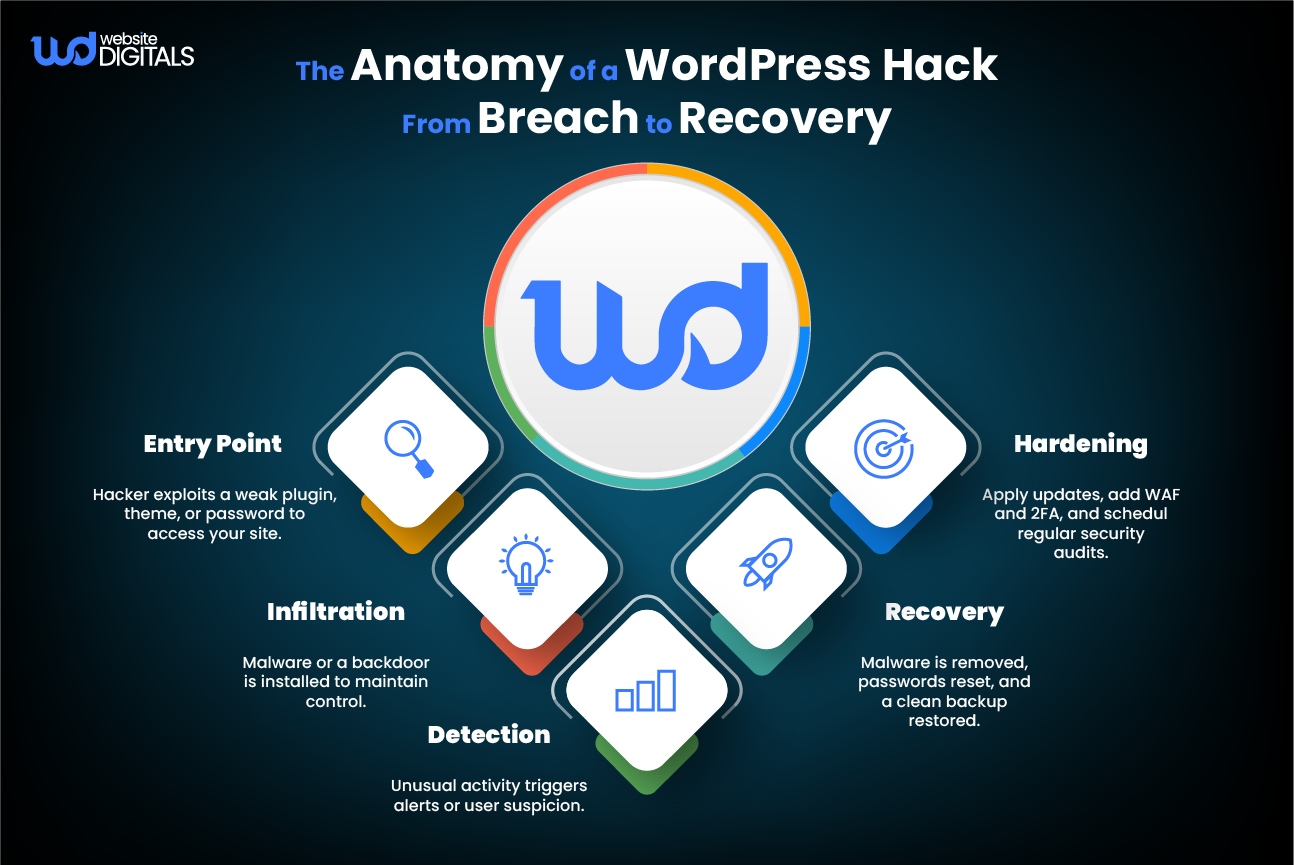
Immediately disconnect your website from the server to prevent further damage. Restore a clean backup, reset all passwords, and use a professional malware cleanup service. Afterward, update all plugins, themes, and security keys, then perform a full scan before taking your website live again to ensure all threats are removed.
How do managed security services differ from hosting support?
Hosting support is typically reactive, focusing on fixing issues after an attack occurs. Managed security services take a proactive approach by continuously monitoring for vulnerabilities, applying security updates, and blocking threats before they cause damage. This proactive strategy ensures greater stability, uptime, and long-term protection.