
SEO Wix vs WordPress: Choosing the Best Platform for Optimized Search Visibility
Feeling like your website is running in circles without gaining traction on Google?
As the saying goes by Daley Thompson, “If you’re not in it, you can’t win it.”
This saying perfectly applies to SEO.
If your website isn’t ranking on Google’s first page, it’s essentially invisible to your audience, no matter how high-quality your content is.
The root cause of this could be the platform you’ve chosen, as it might be limiting your SEO potential. With thousands of website builders available, we’ve narrowed it down to two of the most popular: Wix and WordPress.
Now, the real question is: SEO Wix vs WordPress, which one offers the SEO tools and flexibility your website needs to break through the rankings?
In this blog, we’ll explore the SEO strengths of both platforms and help you decide which one is the best fit for your website’s success.
Key Takeaways:
- Comparison of Wix and WordPress for SEO purposes
- Understanding the SEO capabilities of each platform
- Factors to consider when choosing a platform for website optimization
- Best practices for improving search engine rankings
What is SEO and Why Does It Matter?
SEO is the process of optimizing your website to improve its visibility on search engines like Google, driving organic traffic. It involves:
- Enhancing content.
- Keyword research.
- Mobile optimization and site speed.
When done right, SEO increases website exposure, attracting more visitors and boosting conversions.
Why does SEO matter?
According to Backlinko, the top organic search result on Google captures approximately 27.6% of all clicks. This highlights the critical role SEO plays in driving traffic and business growth.
In summary, SEO isn’t just a marketing tactic but a fundamental component for any business aiming to enhance its online presence and achieve sustainable growth.
Wix vs WordPress Feature Breakdown as Website Builders
Wix:
-
Drag-and-Drop Interface
One of Wix’s most compelling features is its drag-and-drop builder.
You don’t need any coding knowledge to create a beautiful website.
This intuitive interface lets users easily add text, images, videos, and other elements to their site, offering full design flexibility without the complexity.
-
Wix SEO Tools
Wix SEO Wiz is the built-in tool that guides you step-by-step to optimize your website for Google and other search engines.
From editing meta tags and improving URL structures to submitting sitemaps, Wix SEO Wiz streamlines the SEO process, making it simple for beginners to improve visibility and rankings.
-
Mobile Optimization
With mobile traffic accounting for over 60% of global web traffic, having a mobile-friendly site is no longer optional.
Wix automatically optimizes your website for mobile devices, ensuring that it looks and works great on smartphones and tablets.
This built-in mobile optimization helps maintain a seamless user experience, improving both your SEO and user engagement.
-
Automatic Site Maps
Wix automatically generates sitemaps for your website, which is essential for search engines like Google to index your site properly.
This feature ensures that all your pages are easily discoverable by search engines, helping improve your website’s SEO performance.
Bonus Point
|
This process is automatic, so you don’t need to worry about updates. It saves you time and effort, letting you focus on growing your business while Wix handles the SEO. |
-
Easy Setup for Businesses
You can quickly launch your site, add content, and start driving traffic without dealing with complex configurations or hiring developers.
It’s the perfect platform for entrepreneurs looking to get their business online in no time.
Whether you’re looking to create a blog, an e-commerce store, or a business website, WordPress provides thousands of themes and plugins to tailor every aspect of your site, making it a competitive option compared to Wix vs Drupal.
Pro Tip:
|
Don’t forget to regularly update your content and make use of Wix’s SEO Tools to boost SEO. Google loves fresh, relevant content. Pair this with Wix’s built-in meta tags and URL optimization, and you’re all set to improve your search rankings. |
WordPress
-
Customization and Flexibility
WordPress is renowned for its customization options, giving you the ability to build virtually any type of website.
Whether you’re looking to create a blog, an e-commerce store, or a business website, WordPress provides thousands of themes and plugins to tailor every aspect of your site.
-
SEO Control with Plugins
WordPress offers unparalleled control over SEO through powerful plugins like Yoast SEO and RankMath, and can be further enhanced with WordPress CRM integration services to align marketing automation and lead tracking with your SEO efforts.
These plugins allow users to customize their meta tags, optimize on-page content, create XML sitemaps, and more, ensuring your website adheres to SEO best practices.
-
Mobile Responsiveness
While WordPress doesn’t automatically optimize your site for mobile devices like Wix, many themes are mobile-responsive, ensuring that your website looks great on smartphones and tablets.
Additionally, with plugins like WP Touch, you can further enhance mobile performance.
-
Open-Source and Scalability
WordPress is open-source, which means you have full control over your website’s data, customization, and long-term growth.
As your business grows, you can scale your website without limitations, whether it’s adding more pages, integrating additional features, or upgrading your server.
-
Robust E-commerce Capabilities
WooCommerce transforms WordPress into a fully functional online store, allowing users to manage products, track inventory, handle payments, and more.
If you’re planning to run an online business, WordPress provides extensive eCommerce tools and flexibility, including the ability to integrate payment gateways and custom tax setups.
SEO Performance Results (Wix vs WordPress)
|
Factor |
Wix |
WordPress |
|
Ease of Getting Started |
Quick setup with built-in SEO tools |
Steeper learning curve for SEO setup |
|
Mobile Optimization |
Automatic optimization |
Themes often need manual adjustments |
|
SEO Customization Flexibility |
Basic but sufficient for small sites |
Highly flexible with plugins and themes |
|
Speed Performance |
Faster load times with built-in tools |
Needs additional plugins for speed optimization |
|
Search Engine Rankings (average) |
1-3 months to see results |
Faster results with optimal setup |
|
User Experience |
Extremely user-friendly |
Requires technical knowledge |
Wix vs WordPress: Which Platform is Best for SEO?
When comparing SEO Wix vs WordPress, Wix stands out, particularly for businesses seeking efficiency and streamlined results.
Unlike WordPress, which often requires intricate plugins and manual configurations, Wix simplifies SEO with tools like Wix SEO Wiz, guiding users through key SEO tasks such as optimizing meta tags, structuring URLs, and submitting sitemaps.
For businesses focused on optimizing for mobile, Wix offers automatic mobile optimization, ensuring that your site is mobile-friendly out of the box, a crucial element for Google’s ranking algorithms, even when compared to Wix vs Bluehost hosting options.
This eliminates the need for additional plugins or manual adjustments, something WordPress users often encounter.
While WordPress provides greater customization, it requires a more significant investment of time and technical resources.
For companies looking to rapidly deploy an SEO-optimized website without extensive configuration, Wix offers a highly efficient, user-friendly solution.
Real World Case Study:
|
A UK-based sci-fi merchandise store saw a 100% increase in organic traffic and a 67% boost in sales within just three months after utilizing Wix’s SEO tools, an outcome often referenced by an SEO agency for eCommerce businesses when highlighting how platform-based optimization can significantly improve visibility and conversions for online retailers. |
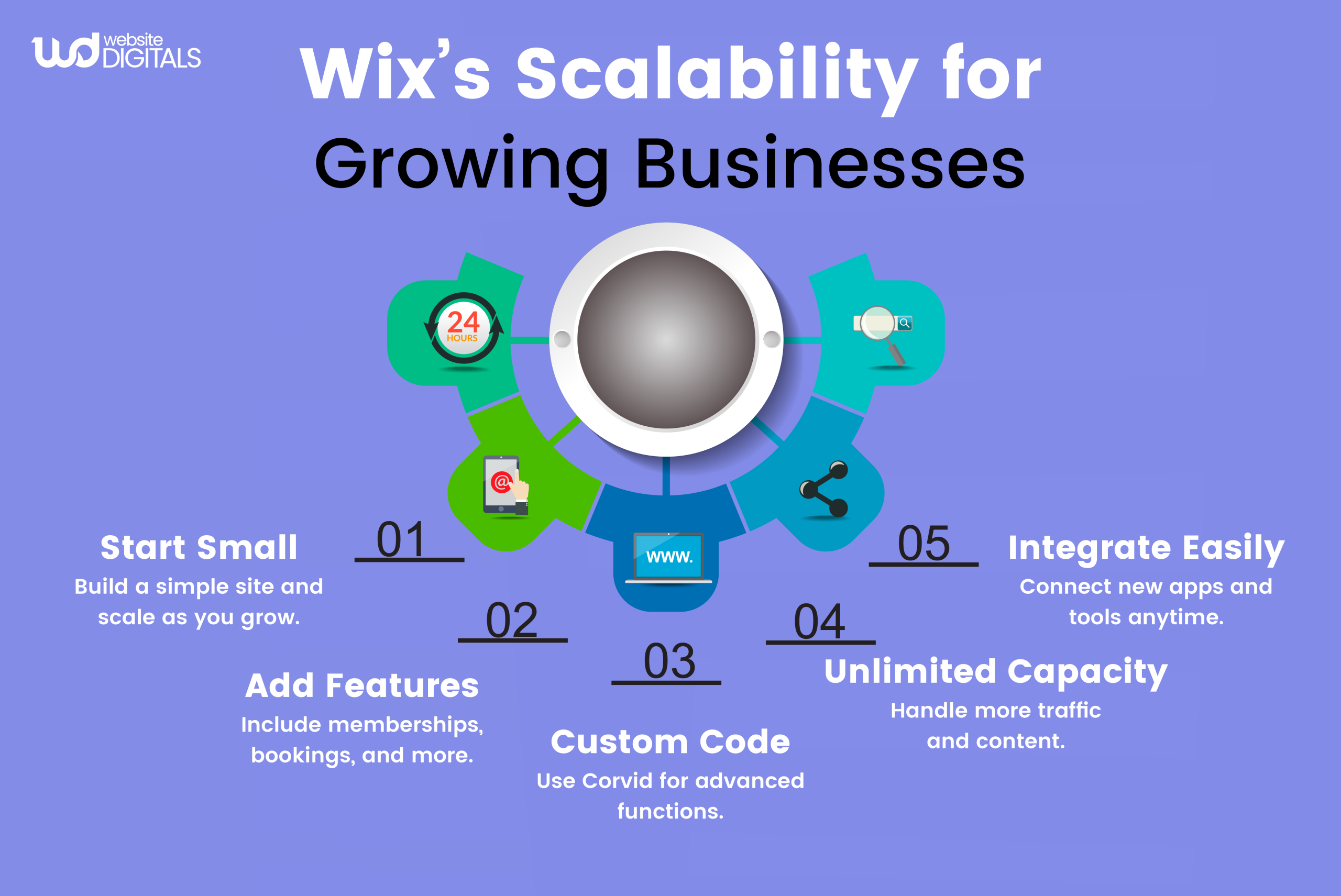
Final Verdict: Wix Leads the SEO Race with Ease and Efficiency
In the comparison of SEO Wix vs WordPress, Wix stands out as the clear winner for businesses that prioritize efficiency and results.
With its intuitive SEO tools and seamless mobile optimization, Wix ensures your website ranks higher and performs better without the need for advanced technical knowledge, especially when combined with the Wix API integration service.
At Website Digitals, we specialize in web development and SEO, helping businesses maximize their SEO potential using the Wix platform, ensuring improved visibility and better rankings.
Our team of experts offers tailored SEO strategies that are designed to drive measurable results for your business.
Whether you’re starting a new project or looking to enhance your existing website, we ensure that your online presence stands out in search rankings.
Ready to take control of your website’s SEO? Partner with us to optimize your Wix site for maximum performance. Reach out today at (646) 222-3598 or email info@websitedigitals.com to get started and watch your website climb the SEO ladder.
FAQs
What is the best platform for SEO: Wix or WordPress?
Wix is best for beginners due to its user-friendly SEO tools like Wix SEO Wiz, while WordPress offers more customization and advanced features for those with technical expertise.
How can Website Digitals help with SEO for my Wix website?
At Website Digitals, we optimize your Wix website using Wix SEO tools to enhance meta tags, improve site structure, and drive better Google rankings.
How does SEO work on Wix?
Wix simplifies SEO with Wix SEO Wiz, which helps optimize meta tags, sitemaps, and URLs, while automatically handling mobile optimization and site speed.
What are some WordPress SEO tips and tricks?
Use plugins like Yoast SEO for detailed customization, focus on page speed, ensure mobile optimization, and integrate WordPress CRM integration services to improve WordPress SEO.
Which is better, Wix vs WordPress?
Wix offers quick results with built-in SEO tools, while WordPress provides deeper customization for long-term SEO success but requires more technical effort.
What is the best SEO strategy for beginners: SEO Wix vs WordPress?
Wix is ideal for beginners with its simple SEO setup tools, while WordPress requires more technical knowledge for optimal SEO performance.




