
Why Your Website Not Working the Way It Should (And How to Fix It Fast)

Have you ever refreshed your browser over and over, wondering why your website not working issues always show up at the worst possible time?
Well, what feels like a small glitch often leads to something much bigger: lost leads, lost trust, and lost revenue.
Studies show that 88% of online consumers are less likely to return after a bad experience, especially slow or broken pages.
When a single element breaks, be it speed, hosting, plugins, or mobile layout, the entire experience falls apart.
If your website keeps failing without warning, you’re about to understand what’s causing it and how to fix it before the damage grows.
Key Takeaways
|

The Top 6 Reasons Your Website Isn’t Working as It Should
When a client comes to us because their website not loading properly, we start by examining six core areas.
Most issues fall neatly into one of these categories.
Reason 1: Poor Website Performance & Speed Issues
Slow loading is a major form of not working correctly. Users have no patience for a sluggish experience, and neither does Google. A common symptom is a high server response time or poor TTFB (time to first byte).
- Problem: The primary issue here is often a lack of proper website speed optimization. Large, unoptimized images, poorly configured caching, or excessive blocking JavaScript can all contribute.
- Impact: When pages load slowly, visitors leave before anything appears, which quickly drives up your bounce rate. Slow performance also harms search rankings because Google prioritizes websites that deliver a fast, smooth experience.
- Fix: Implement dedicated hosting, compress all assets, and utilize content delivery networks (CDNs). We focus on optimizing every element to ensure your site is fast, smooth, and reliable.
Reason 2: Weak Mobile Responsiveness
With over half of all web traffic coming from mobile devices, if your site looks broken on a phone, it is broken. If your website not loading images correctly on an iPhone, or your layout shifts dramatically, the user experience collapses.
- Problem: The core design was not built with a mobile-first approach. This leads to frustrating layout issues that make content unreadable or calls-to-action impossible to tap.
- Impact: You alienate a massive segment of your potential market and damage your SEO standing, as mobile-friendliness is a core ranking factor.
- Fix: A professional audit and redesign that enforces adaptive, responsive layouts, ensuring that every element scales correctly across all devices.
Reason 3: Server and Hosting Issues
This is often the most critical type of failure. If you are seeing a “connection timed out” error, the issue likely resides with your hosting provider.
- Problem: This includes a true server outage, a hosting downtime event, or resource limits being hit on shared hosting. Occasionally, an SSL certificate error (an expired or misconfigured security certificate) can prevent the site from loading securely at all.
- Impact: Your entire business is offline. You’ll need to investigate a true website downtime incident.
- Fix: The immediate fix is contacting your host, but the long-term solution may involve migrating to a high-quality, dedicated hosting environment to ensure high uptime reliability and consistent server health checks.
Bonus Tip: Monitor Peak Traffic Hours
|
Monitoring peak traffic hours helps you spot when your site is under the most pressure, preventing sudden website not working issues caused by traffic spikes. By tracking these patterns, you can scale hosting resources before outages happen and keep your site stable during high-demand periods. |
Reason 4: Outdated Technology or Plugins
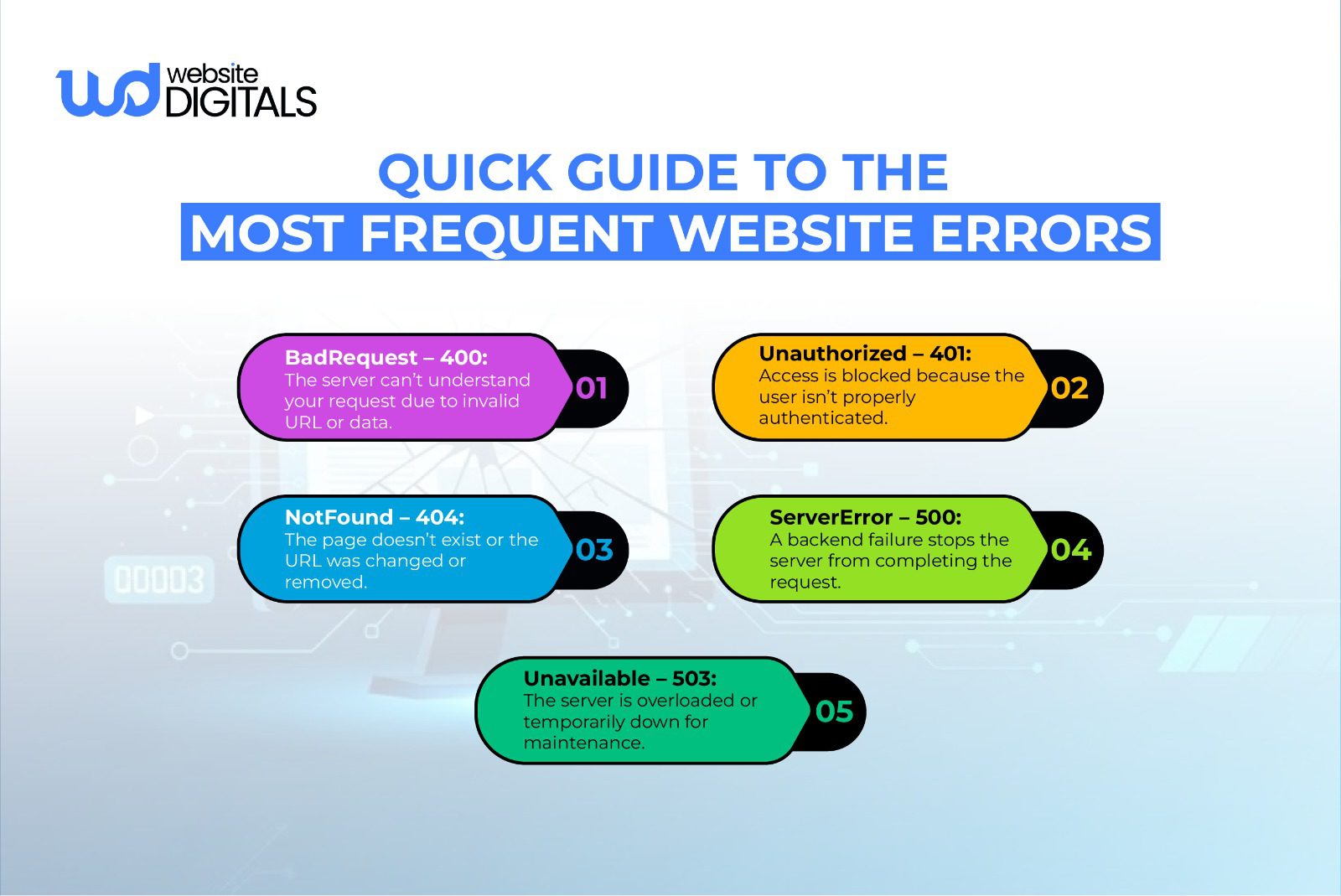
One of the most frequent causes of a functioning website suddenly crashing is a technical conflict, often driven by a lack of maintenance. This is where you might see a terrifying internal server error.
- Problem: A conflicting combination of an old CMS version, a CMS update failure, or a recent plugin conflict can break the site’s functionality. Similarly, an attack might exploit an out-of-date security vulnerability, leading to a malware infection website scenario.
- Impact: The site becomes unstable, key features (like forms or checkout) stop working, and security risks multiply.
- Fix: Implement a proactive maintenance plan. This includes continuous updates of plugins, themes, and the core CMS. Always test updates in a staging environment first to prevent issues caused by backend errors.
Reason 5: SEO Issues That Block Visibility
A website that is technically live but cannot be found by potential customers is, from a business standpoint, also not working. If you’re wondering about website not showing up on Google, the issue is often visibility.
- Problem: This includes fundamental problems like incorrect robots.txt files blocking search engines, a lack of clear sitemaps, or a complete absence of a focused website performance monitoring strategy.
- Impact: Your marketing dollars are wasted because your site is invisible to people actively searching for your service.
- Fix: A comprehensive website diagnostic service that reviews every on-page and technical SEO element. This ensures your site can be properly crawled, indexed, and ranked.
Reason 6: Broken Integrations (Forms, Chat, CRM, Payment Gateways)
For a B2B site, functionality often relies on seamless communication between different systems.
- Problem: Common integration failures include a broken lead form, an unlogged payment, or a silent database connection error that prevents data from being read or written correctly. This often requires an error log review to diagnose.
- Impact: The critical conversion points on your website fail, leading to lost revenue opportunities that go unnoticed until a client complains.
- Fix: A systemized check of all integration APIs. We monitor these pathways to ensure every lead, payment, and data exchange completes successfully, maintaining a seamless flow between your website and your CRM.
Real World Case Study:
|
Shopify’s major DNS outage in 2020 is a strong reminder that even leading platforms can go offline when DNS propagation fails. During the incident, thousands of stores experienced delays, broken pages, and complete downtime, not because their websites were poorly built, but because a single infrastructure issue interrupted their ability to connect to the internet. It highlights why businesses of every size need reliable DNS management, redundancy, and continuous monitoring to prevent similar disruptions. |
Website Security Checks to Run Monthly
|
Security Task |
Purpose |
Tools to Use |
Red Flags to Watch |
|
Malware Scan |
Detect hidden malicious scripts or unauthorized file changes |
Wordfence, Sucuri, VirusTotal |
Unexpected file edits, injected code, suspicious redirects |
|
SSL Certificate Validation |
Ensure secure data transmission and prevent browser warnings |
SSL Labs, WhyNoPadlock |
Certificate expired, mixed content warnings, insecure connections |
|
User Access Review |
Remove unnecessary admin accounts and reduce security risks |
CMS user manager, password auditing tools |
Unknown users, weak passwords, inactive accounts with privileges |
|
Firewall & Security Rules Check |
Prevent attacks by blocking harmful traffic and misconfigured rules |
Cloudflare, ModSecurity |
Excessive blocked requests, firewall misconfiguration, and brute-force attempts |
|
Backup Integrity Test |
Confirm backups are complete, current, and recoverable |
UpdraftPlus, JetBackup, cPanel backups |
Missing backups, corrupted files, and backups older than 30 days |
What a Well-Optimized Website Should Deliver
-
Fast, Smooth, and Reliable Performance
This starts with a solid foundation. We look beyond basic speed tests and analyze network issues, server response time, and real-time monitoring to guarantee an optimal user experience.
Our focus on website speed optimization means every page loads instantaneously.
-
User-Friendly Layouts
A great site is intuitive. We rework navigation and key user journeys to remove points of friction, ensuring the user experience (UX) is clear and compels the visitor to take the next step.
-
Search-Optimized Structure
Your site must be found. Our process includes reviewing DNS propagation, sitemaps, and content structure to maximize website conversion optimization and search visibility.
Strong technical SEO also supports broader goals like how to reduce website bounce rate by ensuring users land on fast, relevant, and easy-to-navigate pages.
Note:
|
When search engines can crawl your site efficiently, and visitors can navigate it without friction, both rankings and conversions improve. |
-
Seamless Integrations and Automated Workflows
We guarantee that all essential systems, from lead forms to payment gateways, are functioning without issues.
A firewall misconfiguration can often block these connections, so we secure and test all entry points.
Easy Wins to Improve Your Website’s Functionality
If your website not working and is causing immediate problems, here are four steps to take right now, followed by a long-term plan.
-
Run a Full Website Audit
Start with a complete audit.
This gives you a clear view of technical issues, backend errors, outdated components, and performance bottlenecks, so you know exactly what needs attention.
-
Improve Page Speed Immediately
If your site feels slow or your website is not loading properly, tackle speed issues right away.
Compress images, remove unnecessary scripts, and make sure caching is enabled to improve load times instantly.
-
Update Plugins, Themes, and CMS Versions:
Outdated tools are one of the most common causes of security gaps and functionality errors.
Keeping your CMS, themes, and plugins updated helps prevent crashes and unexpected behavior.
-
Check for “Is My Website Down For Everyone?”
Before troubleshooting deeper, use an external website monitoring tool to confirm whether the site is in maintenance mode or down only on your local network.
This confirms if you have a genuine site offline issue.
Final Thoughts: A High-Performing Website Is an Ongoing Process
The digital world changes quickly, security risks grow, search engines update, and visitors expect a smooth experience every time.
If you’re dealing with outages, crashes, or slow pages that show your website not working, it’s a sign you need professional support.
Our team at Website Digitals can troubleshoot the root cause, fix critical issues, and help you move to a more reliable hosting setup when needed. For fast help, email us at info@webdigitalsl.com or call (646)-222-3598.
Don’t let website problems cost you customers; let our experts get everything running the way it should.
FAQs
What services does Website Digitals offer if my website is not working?
Website Digitals provides full technical support, including diagnosing downtime, fixing errors, restoring crashed websites, improving loading speed, and handling secure hosting migration to prevent future issues.
How fast can Website Digitals resolve urgent website problems?
Our team responds quickly to restore your site as soon as possible. We focus on finding the root cause, applying reliable fixes, and ensuring your website remains stable after recovery.
Why is my website not working?
A website may stop working because of hosting issues, DNS errors, broken plugins, expired domains, or server overload.
What are the common reasons a website stops working?
The most common causes include hosting outages, incorrect updates, security attacks, misconfigured settings, or heavy traffic that the server can’t handle.
How can I diagnose website downtime?
Start by checking your hosting dashboard, testing your domain settings, using an uptime checker, and confirming whether the issue is on the server or with your site’s code.
Why does a website crash?
Websites often crash due to server overload, outdated software, plugin conflicts, or security vulnerabilities being exploited.
What causes a website to load slowly?
Slow loading is typically caused by large images, unoptimized code, slow hosting, too many scripts, or heavy third-party integrations.
How do I fix website errors?
Begin by clearing your cache, disabling recent plugins or themes, updating your CMS, checking error logs, and verifying that your hosting server is functioning properly.
How do I know if my website is down for everyone or just me?
You can use an online “site down checker” to verify if the issue is global. If the tool shows your site is down for everyone, it’s likely a server-side problem.






