Future-Ready Website Setup for Small Business That Eliminates Costly Rebuilds
Tired of rebuilding your website… only for it to feel outdated, slow, or stuck all over again?
For most small businesses, the problem isn’t the design or the developer, it’s the foundation.
A site that can’t grow, adapt, or support your tools traps you in an endless, costly cycle.
And it’s not just annoying, 75 % of consumers will ditch a purchase if a website feels outdated or unprofessional.
If updates break your site, it looks old months after launch, or it can’t scale with your business, the issue runs deeper: your system was never built to grow.
A proper website setup for small business can finally break the cycle, so your site works for your business, not against it.
Key Takeaways
- A scalable website setup helps small businesses stay competitive and avoid long-term technical limitations.
- Frequent rebuilds and aging websites can lead to substantial financial loss, operational disruption, and declining performance.
- Long-term development packages support continuous improvement and allow businesses to adapt as markets and technologies evolve.
- A future-ready website foundation ensures ongoing relevance, flexibility, and stability as the business grows.
- Investing in a scalable online presence strengthens long-term business growth and digital resilience.
The True Cost of Website Rebuilds for Small Businesses
Rebuilding a website comes with far more than a one-time price tag. It affects a small business’s finances, operations, and long-term digital performance.
Financial Impact of Starting Over
Starting from scratch can be costly, especially when factoring in development, redesign, content creation, and potential rebranding. Industry estimates place the average redesign cost between $5,000 and $100,000, depending on complexity and features.
Key financial considerations include:
- Development costs: hiring developers, designers, and project managers
- Content creation: copywriting, product descriptions, photography, and video
- Rebranding needs: updating logos, color palettes, and visual identity
Business Disruption During Rebuilds
Website rebuilds often interrupt daily business operations. They can reduce sales, slow customer service, and disrupt internal workflows.
According to a Clutch-reported industry statistic, 70% of small business websites lack a clear call-to-action on their homepage, which can negatively impact engagement and conversions.
A website is more than a digital presence; when it goes offline or under construction, the ripple effects touch sales, customer satisfaction, and brand perception.
Lost SEO Equity and Traffic
Rebuilds can significantly impact SEO if not handled carefully. Changes to URLs, content, or site structure may damage rankings and organic traffic, making it crucial to implement search-safe practices throughout the process.
|
SEO Risk |
Potential Impact |
Mitigation Strategy |
|
URL changes |
Loss of backlinks and reduced rankings |
Implement 301 redirects |
|
Content modifications |
Decreased keyword relevance and visibility |
Preserve key pages and optimize new content |
|
Structure changes |
Crawling issues and search engine confusion |
Maintain consistent architecture |
Understanding these risks helps small businesses plan rebuilds more strategically, reduce unnecessary costs, and protect long-term performance.
Assessing Your Current and Future Website Requirements
To create a future-ready website for your small business, you must evaluate both your immediate needs and long-term goals. This includes understanding your growth trajectory, technical capabilities, and the budget required to support sustainable development. A clear assessment ensures that your website can scale alongside your business rather than holding it back.
Business Growth Trajectory Analysis
Understanding how your business will evolve is essential for choosing a website setup that can support future expansion. Consider:
- Short-term needs (1–2 years): e-commerce setup, improved content management, or basic integrations
- Long-term goals (3–5 years): entering new markets, expanding product or service offerings, or increasing automation
Planning with both horizons in mind ensures your website remains flexible as your business changes.
Technical Capability Assessment
Evaluate your current technical environment and the skills available within your team. Determine whether you can manage updates and maintenance internally or if you will require ongoing professional support. Knowing your limitations helps you choose a platform and structure that fit your operational reality.
Budget Planning for Sustainable Development
Create a budget that covers both initial setup and ongoing enhancements. Consider hosting, security, maintenance, and future upgrades. Explore scalable small business website platforms or development options that align with your financial plan and growth expectations.
Core Principles of Scalable Website Architecture
To maintain a strong and adaptable online presence, small businesses need a website architecture built for long-term scalability. A scalable foundation makes it easier to evolve with changing customer expectations, new technologies, and growth goals, without repeated rebuilds or structural limitations.
Modular Design Frameworks
Modular design breaks a website into independent, reusable components. This structure allows teams to update or replace individual parts without disrupting the entire system. As a result, businesses benefit from:
- Faster development and iteration
- Easier long-term maintenance
- Lower overall development costs
- Greater design and feature flexibility
API-First Development Approach
An API-first approach prioritizes building a consistent, well-structured API before designing the front end. This ensures the website’s core functions can easily integrate with third-party tools, mobile apps, automation systems, and future technology upgrades. It also strengthens the website’s ability to scale across multiple channels.
Headless CMS Implementation
A headless CMS separates backend content management from frontend design. This enables businesses to deliver content across websites, apps, and digital platforms from one central system. Key advantages include:
- Omnichannel content delivery
- More efficient content management
- Greater flexibility in frontend design and technology choices
Content Modeling Strategies
Effective content modeling organizes content into structured, reusable types and fields. Clear content models enhance consistency, improve findability, and make long-term updates easier. This foundation directly supports growth, redesigns, and multi-channel content distribution.
Separation of Front and Back End
Separating the frontend and backend allows each layer to evolve independently. Businesses can adopt modern frontend technologies while maintaining a secure, stable backend. This separation improves scalability, increases development agility, and opens the door to more customized, future-ready solutions.
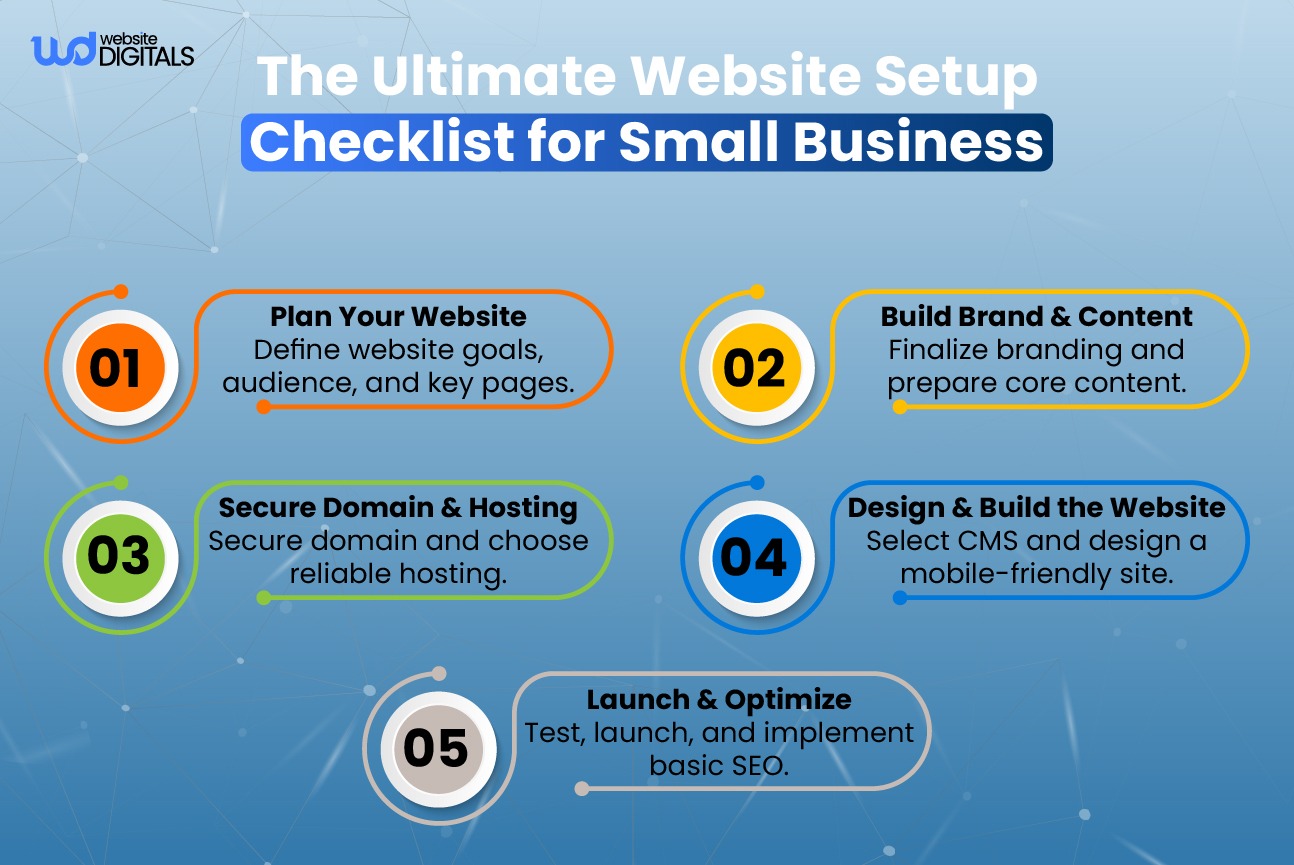
Step-by-Step Website Setup for Small Business Success
Building a successful small business website starts with a strong technical foundation. By following a structured setup process, you can create a website that performs well, stays secure, and scales as your business grows.
Domain Selection and Registration
Your domain name is the core of your online identity. It should be easy to remember, simple to spell, and clearly aligned with your business or services.
Choosing a Future-Ready Domain
Select a domain that supports long-term growth. Avoid overly narrow names, local-only references (unless intentional), or difficult alternative spellings that may confuse customers.
Domain Management Best Practices
Once registered, your domain must be properly maintained to ensure security and reliability:
|
Domain Task |
Description |
Frequency |
|
Domain Renewal |
Renew your domain to prevent accidental expiration |
Annually |
|
DNS Configuration |
Update DNS records when changing hosts or service tools |
As needed |
|
Domain Privacy Protection |
Hide personal contact information in WHOIS records |
At setup / when ownership changes |
Proper domain management prevents downtime, protects your information, and ensures your website remains accessible.
Hosting Infrastructure Selection
Your hosting environment plays a significant role in website speed, security, and long-term scalability. Evaluate hosting types based on expected traffic, performance needs, and the level of control you require.
Scalable Hosting Options
- Shared Hosting: Budget-friendly, suitable for low-traffic sites
- VPS Hosting: Better performance and control for growing businesses
- Dedicated Hosting: Maximum power and security for high-traffic or complex sites
Choose an option that aligns with your current needs but also allows room for future expansion.
Server Configuration for Growth
Ensure your hosting provider offers easy resource upgrades, reliable uptime, solid security features, and support for higher storage or bandwidth as your business scales.
SSL Implementation and Security Foundations
SSL certificates encrypt customer data and signal trust to both visitors and search engines. Enabling HTTPS is a non-negotiable requirement for modern websites and contributes to stronger SEO performance.
By following these essential steps, securing the right domain, choosing scalable hosting, and implementing proper security. you establish a strong, future-ready foundation for your small business website. This ensures your site remains reliable, adaptable, and capable of supporting long-term growth without unnecessary rebuilds.
Selecting Growth-Ready CMS and Development Platforms
Choosing the right Content Management System (CMS) and development platform is one of the most important decisions in building a scalable, future-ready website for your small business. The platform you select will determine how easily your site can grow, integrate new tools, support e-commerce, and adapt to changing business needs without frequent rebuilds or technical limitations.
WordPress as a Scalable Foundation
WordPress remains one of the most versatile and widely adopted CMS platforms for businesses of all sizes. Its extensive plugin ecosystem, theme frameworks, and customization capabilities make it ideal for long-term scalability.
Advanced Theme Frameworks
- Genesis Framework: Known for clean code, fast performance, and SEO-optimized architecture.
- Thesis Framework: Offers strong customization capabilities with a focus on conversion-oriented design.
These frameworks give businesses a stable, well-structured foundation that supports ongoing growth and design evolution.
Essential Plugins for Performance and Security
- WP Rocket: Enhances page load speed with advanced caching and performance optimization.
- Wordfence Security: Provides malware protection, firewall filtering, and continuous monitoring.
These plugins support long-term scalability by improving speed, stability, and site protection.
Evaluating E-commerce Platforms
If your business sells products or services online, choosing the right e-commerce platform is critical for long-term performance and operational efficiency.
Shopify vs WooCommerce for Growth
- Shopify: A fully hosted, user-friendly platform with built-in security, fast setup, and reliable performance. Best for businesses that want a streamlined experience without managing technical details.
- WooCommerce: A flexible, self-hosted WordPress solution offering deeper customization and control. Ideal for businesses needing tailored functionality or tight integration with existing WordPress systems.
Custom E-commerce Solutions
For businesses with highly specific workflows, unique product structures, or complex integrations, custom e-commerce systems provide maximum flexibility. While they require more development resources, they offer full control over features and scalability.
Headless CMS for Maximum Flexibility
A headless CMS decouples content management from front-end design, allowing content to be delivered across websites, apps, and digital platforms through APIs. This approach is ideal for businesses planning multi-channel experiences or custom front-end interfaces.
Popular options include:
- Contentful
- Strapi
Headless architecture enables faster development, easier redesigns, and greater long-term adaptability, making it a powerful choice for growth-oriented businesses.
Building Toward a Future-Ready Website
By evaluating CMS platforms, e-commerce solutions, and architectural approaches through the lens of scalability, integration flexibility, and long-term growth, small businesses can choose a development platform that supports their evolution. The right foundation prevents costly rebuilds, minimizes technical limitations, and ensures the website remains capable as the business expands.
Technical Implementation Strategies That Prevent Rebuilds
Future-ready websites are built on solid technical foundations. When the underlying architecture is structured correctly, small businesses can add features, improve performance, and adapt to new market demands without needing costly rebuilds. The following strategies ensure long-term scalability, reliability, and maintainability.
1. Database Architecture Best Practices
A scalable website starts with a well-structured database. Proper database design reduces errors, supports growth, and ensures data remains accurate as your website expands.
Key practices include:
- Normalizing data structures to reduce duplication and maintain consistency
- Using clear data models that can handle increased traffic and larger datasets
- Designing for extensibility, allowing new features or content types to be added without major restructuring
A strong database foundation prevents bottlenecks and minimizes the need for future system overhauls.
2. Code Organization and Documentation Standards
Clean, well-organized code is essential for long-term maintainability. When code is modular and properly documented, developers can make updates without breaking existing functionality.
Core standards include:
- Consistent coding conventions for readability
- Modular architecture that allows individual components to be improved independently
- Comprehensive documentation so future developers can easily understand and extend the system
This approach reduces technical debt, the main driver behind expensive rebuilds.
3. Version Control and Deployment Workflows
Effective version control ensures that every change to your website is tracked, reviewed, and safely deployed. Git-based workflows provide structure, transparency, and risk reduction.
A growth-ready workflow includes:
- Branching strategies that isolate new features from production
- Code reviews to catch issues early
- Clear release processes for predictable deployments
This foundation helps small businesses evolve their websites without introducing instability.
4. Continuous Integration and Continuous Deployment (CI/CD)
CI/CD pipelines automate testing and deployment, ensuring that updates are reliable and error-free before they reach customers.
Benefits include:
- Automated testing for faster issue detection
- Reduced downtime during updates
- Consistent deployment processes that lower the risk of critical failures
Automation keeps the website stable as new features, content, or integrations are added over time.
5. Testing Frameworks and Quality Assurance
Quality assurance protects your website from bugs, performance issues, and outages. A complete testing strategy includes:
- Unit tests to validate individual functions
- Integration tests to ensure components work together
- End-to-end tests that simulate real user interactions
Regular testing identifies issues early, long before they escalate into problems that require major redevelopment.
By implementing these technical strategies, small businesses create websites that are stable, scalable, and built to last. This approach reduces long-term costs, prevents unnecessary rebuilds, and ensures the website continues to support business growth well into the future.
Designing Flexible Content and User Experience Systems
Flexible content and user experience systems allow small businesses to evolve without constant redesigns or full website rebuilds. When structured correctly, your website can adapt to new offerings, branding updates, and customer behavior changes, while maintaining consistency and usability.
1. Content Type Modeling for Future Expansion
Content type modeling establishes clear structures for different types of information, such as blog posts, product details, service descriptions, FAQs, or case studies.
A well-organized content model ensures:
- Easier updates without developer involvement
- Better scalability as new content types are added
- More consistent formatting across the entire website
This foundation helps your website grow alongside your business without breaking existing layouts.
2. Component-Based Design Systems
Component-based design divides the website into reusable building blocks, such as cards, forms, buttons, modals, menus, and navigation elements.
This becomes especially valuable when you plan to hire landing page design services, because new promotional or campaign-driven layouts can be created without disrupting the entire website structure.
This approach delivers:
- Faster design and development cycles
- Consistent appearance across all pages
- The ability to update individual components without redesigning entire sections
Reusable UI Components
Reusable UI components ensure that visual elements behave consistently wherever they appear. This reduces design drift and keeps the user experience intuitive as the website evolves.
Design System Documentation
Design system documentation outlines rules, patterns, usage guidelines, and component libraries. Clear documentation enables designers, developers, and content teams to collaborate effectively while maintaining a cohesive brand experience.
3. Mobile-First Responsive Frameworks
A mobile-first framework begins with the smallest screen and scales upward, ensuring optimal usability on all devices.
This approach improves:
- Page load performance
- Accessibility and touch interactions
- Readability and layout stability across screen sizes
Mobile-first design is essential for modern users, especially as mobile traffic continues to outpace desktop.
4. Accessibility Implementation for Wider Reach
Accessibility ensures that your website can be used by everyone, including people with disabilities. Implementing accessibility from the start avoids costly fixes later and expands your audience. Key practices include:
- Providing alt text for all images
- Ensuring keyboard navigation works throughout the site
- Using proper heading hierarchy and semantic HTML
- Maintaining color contrast that meets WCAG guidelines
A more inclusive website improves user satisfaction, search engine visibility, and legal compliance.
By implementing flexible content modeling, reusable design systems, responsive frameworks, and accessibility standards, small businesses can create websites that are visually consistent, easy to manage, and future-ready. These systems reduce long-term costs, prevent unnecessary rebuilds, and support ongoing growth.
Integration Capabilities for Business Scaling
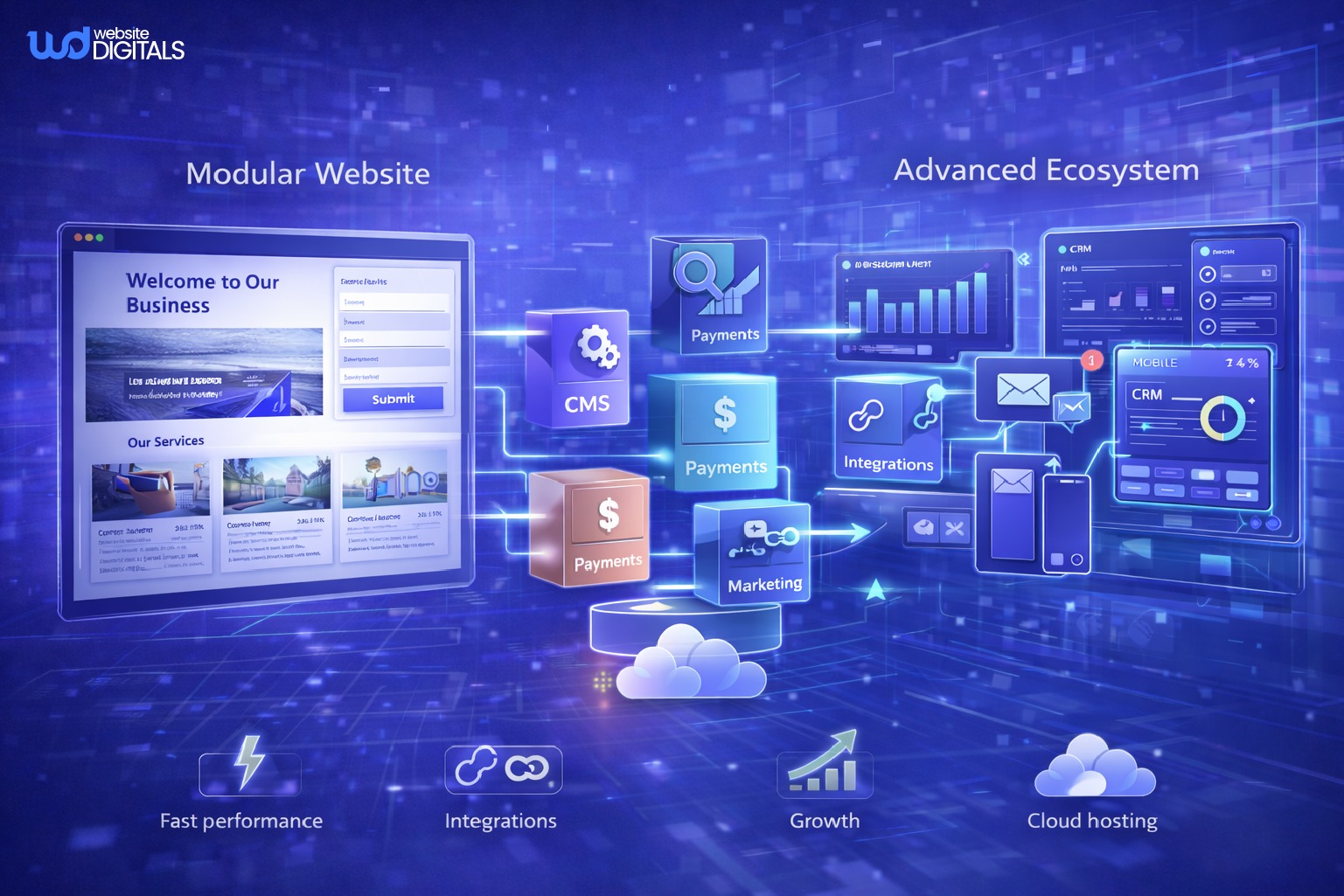
As a small business grows, seamless integration between its website and essential business systems becomes critical. Effective integrations reduce manual work, strengthen customer relationships, streamline transactions, and support smarter decision-making. With the right approach, your website can scale smoothly, without rebuilds or operational bottlenecks.
1. CRM and Marketing Platform Connections
Integrating your website with CRM and marketing platforms ensures that customer data flows automatically between systems. This makes it easier to build campaign assets inspired by high-converting marketing landing page examples, helping small businesses strengthen lead generation and conversion performance.
Key advantages include:
- Automatic syncing of leads, inquiries, and customer activity
- More accurate segmentation and personalization
- Improved sales tracking and marketing automation
Popular platform options include Salesforce, HubSpot, and other CRM tools built for small business growth.
2. Payment Processing and Financial Systems
For e-commerce and service-based businesses, connecting your website to secure payment gateways and financial tools is essential for smooth transactions and clean financial reporting.
Benefits include:
- Faster, frictionless checkout experiences
- Reduced cart abandonment
- Automated financial records for bookkeeping and reconciliation
Trusted platforms like Stripe, PayPal, and other merchant gateways support scalable, compliant payment operations.
3. Analytics and Business Intelligence Infrastructure
A scalable website must be supported by strong analytics and reporting systems. These tools help you understand customer behavior, evaluate performance, and make data-driven decisions.
Data Collection Architecture
A well-designed tracking setup ensures that key interactions, such as page views, form submissions, purchases, and engagement events, are consistently recorded. Studying performance patterns similar to those seen in company landing page examples can also help identify which elements drive higher conversions.
Reporting Systems Setup
Clean reporting dashboards transform raw data into actionable insights, allowing you to identify trends, optimize conversions, and guide business strategy.
Common analytics tools include Google Analytics, Mixpanel, and other business intelligence platforms that support scaling operations.
Integration Summary
|
Integration Type |
Benefits |
Examples |
|
CRM Integration |
Centralized customer data, better segmentation, stronger sales processes |
Salesforce, HubSpot |
|
Payment Processing |
Smooth transactions, fewer abandoned carts, secure payments |
Stripe, PayPal |
|
Analytics Infrastructure |
Customer insights, data-driven decision-making |
Google Analytics, Mixpanel |
4. Third-Party API Integration Strategy
APIs enable your website to connect with external systems and adopt new features without restructuring your entire platform. A strong API strategy supports long-term scalability and adaptability.
Key considerations include:
- Selecting well-documented, reliable APIs
- Ensuring secure data transmission
- Planning for version updates and new feature requirements
A thoughtful API integration approach ensures your website can evolve as your business adds new tools, services, and automation needs.
By building strong integration capabilities, from CRM connections to analytics, payments, and APIs, small businesses create a scalable digital ecosystem that grows with them. This approach reduces manual work, improves customer experience, and prevents the need for expensive future rebuilds.
Cost-Benefit Analysis: Future-Ready vs. Traditional Website Approaches
Small businesses must carefully evaluate whether to invest in a future-ready, scalable website or choose a traditional setup that may require frequent updates or costly rebuilds. A clear cost-benefit analysis reveals how each approach impacts long-term expenses, performance, and business growth.
1. Initial Investment Comparison
Future-ready websites typically require a slightly higher upfront investment because they are built with scalable architecture, modular design systems, and long-term technical strategy.
Traditional websites may cost less initially but are usually limited in flexibility, making them more expensive to modify or expand later.
Key insight: Future-ready setups shift investment forward to reduce expensive structural changes later.
2. Total Cost of Ownership (TCO)
When evaluating TCO, it’s important to consider ongoing expenses such as maintenance, updates, integrations, and potential rebuilds.
A future-ready website provides:
- Lower long-term maintenance costs
- Easier feature upgrades
- Reduced risk of full rebuilds
- Better compatibility with new tools and platforms
Traditional websites often require:
- Frequent patches and redesigns
- Complicated updates due to rigid architecture
- Higher development costs as the business grows
Result: Future-ready frameworks consistently deliver a lower TCO over several years.
3. ROI Timeline for Scalable Website Frameworks
Future-ready websites produce a faster and more predictable ROI because:
- New features can be implemented with minimal redevelopment
- Performance improvements enhance user experience and conversions
- Integrations are easier, reducing operational overhead
- The website remains functional and competitive for a longer time
Traditional platforms typically reach ROI later due to repeated fix-and-patch cycles and growing technical limitations.
4. Case Studies: Rebuild Costs vs. Scalable Implementation
Real-world examples consistently show that scalable frameworks outperform traditional builds over time.
Sample outcomes (based on common industry patterns):
- According to industry case studies, companies can reduce operational and maintenance costs by up to 30% when migrating to scalable, modern website architectures, as demonstrated in a real-world digital transformation case. Source
- Service-based businesses saved months of redevelopment time by expanding existing modules instead of rebuilding entire sections.
- Companies adopting a future-ready approach avoided at least one full redesign cycle, saving thousands in rebuild costs.
Overall advantages of scalable design:
- Lower cumulative development spending
- Minimization of downtime and disruption
- Faster implementation of new business needs
- More stable, predictable long-term ROI
Choosing a future-ready website empowers small businesses to significantly reduce long-term expenses, avoid frequent rebuilds, and maintain a competitive online presence. While the initial investment may be slightly higher, the long-term savings, adaptability, and scalability make it the more cost-effective choice for sustainable growth.
Selecting and Managing Development Partners
Choosing the right development partner is one of the most important decisions a small business can make when building a future-ready website. The right partner provides technical stability, strategic guidance, and long-term support, ensuring your online presence grows alongside your business.
1. Criteria for Evaluating Agencies
When assessing potential agencies for long-term collaboration, prioritize the following:
Portfolio and Relevant Experience
Review their past projects to ensure they’ve worked with similar business models, website architectures, or industries. This is especially important when comparing one web design company to another to determine which partner fits your long-term goals. Look for measurable outcomes, case studies, or long-term client relationships.
Technical Capabilities
Confirm that the agency has expertise in the platforms, frameworks, and integrations you need. Ask how they approach scalability, performance, and modern development practices.
Communication and Project Management
Evaluate how clearly and consistently they communicate. Strong partners use structured project management processes, provide regular updates, and set transparent expectations.
2. Structuring Contracts for Ongoing Development
A well-structured contract prevents misunderstandings and ensures both sides are aligned on expectations.
Key elements include:
- Clear Scope of Work: Defined deliverables, responsibilities, and timelines.
- Payment Terms: Milestones, billing cycles, and what is included vs. billed separately.
- Change Management: A clear process for handling new requests, revised requirements, or expanded scope.
- Ownership & Access: Agreement on who owns the code, designs, and accounts, and how access is managed.
3. Knowledge Transfer and Documentation
Proper knowledge transfer ensures your business is never dependent on a single developer or agency.
Important components:
- Comprehensive Documentation: Technical setup, architecture notes, workflows, API details, design system rules, and deployment processes.
- Training and Support: Workshops or walkthroughs so your internal team understands how to manage content, basic updates, and critical workflows.
Effective documentation reduces onboarding time for future partners and prevents costly rebuilds caused by lost or unclear system knowledge.
4. Establishing Maintenance and Growth Partnerships
A long-term development partnership should support both stability and expansion.
This includes:
- Ongoing Maintenance: Regular updates, performance optimizations, security patches, and platform upgrades.
- Growth & Future Development: Strategic planning, new feature implementation, UX enhancements, and continuous improvements as your business evolves.
A strong partnership ensures your website remains scalable, secure, and aligned with changing market needs.
By selecting an experienced development partner and managing the relationship through clear contracts, structured communication, and proper knowledge transfer, small businesses can build a website that remains stable, scalable, and future-ready. This approach minimizes costly rebuilds and supports long-term digital growth.
Conclusion: Securing Your Digital Business Future
Building a future-ready website is one of the most strategic investments a small business can make. With the right architecture, scalable frameworks, and long-term planning, businesses can avoid costly rebuilds, reduce technical limitations, and create a digital presence that supports sustained growth.
A well-structured website enhances user experience, integrates smoothly with essential tools, and adapts as your business evolves. By choosing solutions and partners that prioritize scalability, performance, and flexibility, small businesses establish a strong digital foundation that can expand without disruption.
Future-ready development ensures your website remains competitive, secure, and aligned with changing market expectations. Working with experienced agencies that understand modern best practices empowers your business to grow confidently and maintain a lasting, resilient online presence.
Your website shouldn’t slow you down, or force you into expensive rebuilds every few years. With the right future-ready setup, your business can grow with confidence, stability, and digital strength.
If you’re ready to build a website that finally works with your business instead of against it, partner with Website Digitals. Call us today at (646) 222-3598 or email us at info@websitedigitals.com to start your transformation.
Frequently Asked Questions:
1. What is a future-ready website setup for small businesses?
A future-ready website is built on scalable architecture that can evolve as your business grows. It uses flexible design systems, modern frameworks, and integration-ready structures so you can update features or expand functionality without needing a full rebuild.
2. How do I assess my current and future website requirements?
Start by evaluating your short-term business needs, your long-term goals, and your internal technical capabilities. Consider factors such as planned product expansion, expected traffic growth, content volume, required integrations, and your ongoing budget for development and maintenance.
3. What are the core principles of scalable website architecture?
Scalable architecture relies on clean modular design, an API-first development approach, headless CMS capabilities, and the separation of front-end and back-end systems. These principles make your website easier to expand, maintain, and integrate with new tools and platforms.
4. How do I choose the right CMS and development platforms for my business?
Look for a CMS or platform that supports customization, scalability, and seamless integrations. WordPress (with advanced frameworks), Shopify, and WooCommerce are popular options, but your choice should depend on your business model, growth plans, security needs, and internal workflow requirements.
5. What technical implementation strategies can prevent costly rebuilds?
Strong technical foundations reduce the need for future redevelopment. Prioritize:
- Well-structured database architecture
- Clean, modular code
- Version control workflows
- CI/CD deployment pipelines
- Automated testing and QA processes
These practices support long-term stability and help you avoid expensive redesign cycles.
6. How can I design flexible content and user experience systems?
Use structured content modeling and component-based design systems to ensure consistency and scalability. Implement mobile-first, responsive frameworks and follow accessibility standards so your site works across all devices and user needs. This creates a flexible UX that grows with your business.
7. What integration capabilities are essential for business scaling?
As your business expands, your website should integrate smoothly with:
- CRM and marketing automation tools
- Payment and financial systems
- Analytics and business intelligence platforms
- Third-party APIs for added functionality
These integrations support automation, improve data accuracy, and streamline operations.
8. How do I conduct a cost-benefit analysis of future-ready vs. traditional approaches?
Compare initial build costs with the long-term expenses of maintenance, updates, and potential rebuilds. Future-ready websites often require a higher upfront investment but deliver lower total cost of ownership due to easier updates, better scalability, and fewer redesigns.
9. What factors should I consider when selecting and managing development partners?
Evaluate agencies based on their portfolio, technical expertise, communication methods, and project management practices. Ensure your contract includes clear scope, timelines, ownership terms, and change processes. Prioritize partners who offer documentation, training, and long-term support.
10. What are the benefits of a future-ready website setup?
A future-ready website is scalable, cost-efficient, and easier to maintain. It improves user experience, supports integrations, reduces rebuild frequency, and helps businesses stay competitive. This makes it a smart long-term investment for sustainable digital growth.