Wix vs GoDaddy: Which Platform Offers Superior Web Development for Business Needs?
Ever tried building your dream website, only to feel boxed in by your builder’s limits?
You start strong, drag, drop, publish, and suddenly realize you can’t customize layouts, move sections freely, or add advanced features your business actually needs.
That frustration is familiar to many GoDaddy website builder users. It’s quick to launch, but its limited design flexibility often caps your growth.
Now, meet Wix, a platform built for creativity, control, and scalability. With its drag-and-drop editor, developer tools (Wix Velo), and integrated SEO suite, it empowers you to design a website that grows as your business does.
So the real question isn’t “Which platform is easier?”
It’s “Which one lets your business evolve without holding you back?”
Your website should grow with your business, not restrict it.
This comparison dives deep into Wix vs GoDaddy, covering design freedom, SEO performance, eCommerce power, and long-term scalability so you can confidently choose a platform that fits your business goals, not limits them.
Key Takeaways
- Understand how GoDaddy’s simplicity can become a design and growth limitation.
- Explore Wix’s flexibility, SEO tools, and scalability for long-term success.
- Compare performance, integrations, and eCommerce capabilities side by side.
- Learn which builder gives you control over your digital brand, not constraints.
The Web Development Dilemma for Modern Businesses
Before comparing features, it’s important to understand why choosing the right website builder matters.
Your website is more than just a tool that displays information. It is a conversion engine, an SEO asset, and a 24/7 sales representative, which is why partnering with a web development company that understands design, speed, and performance is critical.
|
According to research from the G2 Web Design Statistics Report, 48% of users say website design is the most important factor in determining a business’s credibility. |
A slow-loading site or outdated layout can drive potential customers away before they even interact with your brand. Design signals trust, and speed protects conversions, making your choice of platform critical to your business success.
Why the Platform You Choose Directly Impacts Business Results
A website builder influences far more than just how your site looks. It determines how easily you can update your content, optimize for Google rankings, and scale as your business grows.
Here’s what to evaluate before deciding between Wix vs GoDaddy:
- Design Flexibility: How unique and on-brand your site can appear.
- SEO Performance: Control over meta tags, structured data, and page indexing.
- Integrations and Scalability: The ability to connect with apps and tools as your business expands.
- Performance and Reliability: Hosting quality, uptime, CDN access, and load speeds.
- Support and Ease of Use: How quickly non-developers can build and maintain pages.
- Security and Backups: Access to SSL certificates, automatic backups, and malware protection.
For small business owners with limited technical expertise, this decision determines whether your site looks like a trusted professional brand or a basic DIY project.
|
For creative control and scalability, Wix offers greater flexibility than GoDaddy, while GoDaddy focuses on simplicity and quick setup. |
Wix and GoDaddy at a Glance
|
Feature |
Wix |
GoDaddy |
|
Ease of Use |
Drag-and-drop editor with AI design tools (Wix ADI) |
Guided setup for faster launch |
|
Templates |
900+ customizable, industry-specific designs |
100+ ready-made themes |
|
SEO Tools |
SEO Wiz, structured data, custom meta, and URLs |
Basic SEO setup and keyword fields |
|
eCommerce |
Advanced product management, multi-channel selling, and abandoned cart recovery |
Simple store builder for basic catalogs |
|
Integrations |
250+ third-party apps via Wix App Market |
Limited native integrations |
|
Hosting and Security |
Free SSL, global CDN, auto backup, DDoS protection |
SSL available, limited CDN, manual backups |
|
Support and Community |
24/7 live chat, help center, developer forum |
24/7 phone support, limited tutorials |
|
Best For |
Businesses needing design freedom, SEO depth, and scalability |
Users prioritizing fast setup and simplicity |
How Easy Are Wix and GoDaddy for Beginners?
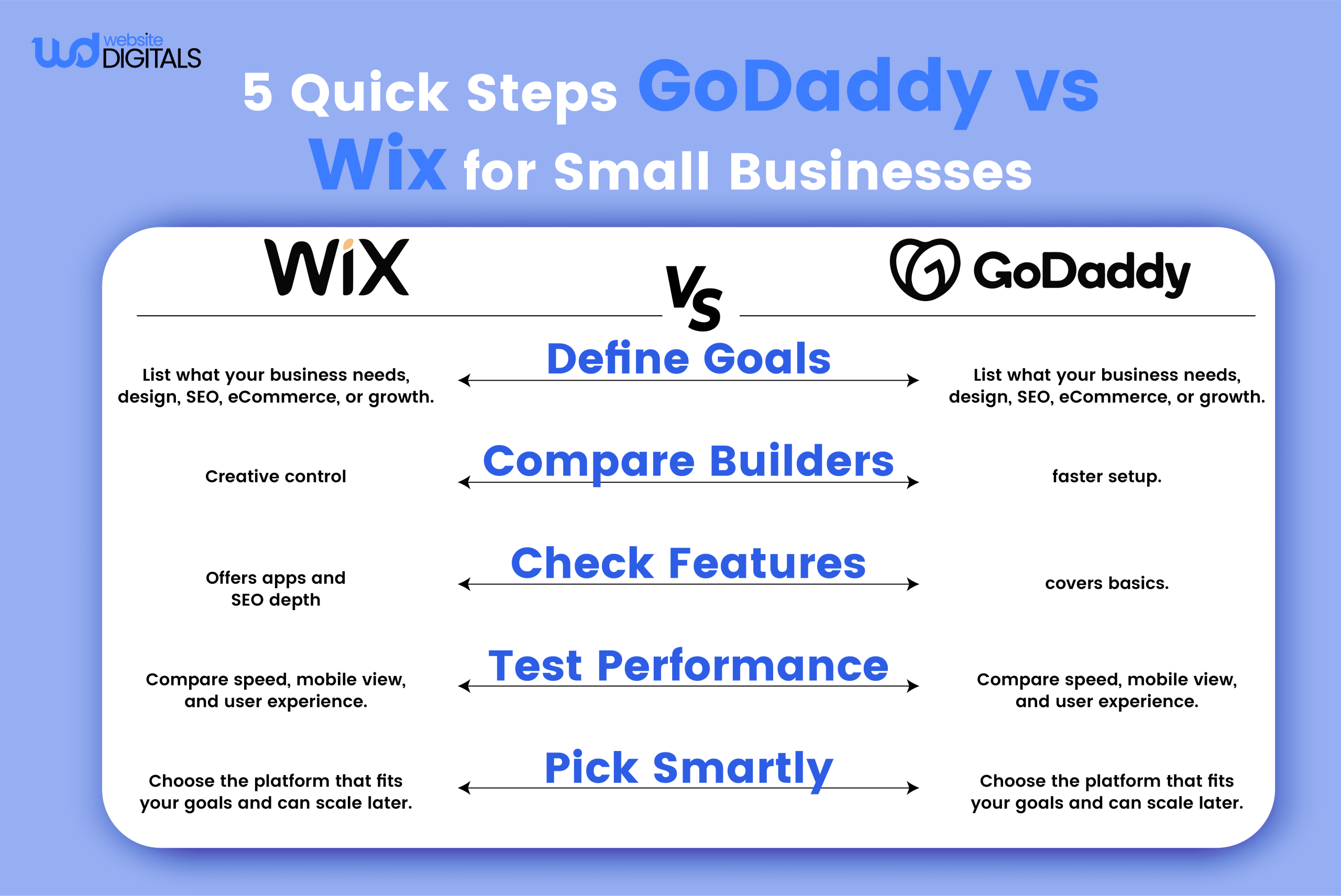
If you want a professional-looking website without coding, both Wix and GoDaddy are solid options.
For those looking for an alternative for Wix that prioritizes faster setup, GoDaddy’s builder delivers simplicity, while Wix remains better for customization and creative control.
Wix ADI (Artificial Design Intelligence) can even create a website in minutes based on a few questions, making it especially helpful for beginners or small business owners building their first site.
|
“Which is easier to use, Wix or GoDaddy?” Wix provides more creative flexibility through its drag-and-drop editor, while GoDaddy is better for users who want to launch a simple site quickly. |
Tip: Maintaining consistent brand colors and visual elements across your website isn’t just about aesthetics but also impacts your bottom line.
According to Lucidpress research, this figure can rise to as high as 33%, emphasizing the importance of cohesive brand design across all touchpoints.
Why Features Matter for Long-Term Business Growth
This is the stage where serious business owners and developers evaluate features that influence scalability, SEO performance, and long-term ROI. The right platform choice can directly impact how your website performs, ranks, and evolves with your business.
SEO and Marketing Tools
When it comes to SEO, Wix stands out for its blend of beginner guidance and advanced customization. It’s built-in SEO Wiz walks users through optimizing meta titles, descriptions, URLs, and structured data.
Advanced users can fine-tune technical elements like robots.txt, 301 redirects, and schema markup, controls that many drag-and-drop builders don’t provide.
GoDaddy, on the other hand, includes basic SEO setup tools such as automatic sitemaps and keyword optimization fields, but it offers less flexibility for advanced technical edits.
It’s suitable for users who want quick optimization without diving deep into configuration.
|
Wix offers deeper SEO customization, while GoDaddy provides faster but more limited SEO tools for beginners. |
Pro Tip: Regardless of which builder you choose, integrate Google Search Console and Google Analytics to monitor performance, track keyword visibility, and understand audience behavior, key steps in improving long-term on-page SEO and visibility in Google ranking factors.
App Market & Integrations
As your business grows, the ability to connect apps and tools becomes a major factor in how well your website can scale. This is where Wix pulls ahead.
Wix App Market offers 250+ verified third-party integrations, covering everything from CRM systems and email marketing platforms to live chat widgets and automation tools.
You can easily connect apps like Mailchimp, HubSpot, Google Analytics, or Zapier to enhance your marketing and data tracking capabilities.
GoDaddy, by contrast, focuses primarily on in-house tools with limited external integrations. While this simplicity works for users who prefer fewer moving parts, it restricts scalability for those who rely on specialized marketing or automation platforms.
|
Wix provides hundreds of third-party integrations for CRM, automation, and analytics, while GoDaddy mainly connects with its built-in tools. |
Pro Tip: If you’re building a growth-oriented site, explore the best Wix integrations for small business marketing to automate workflows, improve user engagement, and streamline campaign tracking.
eCommerce Capabilities for Business Scalability
When it comes to selling online, the difference between Wix and GoDaddy often lies in how each platform supports growth, flexibility, and automation.
Wix: Advanced Features for Expanding Stores
Wix provides a robust eCommerce suite designed for scalability. Key features include:
- Multiple product variants and custom attributes
- Personalized checkout pages
- Abandoned cart recovery
- Discount coupons and digital downloads
- Advanced shipping rules and third-party payment integrations
Wix’s flexibility makes it a strong choice for growing businesses that sell across multiple categories or channels. Its integration with PayPal, Stripe, and Square ensures smooth, secure transactions for global audiences.
GoDaddy: Simplicity for Small Catalogs
GoDaddy’s eCommerce builder is better suited for smaller or single-product stores and is often considered one of the simpler competitors of Wix for quick-selling setups.
It offers a quick setup process, built-in payment options, and basic inventory management, but customization and automation options are limited compared to Wix. For businesses that need simplicity over scalability, GoDaddy remains a convenient entry-level choice.
Wix offers more advanced eCommerce tools, customization, and integrations for growing online stores, while GoDaddy is better for small businesses with simple product catalogs.
Hosting, Security & Performance
Most users won’t wait for a slow-loading website.
According to Google’s mobile performance research, 53% of mobile visitors abandon a site if it takes longer than three seconds to load. That’s why choosing a platform with reliable hosting, strong security, and optimized performance is essential for keeping visitors engaged and conversions high.
Wix: Built-In Performance and Protection
Wix provides built-in tools that automatically handle performance and security, including:
- Free SSL certificates for data protection
- Global CDN (Content Delivery Network) for faster load times
- Automatic backups and 24/7 monitoring for peace of mind
You can also use Wix’s Speed Optimizer to compress images, minify code, and improve Core Web Vitals scores, all without technical setup.
GoDaddy: Manual Control, Reliable Uptime
GoDaddy also offers SSL certificates and 99.9% uptime, but its site speed often depends on manual optimization.
Users may need to:
- Compress images manually or use external tools
- Configure caching or CDN settings separately
- Regularly review Google PageSpeed Insights and Core Web Vitals for performance updates
This hands-on approach suits developers comfortable with tuning performance settings but may be challenging for beginners.
Pro Tips for Faster Website Performance
- Use Wix’s built-in optimizer or GoDaddy’s caching tools to reduce load time.
- Monitor your Core Web Vitals using Google Search Console.
- Optimize media files before uploading and test page speed regularly with PageSpeed Insights.
|
Which platform is faster, Wix or GoDaddy? |
A Real-World Scenario: When Growth Outgrows Simplicity
Imagine a small home décor brand called Rustic Threads. The founder launched her first online store using GoDaddy’s website builder because it offered a fast setup and straightforward tools, ideal for getting started quickly.
However, as orders increased and the product line expanded, new challenges surfaced:
- Limited options for managing product variants (sizes, colors, finishes)
- Difficulty setting different shipping zones or tiered rates
- Few integrations for email marketing and inventory automation
To overcome these limitations, the brand migrated to Wix, which offered:
- Advanced product filtering to help customers browse faster
- Flexible payment integrations (PayPal, Stripe, Square) for global sales
- Automated abandoned-cart emails, boosting customer re-engagement
After optimizing checkout flow and integrating automation tools, Rustic Threads experienced smoother operations and higher customer retention, proving how platform scalability directly impacts long-term business growth.
Note: This scenario is fictional but reflects common challenges faced by small businesses scaling their eCommerce operations.
Why Small Businesses and Developers Prefer Wix
Design Freedom and Developer Control
When it comes to flexibility, Wix goes beyond standard drag-and-drop tools.
Partnering with a Wix Velo development agency allows businesses to build fully customized websites using JavaScript, APIs, and backend logic, all within the Wix ecosystem, no WordPress switch required.
You can create dynamic pages, integrate third-party applications, and even manage data collections directly inside the Wix dashboard.
This gives small businesses developer-level control without needing a traditional hosting stack.
GoDaddy, on the other hand, focuses on simplicity. It’s great for quick setups and small static sites, but lacks access to advanced code-level customization or API integrations, features developers often need as projects grow.
Scalability and Long-Term Value
As your website traffic and features expand, scalability becomes essential.
Wix supports growth with flexible hosting, advanced security infrastructure, and a range of upgradeable plans, including Wix Enterprise for larger teams.
It easily handles member portals, product catalogs, and custom workflows.
GoDaddy’s website builder works well for smaller or brochure-style sites but lacks advanced scaling tools such as multi-region hosting or automation integrations.
Pro Tip: Start with a basic Wix plan to explore core features, then upgrade as your audience or online store grows. You’ll maintain the same site while unlocking new capabilities like higher bandwidth, more storage, and deeper analytics.
Customer Support and Community Resources
Reliable support is crucial when running a business online.
Wix provides 24/7 live chat, an extensive Help Center, and an active community forum for troubleshooting and tips.
Developers can also access the Velo Dev Center, which includes API documentation, sample code, and tutorials.
GoDaddy offers strong phone support but fewer developer-specific resources or learning guides. Its knowledge base covers essentials but isn’t as comprehensive for custom or API-driven projects.
|
Support Feature |
Wix |
GoDaddy |
|
24/7 Chat |
Yes |
No |
|
Community Forum |
Yes |
No |
|
Tutorials & Guides |
Yes |
Limited |
|
Developer Support |
Yes (Velo Dev Center) |
No |
Real User Reviews and Ratings
To validate user satisfaction, here’s how both platforms perform according to independent review aggregators:
- Wix: 4.4/5 on Capterra and 4.2/5 on G2. Users praise its creative freedom, integrations, and professional design tools, though some note a slight learning curve.
- GoDaddy: 4.2/5 on Capterra and 4.1/5 on G2. Users appreciate its ease of setup and reliable hosting, but mention limited customization options for more complex needs.
For small business owners, these reviews reinforce a simple takeaway:
Wix offers greater creative and technical control, while GoDaddy delivers simplicity and speed for beginners.
Making the Smart Choice for Your Business Website
Which Platform Should You Choose?
Your final choice depends on your business goals, technical comfort, and growth plans.
Choose Wix if you:
- Want full creative control and visual customization
- Need scalable features like integrations, automations, or eCommerce tools
- Plan to grow your online presence and eventually expand into advanced functionality
Choose GoDaddy if you:
- Need a basic, fast-launch website for a simple online presence
- Prioritize ease of use and quick setup over customization
- Prefer a low-maintenance platform with fewer moving parts
Tip: Many small businesses start with GoDaddy for speed but migrate to Wix once they need more flexibility and design control.
Step-by-Step Guide to Getting Started with Wix
Building your first Wix website is straightforward, no coding required. Follow these simple steps to launch quickly and professionally:
- Sign up for a free Wix account.
- Choose a template or let Wix ADI (Artificial Design Intelligence) create one for you.
- Customize your design with your brand colors, logo, and media.
- Add integrations like Google Analytics, CRM tools, or email marketing apps.
- Connect your custom domain (available on paid plans).
- Enable SSL security and preview your site across devices.
- Publish and promote your website on Google Search Console and social media.
Pro Tip: Before going live, review your Core Web Vitals, ensure mobile optimization, and test load speed using PageSpeed Insights.
|
How do I build a website with Wix? |
Conclusion: Wix Powers Creativity, Growth, and Professional Presence
Choosing between Wix vs GoDaddy isn’t just about building a website but shaping your digital success for the long run.
If you prioritize design flexibility, SEO strength, and scalability, Wix emerges as the platform built for modern businesses that want to grow with confidence.
As Thomas J. Watson Jr., former IBM CEO, once said, “Good design is good business.”
That philosophy perfectly reflects how Wix empowers creators, entrepreneurs, and developers to bring their vision to life, with both ease and depth.
At Website Digitals, we help small businesses and entrepreneurs transform ideas into powerful online experiences.
From custom Wix development to SEO-driven web design, our experts ensure your website not only looks amazing but performs exceptionally.
Partner up with us, give us a call today at (646) 222-3598 or email us at info@websitedigitals.com to get started on creating a website that truly represents your brand and drives measurable results.
FAQs
Which is better for small businesses, Wix or GoDaddy?
For small businesses, Wix provides greater design flexibility and scalability, making it ideal for long-term growth. GoDaddy is better suited for beginners who want a quick, no-fuss setup without much customization.
Is GoDaddy cheaper than Wix in the long run?
GoDaddy's starter plans are more affordable upfront, but Wix offers more value over time with built-in SEO tools, integrations, and design features that can save additional plugin costs. Always compare renewal pricing and feature needs before deciding.
Which platform offers better SEO tools?
Wix leads in SEO performance with features like SEO Wiz, structured data, and custom meta controls. GoDaddy includes basic SEO settings such as meta titles and descriptions but lacks advanced customization options.
Can I migrate my GoDaddy website to Wix?
Yes. You can transfer your domain and content to Wix, though the design must be rebuilt using Wix's editor. Remember to redirect old URLs and update your sitemap in Google Search Console to maintain rankings.
Which builder is better for eCommerce?
Wix eCommerce excels with product variants, discount codes, multi-channel selling, and abandoned cart recovery. GoDaddy supports basic online stores but lacks deeper customization and advanced sales automation.
How does Wix compare to GoDaddy in website performance?
Wix offers automatic CDN, SSL, and image optimization, ensuring faster loading and stronger security by default. GoDaddy performs well on uptime but may require manual speed optimizations and third-party caching.
Which platform suits developers and agencies better?
Wix is the better choice for developers thanks to Wix Velo, a full-stack environment supporting APIs, custom code, and backend logic. GoDaddy, on the other hand, appeals to agencies that prefer a simpler, client-ready setup.