Navigating WordPress versus Wix for Seamless Web Development and Scalability
You’re ready to bring your idea, whether it’s a brand, startup, or creative portfolio, to life online.
But before you launch, one crucial decision stands in your way: should you build your website on WordPress or Wix?
Both are powerful and proven website platforms that can help you scale your online presence, but each follows a different path. Making the wrong choice early on can lead to extra maintenance costs, design limitations, or SEO challenges later.
“Simplicity is the ultimate sophistication.” — Leonardo da Vinci
That quote captures the heart of the decision. WordPress offers flexibility and control for those who want full customization, while Wix provides simplicity and scalability for users who prefer a managed, no-code environment.
In this WordPress versus Wix comparison, we’ll explore how each platform performs in setup, scalability, SEO, and cost, helping you choose the one that aligns best with your business goals and growth vision.
Key Takeaways
- Compare WordPress vs Wix in hosting, design, and scalability to choose the right fit.
- Explore SEO, automation, and content tools that boost site visibility and performance.
- Identify the best platform for marketers, small business owners, and freelancers.
- See real-world scalability examples showing how each CMS supports growth.
- Understand long-term costs and maintenance to make a confident, informed decision.
The Digital Crossroads: Why Your Platform Choice Matters
Your website is more than just a digital brochure. It is the engine that drives your marketing, sales, and customer trust.
The content management system (CMS) you choose determines your site’s flexibility, SEO control, and scalability as your business and traffic grow.
According to Codexpert Market Share, around 68.7% of all websites now use a content management system. Among these, WordPress powers over 62% of the CMS market, while Wix accounts for about 3.9%.
This widespread CMS adoption highlights why your WordPress vs Wix decision matters. The platform you select directly affects how easily you can build, secure, and scale your online presence for long-term growth.
Understanding the Core Difference Between WordPress and Wix
What Is WordPress?
WordPress is an open-source content management system (CMS) that powers millions of websites, from small blogs to large enterprise portals.
It is self-hosted, meaning you install it on your own hosting provider, such as Bluehost or SiteGround, which gives you full control over every line of code, design element, and plugin.
Best for: Developers, agencies, and businesses that require complete customization and control.
Key Features:
- Thousands of themes and over 55,000 plugins
- Open-source flexibility for developers and coders
- Manual control over security, backups, and updates
- Robust plugin ecosystem for SEO, analytics, and automation
What Is Wix?
Wix Website Development is centered on a cloud-based, no-code approach that makes web creation easy for everyone.
Known for its drag-and-drop design and automatic updates, it includes everything from hosting to SSL certificates.
Everything, from hosting to SSL certificates, is included, allowing you to focus on creativity instead of technical setup.
Best for: Marketers, freelancers, and small business owners who want to build and scale websites quickly without coding.
Key Features:
- AI-powered Wix ADI (Artificial Design Intelligence) for instant site creation
- Wix Studio for agencies and collaborative teams
- Wix Enterprise for advanced scalability and enterprise-grade performance
- Built-in tools for SEO, analytics, and automation
WordPress vs Wix at a Glance
|
Feature |
WordPress |
Wix |
|
Hosting |
Self-hosted |
Fully managed cloud hosting |
|
Ease of Use |
Moderate (manual setup) |
Beginner-friendly |
|
SEO Tools |
Plugin-based (Yoast, Rank Math) |
Built-in (IndexNow, structured data) |
|
Customization |
Unlimited flexibility with themes and plugins |
Guided templates and apps |
|
Maintenance |
Manual updates and backups |
Automatic updates |
|
Cost |
Variable (hosting and plugin costs) |
Fixed monthly plans |
|
Scalability |
Developer-managed |
Cloud-managed scalability |
Real-World Scenario: Building a Digital Presence That Scales
Imagine Sophie, a small business owner who runs a local handmade candle shop called Glow Studio.
She wants to take her brand online to reach customers beyond her city. With limited technical skills and a modest budget, Sophie faces a common dilemma: should she build her website on WordPress or Wix?
Sophie’s Journey in Two Paths
1. The WordPress Route
Sophie chooses WordPress because she wants full control over her brand experience.
- She purchases hosting from a reliable provider and installs WordPress.
- Using a premium theme and plugins like WooCommerce and Yoast SEO, she builds an online store that reflects her handmade aesthetic.
- Over time, she partners with a web development company to optimize her site speed, enhance user experience, and integrate automation tools.
Result: Her site is highly customizable and SEO-friendly, but managing plugins, security, and updates requires ongoing attention.
2. The Wix Route
Alternatively, Sophie opts for Wix to save time and simplify her setup.
- Within a day, she uses Wix ADI (Artificial Design Intelligence) to create a visually appealing website.
- Built-in hosting, SSL (Secure Sockets Layer), and SEO tools handle the technical work automatically.
- As her store grows, she upgrades to a Wix Business plan and adds CRM (Customer Relationship Management) and shipping integrations from the Wix App Market.
- Result: Her website scales smoothly without technical maintenance, although deep customization remains limited compared to WordPress.
Key Takeaways from Sophie’s Story
- WordPress offers long-term flexibility, deep customization, and control. It is ideal for users ready to manage technical details or hire developers.
- Wix provides simplicity, scalability, and speed. It is perfect for entrepreneurs who value design freedom and minimal maintenance.
- The best choice depends on your growth goals, technical comfort, and time investment.
Comparing User Experience: Code Freedom vs No-Code Ease
Both WordPress and Wix offer unique experiences that appeal to different types of users. Choosing between them depends on whether you value creative freedom through code or effortless no-code design.
WordPress for Developers
WordPress is ideal for those who want to customize every detail of their website.
- Unrestricted customization via PHP and CSS, along with modern tools like Elementor WordPress Development Services that simplify design and layout control.
- Full control over performance tuning, caching, and hosting environments.
- Steeper learning curve, but high flexibility through plugins and theme development.
- Access to a vast plugin ecosystem for SEO, analytics, and automation.
Wix for Marketers and Entrepreneurs
Wix focuses on simplicity and speed, making it perfect for users who prefer a visual, no-code experience. This is a trait that often surfaces in Wix vs Shopify discussions comparing ease of design and creative freedom across platforms.
- Visual What You See Is What You Get (WYSIWYG) editing with drag-and-drop functionality.
- Built-in marketing and automation tools for campaigns, email sequences, and analytics.
- AI-generated design blocks for quick layout creation.
Bonus point: Wix Studio bridges ease of use with enterprise-level scalability and team collaboration.
Key Insight
- WordPress empowers developers with control, scalability, and open-source flexibility.
- Wix empowers creators with simplicity, speed, and built-in automation.
- The right choice depends on whether you prioritize hands-on coding freedom or no-code convenience.
SEO and Content Scalability: Who Wins the Long Game?
Both WordPress and Wix are strong contenders when it comes to search engine optimization and long-term content scalability. The choice depends on whether you prefer manual SEO control or automated optimization.
SEO in WordPress
WordPress provides extensive manual control and plugin-based flexibility for SEO management.
- Use plugins such as Yoast SEO and Rank Math to edit meta tags, schema markup, and sitemaps.
- Configure robots.txt, canonical tags, and 301 redirects for complete technical optimization.
- Integrate tools like Google Search Console and PageSpeed Insights to improve Core Web Vitals.
- Fine-tune caching, CDN, and structured data for better performance and indexability.
WordPress is best for users who prefer hands-on SEO management with full technical customization.
SEO in Wix
Wix simplifies SEO with automation and built-in optimization tools that handle many tasks automatically.
- Includes native structured data, meta customization, and automatic sitemap generation.
- Uses IndexNow to notify participating search engines such as Bing whenever a page is updated or published.
- Offers SEO patterns and prebuilt templates that align with Google’s best practices.
- Integrates Core Web Vitals monitoring, image optimization, and auto-compression for faster loading speeds.
Wix automates SEO setup and indexing, helping users gain visibility quickly without technical management.
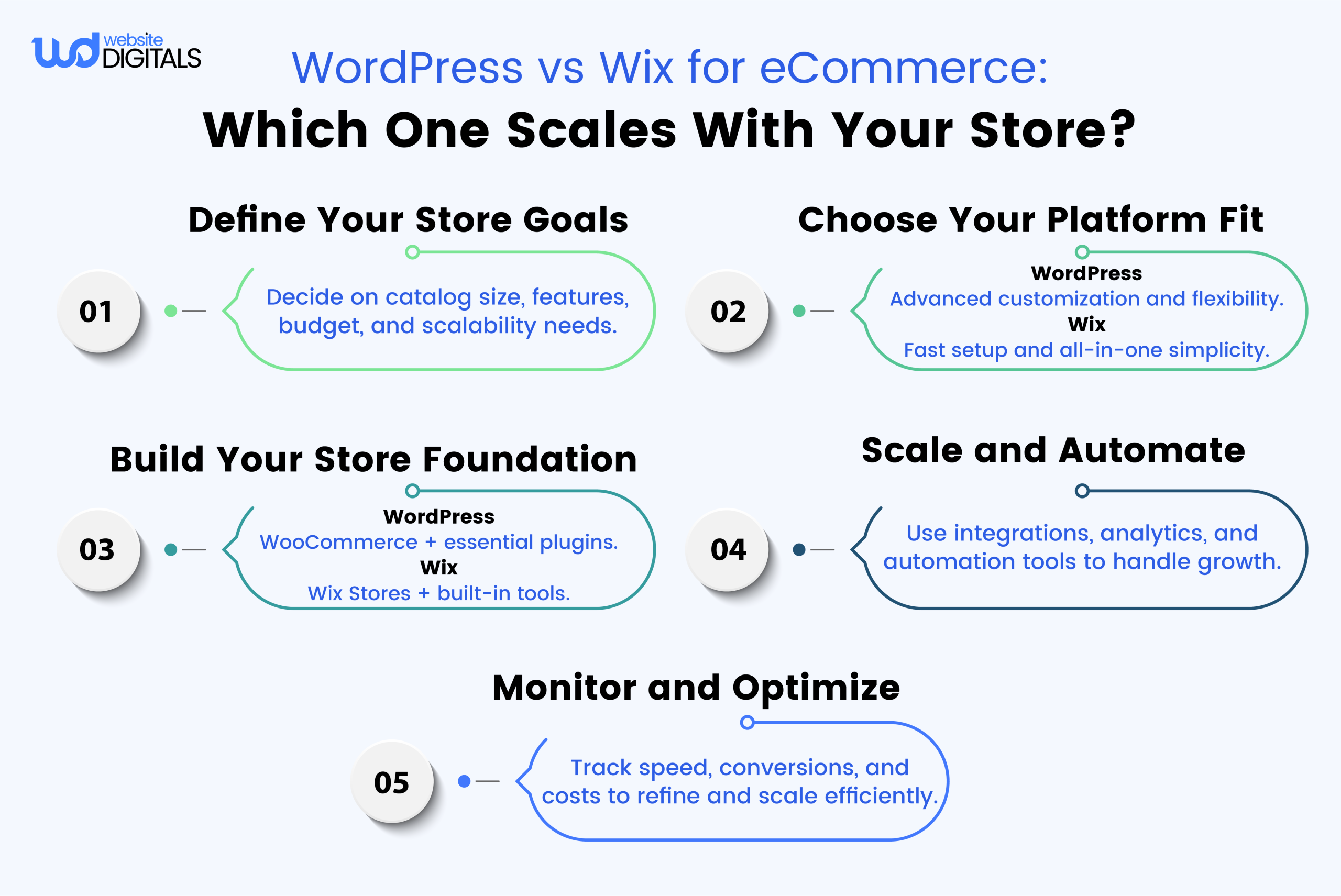
Things to Consider Before Choosing Your Platform
- How much technical control do you want over your site’s SEO setup?
- What is your budget for hosting, plugins, or premium features?
- How quickly do you plan to launch your website?
- Will your content strategy need advanced scalability in the future?
Note: Choose the platform that aligns with your long-term digital growth goals, not just your current comfort level.
Scaling Beyond the Basics: From Startup to Growth
As your business grows, so do your website’s performance and scalability needs. In a WordPress vs Wix scaling comparison, both platforms handle growth differently, depending on how much control or automation you prefer.
WordPress Scalability Considerations
WordPress can scale to millions of monthly visitors when paired with the right infrastructure and optimization strategies.
- Works efficiently with managed hosting, object caching (Redis), and CDN integration.
- Requires ongoing manual optimization, including plugin updates, database management, and server tuning.
- Supports vertical and horizontal scaling, but performance depends on hosting tiers and code quality.
- Managed providers such as WP Engine and Kinsta automate backups, security, and updates, reducing maintenance overhead.
Wix Scalability Advantages
Wix is built on a cloud-based infrastructure that scales automatically as your site traffic increases.
- Uses global CDN and edge caching to maintain performance worldwide.
- Handles traffic spikes automatically without user intervention.
- Includes built-in security monitoring, DDoS protection, and auto-scaling servers to prevent downtime.
- Ideal for small businesses and marketing sites that prioritize simplicity and stability over deep server customization.
WordPress scales through proactive management and infrastructure control, while Wix scales through automation and cloud technology.
Design, Integrations, and Automation for Modern Teams
For modern teams comparing WordPress vs Wix, integrations and automation can dramatically affect productivity, marketing performance, and scalability.
WordPress Integrations
WordPress connects with thousands of third-party tools through plugins and APIs.
- Integrates with platforms like HubSpot, Zapier, Mailchimp, and many more through plugins or REST API connections.
- Requires manual installation, setup, and updates for most integrations.
- Offers advanced flexibility with WordPress API integration for developers building custom workflows.
- Best suited for businesses that rely on tailored, code-based integrations and have technical resources available.
WordPress supports powerful integrations but requires plugin management and technical setup to unlock full automation.
Wix Integrations
Wix focuses on simplicity by offering automation and integrations that work straight out of the box.
- Comes with a built-in customer relationship management (CRM) system for leads, contacts, and campaigns.
- Includes marketing automation, email workflows, and social media integrations without additional plugins.
- Supports seamless connections with tools like Google Ads, Meta Pixel, and Zapier for extended automation.
- Ideal for marketers and small businesses that want to automate without coding or API configurations.
Wix simplifies integrations with built-in CRM, automation tools, and native marketing connectivity that require no plugins.
Cost of Ownership: Time, Tools, and Talent
|
Factor |
WordPress |
Wix |
|
Hosting |
Typically $3 to $30 per month (varies by provider and plan) |
Included |
|
Security |
Managed via plugins and host-level tools |
Automatic SSL and platform-level security |
|
Maintenance |
Self-managed or automated via managed hosting |
Fully automatic |
|
Support |
Community forums and managed host support (often 24/7) |
24/7 live chat and direct support |
|
Total Cost |
Variable based on hosting, plugins, and developer time |
Predictable monthly cost |
WordPress is often cheaper to start but requires ongoing maintenance, while Wix offers a predictable, fully managed cost structure. This distinction mirrors the pricing comparisons in Sqaurespace versus Wix analyses that emphasize predictable subscriptions versus technical flexibility.
Making the Choice: When to Choose Each Platform
Choose WordPress if you:
- Need advanced custom features, API integrations, or complex workflows.
- Have access to developers or technical support.
- Want complete control over design, data, and infrastructure.
Choose Wix if you:
- Prefer a no-code setup with managed hosting and security.
- Need to launch quickly with minimal maintenance.
- Value built-in marketing tools and automated integrations.
Choose WordPress for control and customization, or Wix for simplicity, speed, and automation.
Quick Comparison Summary
|
Category |
WordPress |
Wix |
|
Customization |
Unlimited with plugins and code access |
Structured, template-driven |
|
Ease of Use |
Moderate learning curve |
Beginner-friendly |
|
SEO |
Manual setup and plugins |
Automated with built-in tools |
|
Hosting |
Self-managed or via a managed host |
Fully cloud-based |
|
Scalability |
Depends on hosting and optimization |
Automatically scales with traffic |
|
Cost |
Variable (hosting, plugins, developers) |
Fixed (subscription-based) |
|
Ideal For |
Developers, agencies, and power users |
Marketers, freelancers, and small businesses |
Final Thoughts: Your Roadmap to Seamless Web Growth
Choosing between WordPress and Wix isn’t about right or wrong but about finding the right fit for your goals and growth plan.
WordPress gives you complete control, flexibility, and open-source customization. It is ideal for those who want to fine-tune every aspect of their site.
Wix, on the other hand, focuses on ease, automation, and managed scalability. It is perfect for businesses that value simplicity, speed, and a no-code environment.
The best platform is the one that scales with your ambition and supports your long-term vision.
Whether you choose WordPress or Wix, focus on creating consistent growth, optimizing for SEO, and simplifying maintenance, not on complexity.
The difference between WordPress and Wix comes down to control versus convenience. Choose the platform that best fits your skills, goals, and scalability needs.
Ready to find out whether WordPress versus Wix is the better fit for your growth goals?
Contact Website Digitals at (646) 222-3598 or info@websitedigitals.com to build a scalable, high-performing website tailored to your business vision.
FAQs
Can I switch platforms later?
Yes. You can migrate from WordPress to Wix or vice versa, but it requires manual setup, including content export, design rebuilding, and redirect mapping.
Is Wix scalable for agencies?
Yes. Wix Studio is built for agencies and teams, offering multi-site management, role-based access, and branded client dashboards for collaboration.
Which offers better SEO control?
WordPress provides manual SEO control using plugins like Yoast or Rank Math. Wix offers automated SEO features, including structured data and IndexNow integration for faster indexing.
Do I need coding skills for Wix?
No. Wix is fully no-code, but developers can use Velo by Wix for custom scripts, APIs, and dynamic content when advanced functionality is needed.
How secure is each platform?
Wix includes automatic SSL certificates, daily backups, and server-level protection. WordPress requires manual setup using security plugins or managed hosting for similar coverage.
Which is better for e-commerce?
Both support online stores. WordPress uses WooCommerce for deep customization and scalability. Wix Stores offers built-in inventory tools, payment gateways, and marketing automation with a simpler setup.
Is Wix good for freelancers?
Yes. Wix Studio lets freelancers build, brand, and manage multiple client sites with white-label dashboards and built-in maintenance automation.